
By default, Microsoft Word saves your documents in .docx format. If you need to share them, for example by e-mail, it is preferable to define a default saving format which offers greater compatibility to prevent you to constantly send files to those who do not have Office 2007 – 2010. In this tutorial I will show you how to define a default savings format in MS Word 2007/2010.
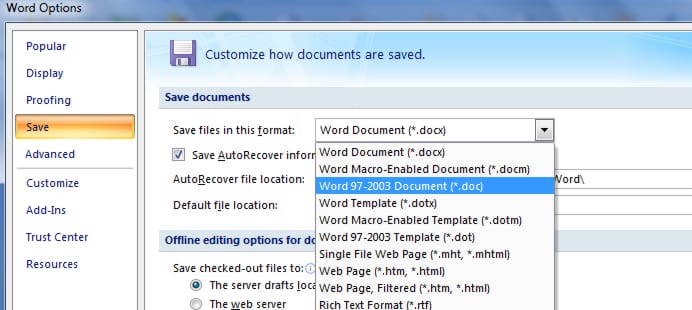
Defining default savings format in Microsoft Word 2007/2010 is quite easy and only requires few mouse clicks. Follow steps below to find out how
Step 1: Open Word 2010 or Word 2007 and click File then Word Options.
Step 2: On the Save tab, in the Save documents, scroll down the dropdown list and choose the format of your choice, for example Word 97-2003 Document
Step 3: Click OK to save changes
Note that some effects which you use in .docx format won’t be visible/not compatible in older Word version.
Now your next Word documents are saved in this format and compatible with version 97 to 2003 which saves precious time!
[ttjad keyword=”microsoft”]

![Read more about the article [Tutorial] How To Turn Switcher On Or Off In Windows 8](https://thetechjournal.com/wp-content/uploads/2012/10/settings-asd8as7d98as7d98sa797sddd.webp)
![Read more about the article [Tutorial] How To Transfer iTunes Music To Your Kindle Fire](https://thetechjournal.com/wp-content/uploads/2012/04/amazon-kindle-itunes-logo.webp)
![Read more about the article [Tutorial] How To Easily Move Software From One Drive To Another – Windows](https://thetechjournal.com/wp-content/uploads/2012/09/icon-rrr-asd6a5s4d65as4d5sa.webp)