
It is sometimes useful to try to disable the welcome screen of Windows 7 in order to save time on startup. In this tutorial I will show you how to do that, also by following this tutorial and disabling welcome screen you will also disable password request on windows startup.
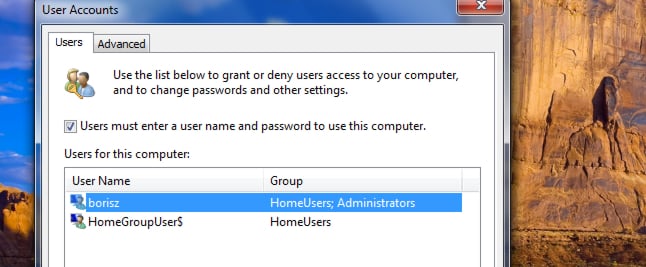
Step 1: Click the Start menu, inside search filed type run and then press Enter.
Step 2: Type the following command: control userpasswords2, and then confirm with OK.
Step 3: Then uncheck the box Users must enter a user name and password to use this computer and click OK to save changes.
Step 4: Restart your computer and you won’t see welcome screen anymore.
[ttjad keyword=”microsoft”]

![Read more about the article [Tutorial] How To Download YouTube Video Using VLC Player](https://thetechjournal.com/wp-content/uploads/2013/01/copy-url-as8d9we98r79ew8.webp)
![Read more about the article [Tutorial] How To Create Virtual Hard Disk or VHDX In Windows 8](https://thetechjournal.com/wp-content/uploads/2012/10/disk-management-as8d77779as7d9879e8poweismdb.webp)
![Read more about the article [Tutorial] How To Save Word, Excel, PowerPoint 2010 Documents In PDF Format](https://thetechjournal.com/wp-content/uploads/2012/03/office-pdf-logo.webp)