
Nikon D3000 is 10.2 megapixel DSLR camera with full HD,EXPEED 2 image processing engine,14 megapixel sensor and many more…
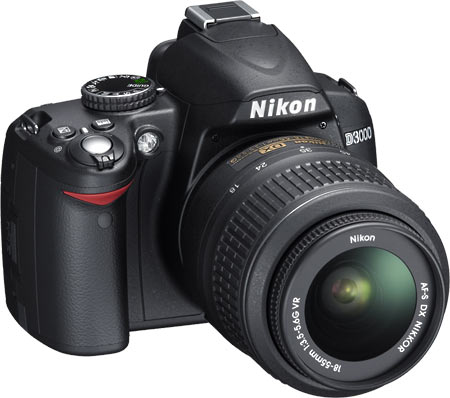
Breathtaking digital SLR image quality and easy operation highlight the 10.2-megapixel D3000-Nikon’s friendliest D-SLR ever. Compact and capable, the D3000 is compatible with a broad range of world-famous NIKKOR lenses and includes the versatile 3x, 18-55mm Zoom-NIKKOR with Silent-Wave Motor autofocusing and Nikon VR image stabilization to combat picture blur caused by camera shake for sharper handheld pictures. Special moments are captured faithfully at up to 3 frames-per-second and displayed on a bright, 3-inch LCD monitor. The D3000’s split-second shutter response eliminates the annoyance of shutter lag.
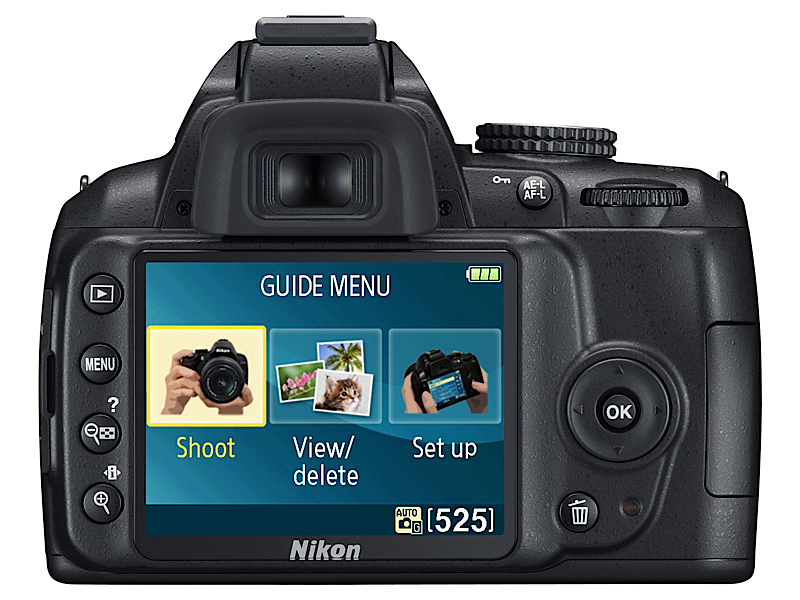
To further simplify picture-taking in special situations such as portraits, sports, landscapes, and more, the D3000 features icon-identified Scene Modes that deliver beautiful results automatically in otherwise complex situations. Additional Nikon technologies elevate picture quality and guard against picture-taking mistakes. Fast, accurate 11-point autofocus delivers razor sharpness. 3D Color Matrix Metering II and Nikon EXPEED image processing work with an exclusive Scene Recognition System for precise automatic exposures and rich, vivid color. Making the D3000 an even smarter choice are its exclusive Retouch functions for creative fun and the onboard Guide Mode that’s ready to lend a reassuring hand to take the pictures you’ve always wanted.

.Breathtaking digital SLR image quality and easy operation highlight the 10.2-megapixel D3000–Nikon’s friendliest DSLR ever. Compact and capable, the D3000 is compatible with a broad range of world-famous Nikkor lenses and includes the versatile 3x, 18-55mm Zoom-Nikkor with Silent-Wave Motor autofocusing and Nikon VR image stabilization to combat picture blur caused by camera shake for sharper handheld pictures. Special moments are captured faithfully at up to 3 frames-per-second and displayed on a bright, 3-inch LCD monitor. The D3000’s split-second shutter response eliminates the annoyance of shutter lag. To further simplify picture-taking in special situations such as portraits, sports, landscapes, and more, the D3000 features icon-identified Scene Modes that deliver beautiful results automatically in otherwise complex situations.
Additional Nikon technologies elevate picture quality and guard against picture-taking mistakes. Fast, accurate 11-point autofocus delivers razor sharpness. 3D Color Matrix Metering II and Nikon EXPEED image processing work with an exclusive Scene Recognition System for precise automatic exposures and rich, vivid color. Making the D3000 an even smarter choice are its exclusive Re-touch functions for creative fun and the onboard Guide Mode that’s ready to lend a reassuring hand to take the pictures you’ve always wanted.
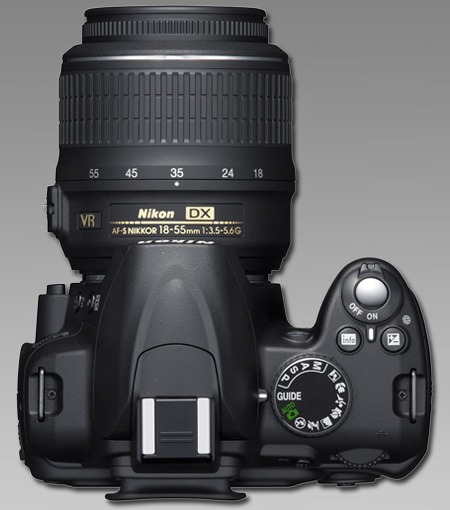
Nikon D3000 Highlights :
10.2-megapixel DX-format Imaging Sensor
Delivers extraordinary image quality for breathtaking prints up to 20 x 30 inches.
Includes 3x 18-55mm Zoom-Nikkor VR Image Stabilization Lens
Legendary Nikkor optical quality and fast, accurate autofocus means vivid color, striking contrast and crisp detail, while VR image stabilization assures your sharpest pictures ever.
Compact Design
Beautifully styled–Ready to go where life takes you.
Easy-To-Use–Featuring Nikon Guide Mode
Intuitive controls and the on-board Guide Mode assist you every step of the way.
Split-second Shutter Response
Eliminates the frustration of shutter delay, capturing moments that other cameras miss.
Continuous Shooting up to 3 Frames-Per-Second
Capture fast action, precious moments and fleeting expressions confidently.
6 Automatic Exposure Scene Modes
Just set the Mode dial to Portrait, Landscape, Child, Sports, Close-up or Night Portrait for stunning results in otherwise challenging conditions.
3-inch Color LCD Monitor
Bright, high-resolution, 170-degree wide-angle viewing for easy picture review and sharing.
In-camera Image Editing
The Retouch Menu provides creative freedom, without the need for a computer, offering 13 easy editing functions, including Trim, Red-eye Correction and Soft Filter.
Nikon EXPEED Image Processing
Assures breathtakingly rich image quality, managing color, contrast, exposure, noise and speed.
Automatic Image Sensor Cleaning
Ultrasonic process and exclusive Airflow Control combats the accumulation of dust in front of the image sensor, safeguarding image quality shot after shot.
11-point Autofocus
Fast and accurate autofocus delivers razor-sharp pictures.
6 Personal Picture Control Settings
Choose from Standard, Neutral, Vivid, Monochrome, Portrait, or Landscape to apply a personal look and feel to your pictures.
Active D-Lighting
Restores picture-enhancing detail in shadows and highlights.
ISO sensitivity from 100-1600
Exceptional results, even in challenging low-light situations.
Feature :
- 10.2-megapixel DX-format imaging sensor for prints up to 20 x 30 inches
- Includes 3x 18-55mm Zoom-Nikkor VR Image Stabilization lens
- Nikon EXPEED image processing; in-camera image editing and Active D-Lighting
- 3.0-inch color LCD screen; 170-degree wide-angle viewing
- Capture images to SD/SDHC memory cards (not included)
Technical Details:
- Sensor: CCD
- Sensor: 10.2 million
- Size: 23.6 x 15.8mm
- Storage Media: SD/SDHC Memory Card
- Compressed Format: JPEG
- Compressed Format: EXIF 2.21
- Compressed Format: Compliant DCF 2.0
- Focus Mode: Auto
- Focus Mode: Manual
- Focus Mode: Single-servo AF
- Focus Mode: Continuous-servo
- Optical Viewfinder: TFT-LCD
- LCD Monitor: 3 inches
- LCD Pixels: 230,000 dots
- LCD Coverage: 100%
- Shutter Speed: 30 ~ 1/4000 sec.
- Exposure Modes: Auto
- Exposure Modes: Manual
Click On Adds To Buy
Via :amazon.com

