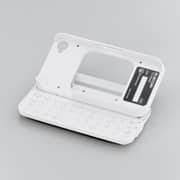
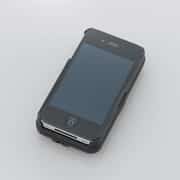
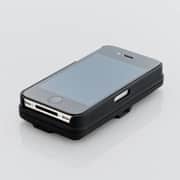
ELECOM, leading electronics company of Japan has revealed an all-in-one case and slide-out wireless keyboard for the iPhone. This slide-out wireless keyboard has specially made for iPhone and ipad. It is an extremely compact and portable solution for carrying your iPhone. For using this keyboard, pick up your iphone, fitted within the case and slide it out so that it pops up over the keyboard.
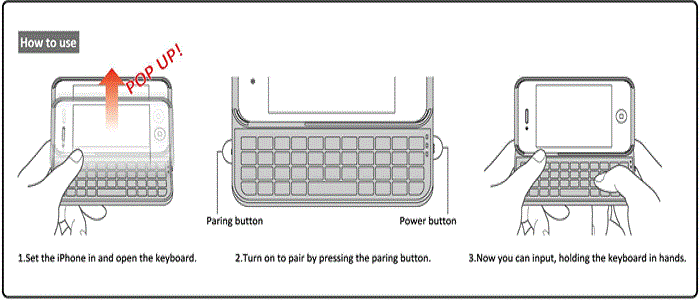
You can use the keyboard easily, anytime, anywhere. If you slide out the iphone, the screen pops up over the keyboard at a comfortable angle and it makes really easy to view the screen. The characters on top of the keys look like original font that is very stylish and easy to read. It provides great visibility and reduces the likelihood of typing mistakes.
The device model number is “TK-FBI033 Series”. It supports the Bluetooth HID profile, with an English layout keyboard and it is perfect for the iPhone 4S and iPhone 4. This device is now available in black, white and pink. The keyboard has a built-in rechargeable lithium-ion battery that can be charged with the supplied charger cable.
However, let’s see the notable features
- A compact and portable all-in-one case and keyboard for the iPhone.
- Leave the iPhone fitted within the case and a simple slide-out motion will allow you to use the keyboard straight away.
- Built-in rechargeable lithium-ion battery that can be charged with the supplied charger cable. A charge of 3.5 hours provides approximately 14 days of use.
- Supports the Bluetooth® HID profile.
- English layout keyboard perfect for the iPhone 4S and iPhone 4.
- Allows you to type in smoothly while holding the keyboard with both hands.
- To register your device with Bluetooth®, simply press the pairing button at the beginning to establish a pairing.
- Can be used on non-magnetic surfaces at distances of approximately10m, and even on magnetic surfaces, such as steel desks, at approximately 3m
- Built-in Home button useful for using with your iPhone.
- Built-in button for changing the character input method between Japanese and English.
- The characters on top of the keys are based on an original font that is very stylish and easy to read.
- Built-in battery indicator that lets you know when the battery needs recharging.
- iPhone can be left fitted within the case when using the screen and when plugging into the dock connector.
- Supported Devices: iPhone 4S, iPhone 4
- Bluetooth® Compatible Standard: Bluetooth®3.0 Class2
- Profile: HID (Human Interface Device)
- Frequency: 2.4GHz
- Range: non-magnetic surfaces (wooden desks, etc.) approximately 10m, magnetic surfaces (steel desks, etc.) approximately 3m *in-house testing values
- Batteries: Rechargeable lithium-ion battery (built-in)
- Battery Capacity: 98mAh
- Estimated Battery Life: approximately 14 days (assuming use from a fully charged battery) *in-house testing values
- Keyboard Layout: 42 keys (English layout)
- Key Width: 10mm
- Key Stroke: 0.8mm
- Dimensions: width 120 × length 100 × height 50mm (when in use), width 120 × length 64 × height 23.5mm (when folded)
- Weight: approximately 98g (including battery)
*These values are based on in-house testing environments and they are by no means guaranteed.
Source:Elecom
[ttjad keyword=”keyboard-mouse”]