website statistics

Netgear Gigabit Speed Wireless Router With IEEE 802.11ac Coming In May

Netgear's new 802.11ac standard router has wider frequency. It dramatically leaps forward in the speed, reliability, and quality of wireless communications.

When do you use Facebook?

View Results

Loading ... Loading ...
1 Star2 Stars3 Stars4 Stars5 Stars (Rate This)
Loading ... Loading ...

The extraordinary growth in the number and type of Wi-Fi devices, coupled with the increasing popularity of bandwidth intensive activities such as high definition video streaming, has created the demand for better wireless network performance with greater reach. Netgear is supposed to be the first networking company with a next-generation router, promising to deliver higher speed than IEEE 802.11n, in the market. With the IEEE 802.11ac standard router, it dramatically leaps forward in the speed, reliability, and quality of wireless communications.
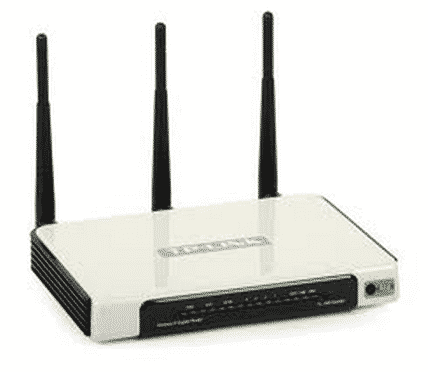

IEEE 802.11ac is a wireless computer networking standard of 802.11 which is currently under development. By providing wider frequency bands, 802.11ac doubles the capacity of traffic that can be processed; multiple antennas increase the reach and the quality of reception at further distances.IEEE 802.11ac standard enables multi-station WLAN throughput of at least 1 Gbps.
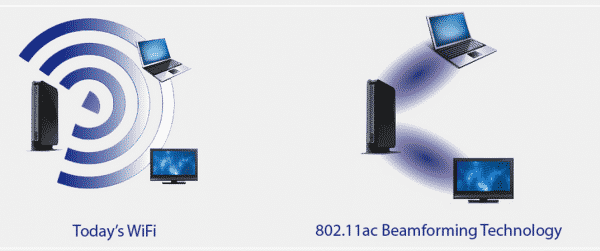
The router R6300, runs on a WiFi chip and uses a number of new techniques to achieve gigabit wireless speeds. The new router can combine its channels to access up to 80 MHz of bandwidth at once, and rather than transmitting data indiscriminately, R6300 uses “beam forming” to maximize signal strength. The highest achieved speed is 1.3 Gbps, three times faster than the IEEE 802.11n devices.

Key Advantages of 802.11ac

Features Benefits
Gigabit Speeds 3 times the speed of 802.11n
Better Range Whole home coverage with fewer dead spots
Mobile Reliable Ideal for media streaming
Ideal for mobile More Wi-Fi bandwidth on your mobile devices
Compatibility Backward compatible with 802.11 a and n at 5 GHz band

Netgear will start shipping a consumer 802.11ac router in May, at the initial price of US$199.99.

Source : Arstechnica
Thanks To : PC Advisor


[Tutorial] How To Speed Your Web Browser By Changing Your DNS

ASUS Brings New A53E-ES31 15.6-Inch Laptop
You can also press the left/right arrow key on your keyboard to go to previous/next post
  On April 27, 2012(1 year, 1 month ago.)

Recent Search

Recent Tutorials

This tutorial will show how to use S.M.A.R.T. (Self Monitoring Analysis and Reporting Technology) to continuously collect information on health of your equipment.
In this tutorial I'll show you how you can easily protect yourself from any kind of security breaks that may occur through Java.
Today Apple enabled "Two Step Verification" for iCloud And Apple ID. But the process is not that simple. But no worry, here we have made a step by step tutorial.
Cant remember your iPhone passcode? Here I will show you some workaround on what to do and how to recover and restore for every possible scenario.
This tutorial will show you how to perform the Winapp2.ini installation inside CCleaner and how to use it under Windows operating system.
With app called AD Sound Recorder, you can record any stream that passes through your sound card or speakers and in this tutorial I will show you how to do that.
If you want to have Boxee app inside your Apple TV, in this tutorial we will show you how to install XBMC and Boxee using Windows on your Apple TV.
This tutorial will show you how to transfer PS3 Saved Game Files from your PC to your PS3 game console.
Adding videos from external sources such as internet, more specifically from YouTube, is a great solution to enhance a presentation; in this tutorial I will show you the procedure.
If you are one of new comers to Windows Phone 8, like me, in this tutorial I will walk you through the process to update your Windows Phone 8 device.
Close You Have To Login
User:
Pass:
Login With »Login With TwitterLogin With Facebook