website statistics

Apple Maps Allows Users To Cache Large Areas For Offline Viewing

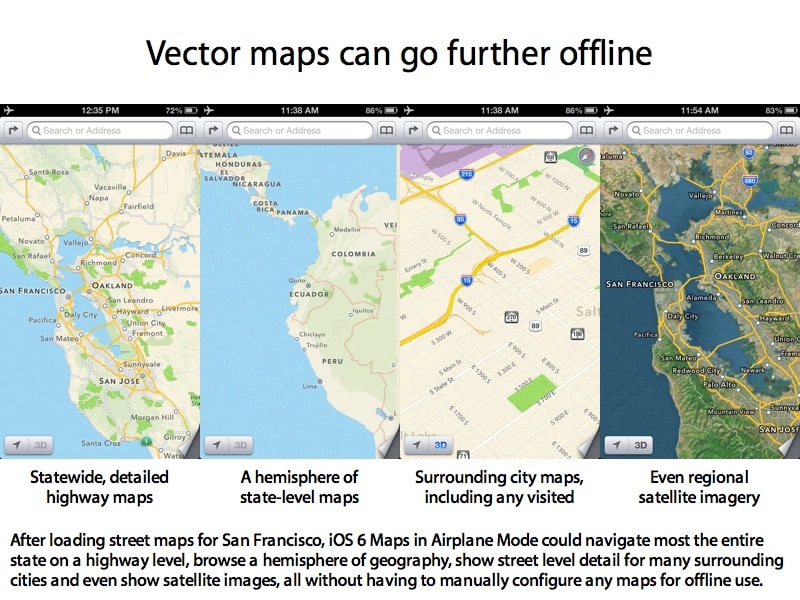
Apple Maps in iOS 6 allows users to cache a much larger area for offline viewing than Google Maps - around a 740 mile radius (1200 km).

When do you use Facebook?

View Results

Loading ... Loading ...
1 Star2 Stars3 Stars4 Stars5 Stars (Rate This)
Loading ... Loading ...

Apple Maps in iOS 6 allows users to cache a much larger area for offline viewing than Google Maps. Apple Maps allows users to view any location around a 740 mile radius (1200 km) from cache when a data connection is lost. Google Maps provided viewing of areas in just a 10 mile radius. While traveling, many users commonly experience some-sort of internet outage, and with this type of offline viewing radius, users will be able to continue their trip for miles.
Apple Maps

The enhanced capability is possible mainly because of small-sized (in terms of space) resolution independent vector maps. With Apple Maps on iOS 6, users will be capable of loading vector maps of a large area and navigate around using the GPS (data-connection not required).

Users who couldn’t cache entire areas of interest before experiencing a data outage, will be able to find there way through unknown places using vector maps. Plus, iOS 6 will enhance the experience for users by overlaying cached satellite imagery over vector maps in case of a data outage.

Although iOS 6 Maps has taken a large amount of heat over the missing streets and misplaced locations, it’s features like offline mode with large area coverage really enhances the user experience. All the named issues with iOS 6 Maps can be fixed in the matter of months; while offline mode was never touched in iOS 1 through 5.

Source: Appleinsider

Courtesy: iClarified

Buy Cheapest Related Product From Amazon.com


AMD Radeon HD 7850 GPU Prices Drop Further

Alcatel OneTouch T10 – A Low Power Tablet PC With A Big Heart
You can also press the left/right arrow key on your keyboard to go to previous/next post
  On October 6, 2012(8 months, 16 days ago.)

Recent Search

Recent Tutorials

This tutorial will show how to use S.M.A.R.T. (Self Monitoring Analysis and Reporting Technology) to continuously collect information on health of your equipment.
In this tutorial I'll show you how you can easily protect yourself from any kind of security breaks that may occur through Java.
Today Apple enabled "Two Step Verification" for iCloud And Apple ID. But the process is not that simple. But no worry, here we have made a step by step tutorial.
Cant remember your iPhone passcode? Here I will show you some workaround on what to do and how to recover and restore for every possible scenario.
This tutorial will show you how to perform the Winapp2.ini installation inside CCleaner and how to use it under Windows operating system.
With app called AD Sound Recorder, you can record any stream that passes through your sound card or speakers and in this tutorial I will show you how to do that.
If you want to have Boxee app inside your Apple TV, in this tutorial we will show you how to install XBMC and Boxee using Windows on your Apple TV.
This tutorial will show you how to transfer PS3 Saved Game Files from your PC to your PS3 game console.
Adding videos from external sources such as internet, more specifically from YouTube, is a great solution to enhance a presentation; in this tutorial I will show you the procedure.
If you are one of new comers to Windows Phone 8, like me, in this tutorial I will walk you through the process to update your Windows Phone 8 device.
Close You Have To Login
User:
Pass:
Login With »Login With TwitterLogin With Facebook