
Mozilla has released Firefox 4 Beta 2 yesterday, a new beta version of the upcoming Firefox 4 web browser. The new version can be downloaded from the release notes or official beta download page.Firefox 4 Beta 2 Adds More Languages and App Tabs….

Mozilla has released the second beta of the Firefox 4.0 web browser with few interface and feature improvements. This beta brings the tabs-on-the-top placement for the Mac OS X users just like Windows. Also, it brings a new “App Tabs” feature to keep a close eye on the most commonly used web apps and services. Following the release of Firefox 4.0 beta 1, this new beta brings a slight facelift for Mac users who like to have tabs on the top. Apart from that, Windows 7 and Windows Vista users get to see a single Firefox button just like the one found on Opera.
Firefox 4 beta 1 was released earlier this month, and today the next version has become available — this time with support for 23 more languages.
The latest Firefox 4 beta also features tabs on top for Mac OS X users (the last version was for Windows users only) and a new feature called App Tabs. App tabs can be created for your most accessed sites, and are designed to save space by only displaying the favicon (instead of the entire tab with its title description).
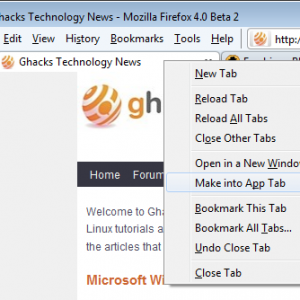
You can create an app tab for any site by right-clicking on the tab and selecting “create App Tab.” This is a really nice little feature and can certainly clean up overly full browser windows.
A new page loading animation has been added as well, the favicon of sites in the tabbar is replaced with a loading animation, which switches back to the website’s favicon once the page has loaded fully.
The release notes contain additional changes and feature descriptions, including:
- Tabs are now on top by default on Windows and OSX – Linux will be changing when the theme has been modified to support the change.
- Responsiveness and scrolling improvements from the new retained layers layout system.
- JavaScript speed improvements due to engine optimizations.
- You can search for and switch to already open tabs in the Smart Location Bar
- The stop and reload buttons have been merged into a single button on Windows, Mac and Linux.
- The Bookmarks Toolbar has been replaced with a Bookmarks Button by default (you can switch it back if you’d like).
- Full WebGL support is included but disabled by default at this time
- Native support for the HD HTML5 WebM video format.
- An experimental Direct2D rendering backend is available on Windows, turned off by default.
- More responsive page rendering using lazy frame construction.
- Link history lookup is done asynchronously to provide better responsiveness during pageload.
- CSS :visited selectors have been changed to block websites from being able to check a user’s browsing history.
- New HTML5 parser, Support for more HTML5 form controls.
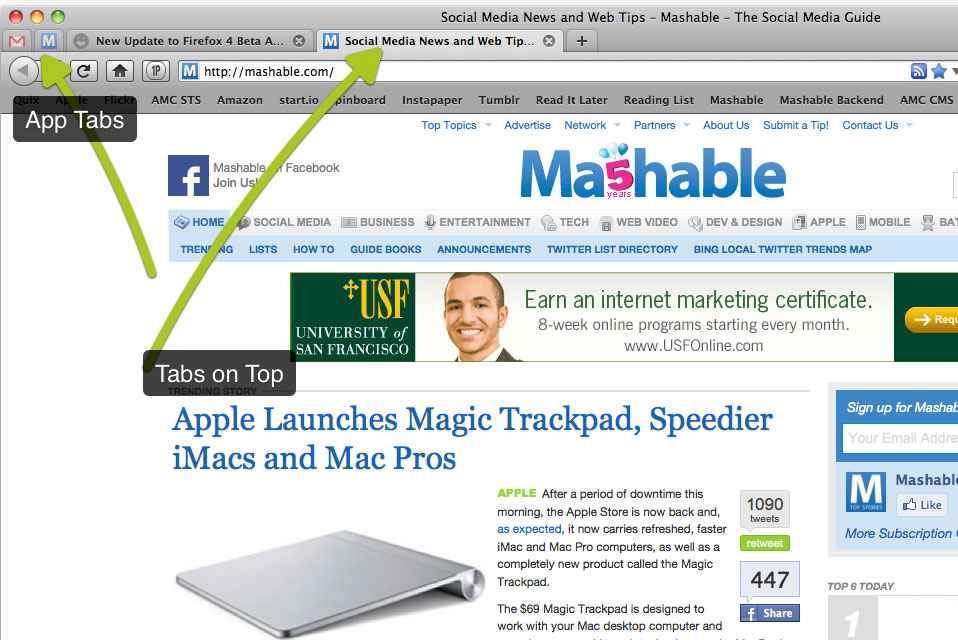
The most interesting feature of Firefox 4.0 beta 2 is Apps Tabs that pins the selected tabs on the left side of the browser permanently. So, you can pin your Gmail, Google Apps, Twitter, Facebook or any other service there. For that, you’ll have to right click on the tab and select “Make an App Tab”. To understand this better.
The latest Firefox 4 beta has also added more support for CSS3 features, including support for CSS3 transitions and animations. You can see the CSS3 demos in action here in Firefox 4 beta 2, although the transitions appeared to work in Safari and Chrome as well.Firefox 4 is an important release for Mozilla, and it promises to be faster and more streamlined. Firefox is facing stiff competition, not just from Google Chrome — a WebKit-based browser that continues to grow at a breakneck pace — but also from the upcoming Internet Explorer 9.
Firefox 4 Beta 2 reaches the same score in the HTML5 browser test as the last beta. The browser scores 97 of 100 points in the Acid3 test, but drops 200 points in the Peacekeeper benchmark when compared to the performance of Beta 1.
However, with things like App Tabs and the even more ambitious Tab Candy in their wheelhouse, it’s clear that the Firefox team is entering this battle fully armed.You can download Firefox 4 beta 4 in your choice of language and OS here. What do you think of the latest Firefox 4 beta? Do you still love the phoenix or has another browser claimed your heart? Let us know!
Resources :techtree.com,ghacks.net,mashable.com


Firefox 4 sucks. No toolbar toggle and no way to get rid of the stupid favicons in the book mark with turning of all buttons.
WTF mozilla?