
Apple just pushed iOS 6.1 for all iDevice. Its now available via OTA update. This update mainly brings additional 4G LTE network support and also fixes some security bug. Keep reading for details.
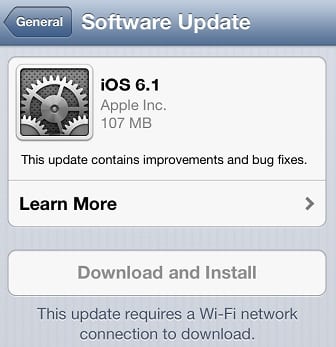
After the release of iOS 6.1 beta 5, even without releasing any GM version to the developer Apple release iOS 6.1 final version for all normal user. It’s very unusual, but as last beta version did show some sign that it could be the final version, and missing development version number already gave us this hint.
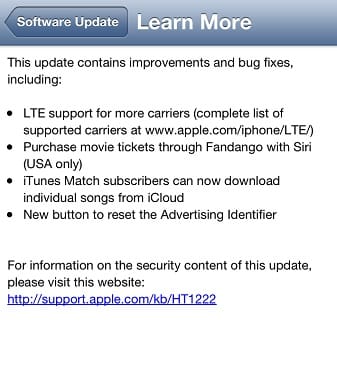
So, iOS 6.1 is now available for all iPhone, iPad and iPod Touch user. iOS shows exactly those update message
● LTE support for more carriers (complete list of supported carriers at www.apple.com/iphone/LTE/)
● Purchase movie tickets through Fandango with Siri (USA only)
● iTunes Match subscribers can now download individual songs from iCloud
● New button to reset the Advertising Identifier
For information on the security content of this update please visit this website:
http://support.apple.com/kb/HT1222
The most important update this iOS 6.1 brings is 36 new iPhone carriers and 23 new iPad carriers around the world. Now your iPhone 5 and iPad 3 & iPad 4 could get faster network with more supported network.
This update also solves some security issue, check full details here
How to get OTA Update?
Navigate to Settings -> General -> Software Update and click Download and Install. And you must be connected to a WiFi network and better to have charge cable plugged-in.
Where to get Firmware
If you want manual upgrade you will need full firmware. Here is link to iOS 6.1 firmware for all available idevice.
iPhone 3GS: iPhone2,1_6.1_10B141_Restore.ipsw
iPhone 4 GSM: iPhone3,1_6.1_10B144_Restore.ipsw
iPhone 4: iPhone3,2_6.1_10B144_Restore.ipsw
iPhone 4 CDMA: iPhone3,3_6.1_10B141_Restore.ipsw
iPhone 4S: iPhone4,1_6.1_10B142_Restore.ipsw
iPhone 5 GSM: iPhone5,1_6.1_10B143_Restore.ipsw
iPhone 5 GSM+CDMA: iPhone5,2_6.1_10B143_Restore.ipsw
iPad 2 Wi-Fi: iPad2,1_6.1_10B141_Restore.ipsw
iPad 2 GSM: iPad2,2_6.1_10B141_Restore.ipsw
iPad 2 CDMA: iPad2,3_6.1_10B141_Restore.ipsw
iPad 2 New: iPad2,4_6.1_10B141_Restore.ipsw
iPad Mini Wi-Fi: iPad2,5_6.1_10B141_Restore.ipsw
iPad Mini GSM: iPad2,6_6.1_10B141_Restore.ipsw
iPad Mini CDMA: iPad2,7_6.1_10B141_Restore.ipsw
iPad 3 Wi-Fi: iPad3,1_6.1_10B141_Restore.ipsw
iPad 3 CDMA: iPad3,2_6.1_10B141_Restore.ipsw
iPad 3 GSM: iPad3,3_6.1_10B141_Restore.ipsw
iPad 4 Wi-Fi: iPad3,4_6.1_10B141_Restore.ipsw
iPad 4: iPad3,5_6.1_10B141_Restore.ipsw
iPad 4: iPad3,6_6.1_10B141_Restore.ipsw
iPod Touch 4G: iPod4,1_6.1_10B144_Restore.ipsw
iPod Touch 5G: iPod5,1_6.1_10B141_Restore.ipsw
What about Jailbreak
The famous iOS hacker MuscleNerd said iOS 6.1 is safe for Jailbreak, and they will release a Jailbreak soon
Pimskeks of the Evad3rs Dev-Team emphasis to use normal restore, and not to use OTA update
If you people plan to upgrade to iOS 6.1 please don’t do an OTA upgrade. Please make a full restore using iTunes.
MuscleNerd explains more
We hope this covers all of your question regarding iOS 6. Share your thoughts in the comments below. Give us a heads up in Social network if we missed anything.
[ttjad keyword=”iphone”]


