
You Cant use normal JailBreaking Tools on iPhone 3GS if you have new BootRom. Here is guide how to know if you have new or old bootrom.
First up, what is bootrom?
iBoot or bootrom basically fires up when you are restoring your iPhone via iTunes. This makes sure that you are flashing a firmware which is greater or equal to the current version on the phone, and that it is genuine and legit (not custom firmware).
Now the old bootrom version, which was exploited by “24kpwn” was patched by Apple in fall 2009 and so any iPhone 3GS shipped after around November last year pretty much had the new bootrom which now needs a new exploit. It was because of this that we had tethered jailbreaks on iPhone 3GS, iPod touch 2G (MC models) and iPod touch 3G using blackra1n on 3.1.2/3.1.3 firmware until userland jailbreak Spirit landed.
Since the exploit used by untethered userland jailbreak Spirit has now been patched by Apple in iOS 4, we are now waiting for a new exploit without which we cannot jailbreak iPhone 3GS (new bootrom), iPod touch 2G (MC models) and iPod touch 3G.
Ok so enough with the explanation, now lets get down and see how can we find whether we have new or old bootrom (iBoot) on iPhone 3GS and iPod touch 2G/3G. The instructions are posted below, for both Windows and Mac users.
on Windows 7/Vista/XP
Step 1: Put your iPhone into DFU Mode (not recovery mode)
- Connect your iPhone to your computer.
- Turn iPhone off.
- Start iTunes.
- Hold Power and Home buttons together for 10 seconds or so.
- Release Power button but keep holding the Home button until your computer recognizes a new USB device.
- iTunes will now recognize your iPhone.
Note: Your iPhone screen at this time should be blank (black in color), if not, then you are most likely in Recovery Mode, not DFU mode.
Step 2: Right Click on My Computer and click on: Properties -> Hardware (tab) -> Device Manager
Step 3: Select the “+” to open submenus tree items for “Universal Serial Bus (USB) Controller”.
Step 4: Now look for “Apple Mobile Device USB Driver”, right click and select Properties.
Step 5: Go to “Details” and find “Device Instance ID”.
Step 6: Simply scroll through the string and you’ll find the bootrom version (iBoot) as shown in the screenshots below:
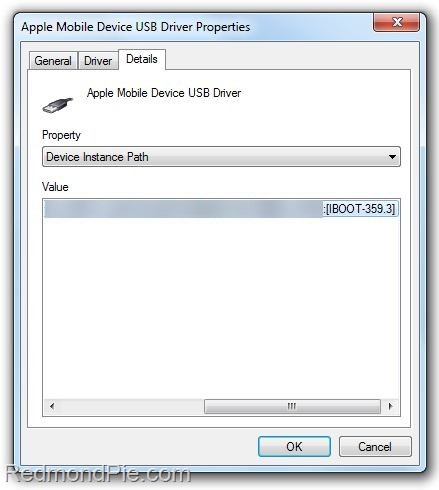 iPhone 3GS – Old Bootrom 359.3
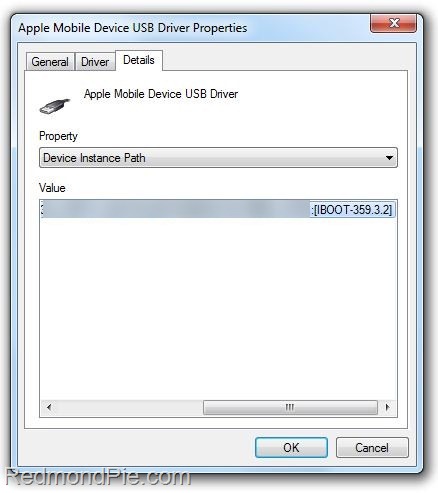 iPhone 3GS – New Bootrom 359.3.2
Step 7: If it’s 359.3, you have old bootrom. If it’s 359.3.2 or anything above that, its a new bootrom.
on Mac OS X
Step 1: Put your iPhone into DFU Mode (not recovery mode)
- Connect your iPhone to your computer.
- Turn iPhone off.
- Start iTunes.
- Hold Power and Home buttons together for 10 seconds or so.
- Release Power button but keep holding the Home button until your computer recognizes a new USB device.
- iTunes will now recognize your iPhone.
Note: Your iPhone screen at this time should be blank (black in color), if not, then you are most likely in Recovery Mode, not DFU mode.
Step 2: Run “System Profiler” and navigate to: Hardware -> USB (menu on left).
Step 3: At the top right under “USB Device Tree” panel click “Apple Mobile Device (DFU Mode)”.
Step 4: Now down under in “Serial Number”, simply go through the string and you’ll find the bootrom version (iBoot) as shown in the screenshots below:
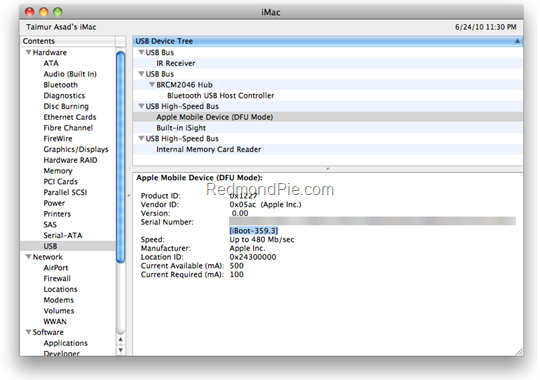 iPhone 3GS – Old Bootrom 359.3
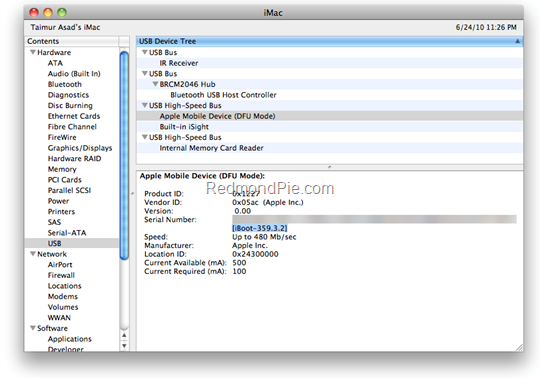
Step 5: If it’s 359.3, you have old bootrom. If it’s 359.3.2 or anything above that, its a new bootrom.
Note: In both the cases above, it doesn’t matter whether your iPhone is an MB model or an MC model. As long as it has 359.3 bootrom, it is iPhone 3GS with old bootrom, and if 359.3.2 or above then it is iPhone 3GS with new bootrom.
for iPod touch 2G and iPod touch 3G
Bootroms are not applicable here, therefore rule of thumb for iPod touch 2G in order to identify if it is jailbreakable on iOS 4 is to check whether it is an MC model or non-MC model (which is usually MB model). If your iPod touch 2G is MC model, then it is not jailbreakable, for everything else, it is jailbreakable.
All iPod touch 3G’s are not jailbreakable on iOS 4. Like iPhone 3GS (new bootrom) and iPod touch 2G (MC model), they require a new exploit in order to jailbreak them on iOS 4. [Credits: Pece1976 on ModMyi]
Thanks: RedMondPie
You could always get support from UnlockAlliPhone.com about any Unlock & JailBreak issue of any model of iPhone including iPhone 2G,3G & 3GS and also upcoming iPhone 4. They provide Premium Members Support for life time. Means just pay one time a small fee and you will receive support(real human support – avg response time 2 hour) for all present & future version of iPhone.

Pingback: substance abuse alcohol
does it restore you iphone or you can just go back into it !?
Well i had to restore my phone after doing this on my MAC… LOL
I did this and never saw where it was suppose to say this. I went into device manger but I never saw an iboot under anything.
Also as far as having to restore your phone afterwards just hold the power and home button until you see the logo show up on your phone. I had to load mine in a safe mode and have the springboard restart (by hitting one button when the phone tells you) but I didn't have to restore it.
I did this 100 time and is not working
i was able to look at the infos through my mac but with my luck the “iboot” part is the only thing missing. any idea why or any other options maybe?
I had exactly the same issue. Did you use Spirit to jailbreak a 3gs, then upgrade to iOS4? I was wondering if doing this broke something that then obscures the “Device Instance Path” property…
hey sorry for the late reply. i actually used pwnage IOS4 without checking if i have the old/or new bootroom so an error occured. My iphone got stuck on a restore mode for hours so i was forced to download the latest itunes which then restored my iphone to 4.0 firmware from 3.1.2. Check first if you have the old/new bootrom just in case u might have jailbroken it using the wrong version. if you still can't figure out the version you can download idetector to check it.
guys you can search and download IDETECTOR. It works wonders except it only works for pc i think so I had to use my old pc for this. all you had to do are; download the app, put your iphone on DFU or restore mode then click on the app and it will tell you right away.
Too many steps can make users jump to other options, thanks for the tip anyway.