
Quick Camera is an ideal camera app that allows you to capture images in the quickest way possible without considering the quality. This amazing app is developed byMelon Lab. This premium app was charged $0.99. You can, however, download this app from App Store free for a limited period.
iTunes Link: http://itunes.apple.com/app/quick-camera/id531146634?mt=8
Overview:
Quick startup – start the camera in less than 2 seconds and capture the most precious moment
Simple interface – no nonsense resolution selection. who wants a picture with bad quality?
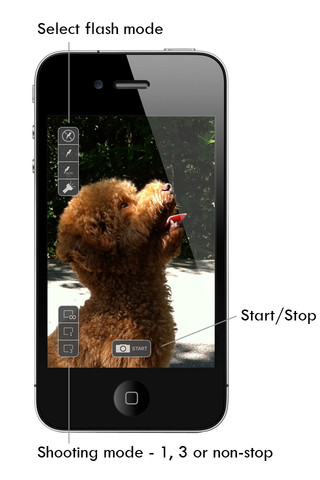
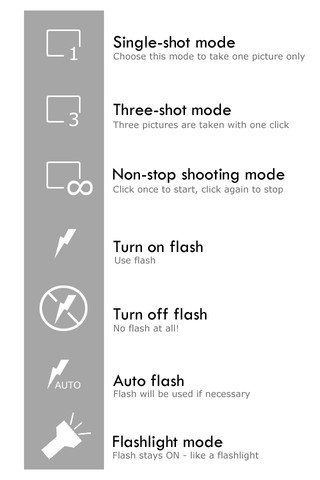
Continuous shooting – choose between 1 shot, 3 shots or non-stop shooting mode.
Speed – On an iPhone 4, capture up to 125 highest quality pictures in a minute!
Quick Camera is a must have for photo lovers like you who is looking for a quick and simple app to capture the candid moment in front of you. With its 125 pictures/minute capture speed and three different continuous shooting modes like those on your SLR camera, you can use it in any situation even in the dark with the iPhone flash switched on.
Photos are automatically saved to the iPhone photo album when you are not taking any pictures. What if it’s still saving and you want to take another picture? Don’t worry – it pauses the saving the moment you press the shutter button and gives you the quickest capturing once again.
Our Review:
Quick Camera comes with similar features like other camera apps in the App Store. What makes this app stand out is its quick photo capture feature. Users are allowed to capture up to 125 pictures/minute using this app. This camera app gives you a shooting experience similar to a DSLR camera, in terms of speed. There are three different continuous shooting modes that power your shooting speed. And all the captured images are saved in iOS photo album. So you can select the best shots later on without any hassle. As this app is free for a limited time period you should try this app. Quick Camera needs only 0.1 MB space on your device.
Requirements: Compatible with iPhone 3GS, iPhone 4, iPhone 4S, iPod touch (4th generation), iPad 2 Wi-Fi, iPad 2 Wi-Fi + 3G, iPad (3rd generation) and iPad Wi-Fi + 4G.Requires iOS 5.1 or later. This app is totally free to download from iTunes.
Current Version: 1.0
Size: 0.1 MB

[ttjad keyword=”iphone”]


This premium app was charged $0.99. You can, however, download this app from App Store free for a limited period.
http://www.lenapelighting.com
choose between 1 shot, 3 shots or non-stop shooting mode.
Speed – On an iPhone 4, capture up to 125 highest quality pictures in a minute!
http://www.offerchat.com/
it pauses the saving the moment you press the shutter button and gives you the quickest capturing once again.
http://www.recruitingconnection.org