
Mobile Web Performance experts at Blaze.io have analyzed the website performance differences between iOS 4 and iOS 5 on an iPhone 4 device. iOS 5 brings with it an evolved browser, and improves many aspects of the browser. From their test they have find out it improves page load performance by about 10% and render and support is much better. It also perform better for graphics heavy site and HTML5 feature. Check details report with chart and data below.
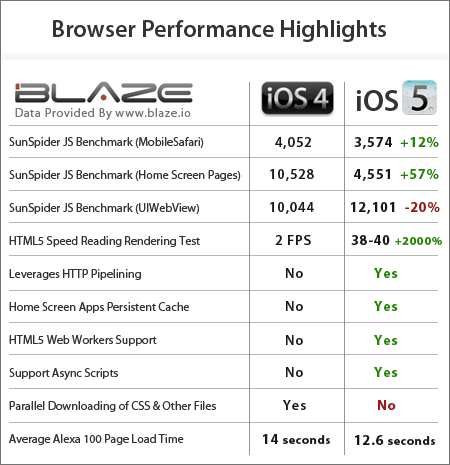
This is the first realistic test of iOS performance. Blaze.io is famous Mobile Web Performance experts. This time they were been able to release their report which previously prevented by the Apple Developer NDA. Here we will focus on few aspects on their report
Browser Used:
They have use all 3 native browser. MobileSafari, Home-Screen Pages (its different then safari and runs separately in Task manager), UIWebView ( its the one used by most apps like Facebook, Twitter).
JavaScript Performance
The table below shows the average results of 3 runs of the SunSpider JavaScript Benchmark (v0.9.1) in each environment. The test measures duration, so lower numbers are better. All tests were done on iPhone 4 hardware.

As you can see, the JavaScript performance of MobileSafari is a little bit better, improving by roughly 10%. This is to be expected, since new browser versions usually improve performance, but the dramatic improvement was already delivered in iOS 4.3 not too long ago.
Rendering Performance
A key performance enhancement in iOS 5 is GPU accelerated rendering. The GPU (Graphics Processing Unit) is much faster than the CPU at processing graphics related actions, such as 3D rendering. Many modern browsers allow websites to leverage the GPU through specific CSS and JavaScript actions, such as translate3d.
Here’s a short video showing iOS 4 vs. iOS 5, clearly demonstrating the improvement:
HTTP Pipelining
HTTP Pipelining is enabled for all browser modes (MobileSafari, UIWebView, Home-Screen). Some private API method names indicate determined developers can probably find ways to disable pipelining in their apps if they have reason to do so.
Digging deeper into its behaviour, here are the specifics on how Pipelining is used in iOS 5 (the terms are explained here and here), compared to the other browsers that support it:
| Mobile Browsers | Server Support Detection | Max pipelined requests | Max connections per host | Pipeline vs. Connection Distribution |
|---|---|---|---|---|
| iOS 5.0 | Per Host | – | 6 | Fill First* |
| Android | Per Connection | 3 | 4 | Fill First |
| Opera Mobile | Per Host | 11 | 4 | Distribute First |
| Opera Mini | Per Host | 4 | 10 | Distribute First |
| Blackberry | – Not Supported – | |||
* Except for the first set of requests per connection. See below.
iOS 5 mixes and matches other browser behaviours, using Opera’s more aggressive detection model and Android’s request distribution model. Blackberry remains the only top browser not to support HTTP Pipelining, at least for now.
One twist iOS 5 introduces is that the first request on every connection is distributed first, and only then the pipe is filled. For example, if a page makes 24 requests to a host (after verifying host support), split over the 6 connections MobileSafari opens, then:
- Connection 1 will send requests 1, 7, 8 and 9
- Connection 2 will send requests 2, 10, 11 and 12
- Connection 3 will send requests 3, 13, 14 and 15
- Connection 4 will send requests 4, 16, 17 and 18
- Connection 5 will send requests 5, 19, 20 and 21
- Connection 6 will send requests 6, 22, 23 and 24
Parallel Downloads
A large component of browser performance has to do with downloading files in parallel. Put simply, the more files are downloaded in parallel, the better the performance. On this field, iOS 5 brings with it good and bad news.
The good news is the new support for the “async” script attribute. This attribute allows website owners to explicitly mark a script as “async”, and thus keep it from blocking the page loading event or other scripts on the page. Support for async scripts is especially important on mobile networks, as they make it easier to keep 3rd party scripts from delaying the page load.
Caching
For the most part, caching hasn’t changed in iOS5. Individual files of at least 4 MBs are still cacheable (as tested using Steve Souders’ test), persistent cache is still zero, and memory cache can still reach 100MB at times (using the same tests we used before).
The main changes happened in how Home Screen Pages handle caching. As Souders observed, Home Screen Apps didn’t enjoy any persistent cache in iOS 4. In iOS 5 that is fixed, and these apps do enjoy proper caching, and don’t need to reload resources on load.
HTML5 Web Workers Support

HTML5 introduces a new entity called Web Workers. These workers are side threads used for running time consuming JavaScript actions. Running such actions on a separate thread leaves the main thread free for user interaction and UI, and makes the application more responsive. You can read more about Web Workers here.
The Android Browser supports Web Workers since Android 2.0, but iOS did not support them until now. iOS 5 now added complete support for Web Workers, which is great news for rich applications.
Thanks to Blaze Team to share this report with us. Check more details to their Site here
[ttjad keyword=”iphone”]


Your passion for this topic shines through in your writing It’s clear that you put a lot of effort and thought into your posts Thank you for sharing your knowledge with us