
Redsn0w 0.9.6 Beta 5 has released both for windows and mac OS X.It can update your iPhone 3GS and iPhone 3G baseband to 06.15.00 which is required in order to unlock with Ultrsn0w 1.2.Unlock for iPhone 3GS and 3G on baseband 05.14.02 has not been released as initially expected.
Instead the iPhone Dev has released an unlock for baseband 06.15.00 (from iPad 3.2.2) which is a higher version baseband. The only way to unlock iPhone 3GS and 3G on any existing baseband is to first upgrade it to bb 06.15.00 and later unlock with Ultrasn0w.
Warning: You do this at your own risk.
1. There is no way to come back down from 06.15, and there’s no hiding the baseband version from Apple. You’ll be voiding your warranty in a very obvious way.
2. If some future baseband comes out with a critical fix, you won’t be able to update to it if it remainsdown in the 05.xx sequence (then again, you wouldn’t update to it if you wanted to keep your unlock anyway).
3. Starting with FW 4.2.1 if you have 06.15 on your iPhone you won’t ever be able to restore to stockfirmware (it will fail). You’ll need to only restore to custom IPSWs (then again, if you’re unlocker you should already be doing that).
Here’s the steps.
Step 1: Download Redsn0w 0.9.6 Beta 5, iOS 4.2.1 or iOS 4.1 IPSW (stock FW) for your iPhone 3GS/3G.
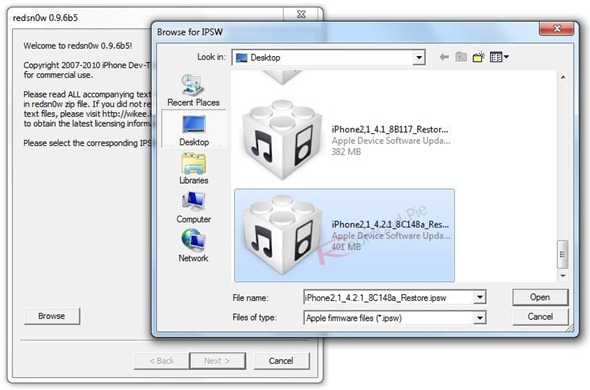
Step 2: Start Redsn0w 0.9.6b5 and point it to either iOS 4.2.1 or iOS 4.1 IPSW.
Step 3: Let Redsn0w recognize the IPSW and prepare jailbreak data by patching the kernel.
In case Redsn0w is unable to recognize the IPSW, check to see if you have pointed to the correct version. For instance if you are currently on iOS 4.1 then select iOS 4.1 IPSW. Also if you have downloaded a zip file then rename the extension to .IPSW and continue using it.
Step 4: In the next step, select ‘Install iPad baseband’ checkbox.
Step 5: Read and fully understand the message that pops up saying
‘Warning: if you choose to do this, you won’t be able to downgrade to a ‘normal’ iPhone baseband. You’ll also void any Apple warranties (they can easily detect this baseband if you bring it in for service.). Starting with FW 4.2.1, you won’t be able to restore to stock IPSWs (only custom ones from PwnageTool). Be sure you understand the consequences of this before ….’
Click Yes to continue.
Step 6: First connect your iPhone to your Computer and then turn it off. Then click Next.
Step 7: Follow the onscreen instructions to put your iPhone into DFU mode.
i) Hold down the POWER/SLEEP button for 3 seconds.
ii) Without releasing the POWER button, also hold the HOME button for 10 seconds.
iii) Without releasing the HOME button, release the POWER button. But KEEP holding the HOME button for another 15 seconds.
Step 8: Let Redsn0w upload jailbreak data to your iPhone and complete the jailbreak cum baseband upgrade process. This may take a while as the current version of Redsn0w uses Apple servers to update the bb to 06.15.00.
That’s all.
Step 8:
Click On Ads To Buy iPhones Accessories


I’m on 3g, 4.1, 05.14.02, PC so tried upgrade to 06.15.00 with Redsn0w. Did as described ubove and Redsn0w said, “done”, but when i go to my settings modem firmware is still 05.14.02. Whyyyyyy-e?
I’m singing the same song at my house.
….thanks for the info. after doing this and installing ultasn0w my iphone 3G started getting the signal back on….thanks a lot guys, almost 2 days trying to figure out what was wrong……