website statistics

Jailbreak Apple TV 2G on iOS 4.1 Using PwnageTool 4.1(Step by Step Guide)

When do you use Facebook?

View Results

Loading ... Loading ...
1 Star2 Stars3 Stars4 Stars5 Stars (Rate This)PwnageTool 4.1 has already been released.Among the supporting device of PwnageTool 4.1 the 2nd-generation Apple TV can be jailbreak with this firmware.If you want to jailbreak Apple TV 2G running on iOS 4.1 with PwnageTool follow the step step guideline that has given below.">
Loading ... Loading ...

PwnageTool 4.1 has already been released.Among the supporting device of PwnageTool 4.1 the 2nd-generation Apple TV can be jailbreak with this firmware.If you want to jailbreak Apple TV 2G running on iOS 4.1 with PwnageTool follow the step step guideline that has given below.
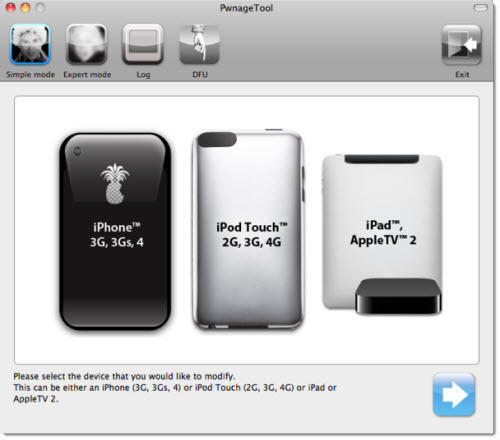
The steps are given below.

Step 1: Download latest iTunes and PwnageTool 4.1.

Step 2: Download iOS 4.1 firmware for Apple TV 2G.

Step 3: Run PwnageTool 4.1 and select “iPad/ Apple TV 2″.

Step 4: PwnageTool 4.1 will try to detect the correct firmware for your Apple TV 2G on its own or you can browser to locate it.

Step 5: The PwnageTool will auto detect the firmware of your device and you will have to click YES when the following message appears on your screen:

We will now create an .ispw file that will help you restore your iPad, Apple TV 2G with iTunes…

Step 6: The .ispw file will now be created.

Step 7: You will then have to enter the DFU mode. This will be done by connecting your Apple TV to your computer using the microUSB. With that done, restart your Apple TV ensuring that you hold the Menu and Down button for approximately 6 seconds. On reboot instantly press the Menu and Play button.

Step 8: Restore your Apple TV on this new firmware file, start iTunes and click the icon on your iTunes. Whilst holding the shift button [alt for Mac] on your keyboard select Restore and let go of the shit key. This step would then require you to point the location of the custom firmware 4.1 file . With the .ispw file located hit Open.

That’s all.

Thanks
Click On Adds To Buy Spplr TV


How to Jailbreak iOS 4.1 with PwnageTool 4.1

Apple Announces iLife ’11
You can also press the left/right arrow key on your keyboard to go to previous/next post
  On October 21, 2010(2 years, 7 months ago.)

Recent Products

Buy Now | Compare  
Buy Now | Compare  
Compare  

Recent Search

Recent Tutorials

This tutorial will show how to use S.M.A.R.T. (Self Monitoring Analysis and Reporting Technology) to continuously collect information on health of your equipment.
In this tutorial I'll show you how you can easily protect yourself from any kind of security breaks that may occur through Java.
Today Apple enabled "Two Step Verification" for iCloud And Apple ID. But the process is not that simple. But no worry, here we have made a step by step tutorial.
Cant remember your iPhone passcode? Here I will show you some workaround on what to do and how to recover and restore for every possible scenario.
This tutorial will show you how to perform the Winapp2.ini installation inside CCleaner and how to use it under Windows operating system.
With app called AD Sound Recorder, you can record any stream that passes through your sound card or speakers and in this tutorial I will show you how to do that.
If you want to have Boxee app inside your Apple TV, in this tutorial we will show you how to install XBMC and Boxee using Windows on your Apple TV.
This tutorial will show you how to transfer PS3 Saved Game Files from your PC to your PS3 game console.
Adding videos from external sources such as internet, more specifically from YouTube, is a great solution to enhance a presentation; in this tutorial I will show you the procedure.
If you are one of new comers to Windows Phone 8, like me, in this tutorial I will walk you through the process to update your Windows Phone 8 device.
Close You Have To Login
User:
Pass:
Login With »Login With TwitterLogin With Facebook