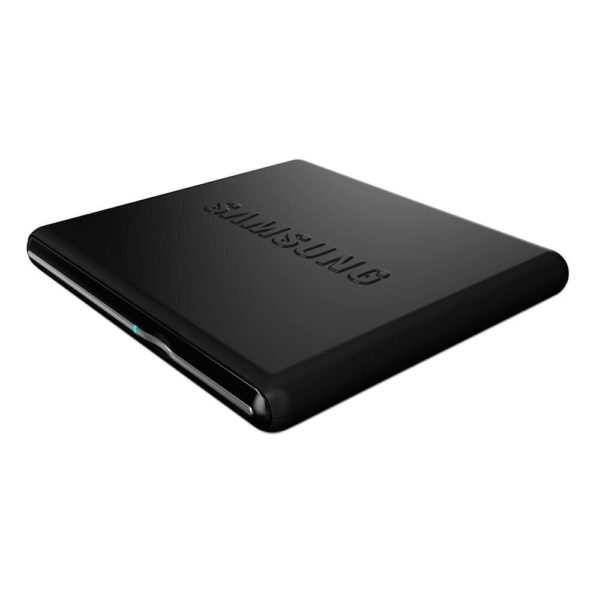
Samsung bring USB 2.0 8x DVD Writer External Optical Drive. The SE-084D drive is 20mm shorter and 25% lighter than the previous drives. This drive features Samsung’s Soft Touch technology which requires user to pass their finger in front of the drive and tray opens. An additional function that has been added is the USB host device functionality which allows user to connect the drive directly to a TV and play DVDs without addtional components. No AC adapter is needed as the SAMSUNG DVD Writers are USB powered. Just simply plug it to the USB port to get power and no need to worry about the AC Adaptor. Furthermore, this model supports both 12 cm & 8 cm discs. This is an Amazon’s product review. Checkout more detail bellow.
|
Product Features:
- 8X DVD+R 8X DVD+RW 6/8X DVD+R DL 8X DVD-R 6/8X DVD-RW 5X DVD-RAM 8X DVD-ROM 24X CD-R 24X CD-RW 24X CD-ROM 2MB Cache USB 2.0
- Easy open and close via “Soft Touch” technology
- Samsung’s Firmware Live Update will keep your drive updated so it always works with the latest media.
- Nero Software Suite (NERO Burning ROM, NERO Showtime, PowerDVD) included.
Technical Details:
- Brand Name: Samsung
- Model: SE-S084D/TSBS
- Hardware Platform: PC
- Form Factor: External
- Buffer Size: 1.5 MB
- Width: 5.7 inches
- Depth: 5.4 inches
- Height: 0.7 inches
Read, write, and watch DVDs on the go with the Samsung Portable Optical Disc Drive. The winner of a 2010 iF product design award, this versatile multimedia storage device and DVD writer is 20 percent smaller and 25 percent lighter than conventional optical disc drives. Samsung’s TruDirect software allows you to burn DVDs quickly and reliably. To power the device, just plug it into a USB 2.0 or USB 3.0 port–no AC adapter is needed.
Sleek, Award-Winning Design:
The Samsung Portable Optical Disc Drive was the winner of a 2010 iF product design award from International Forum Design. It features a sleek, rounded design with a curved surface and a metallic centerline, and comes in a variety of vibrant colors, including black, blue, pink, red, silver, white, and yellow.
The drive’s creative design also incorporates a touch eject button on the front, which, when gently pressed, opens the optical disc drive tray.
Slim and Compact for Easy Travel
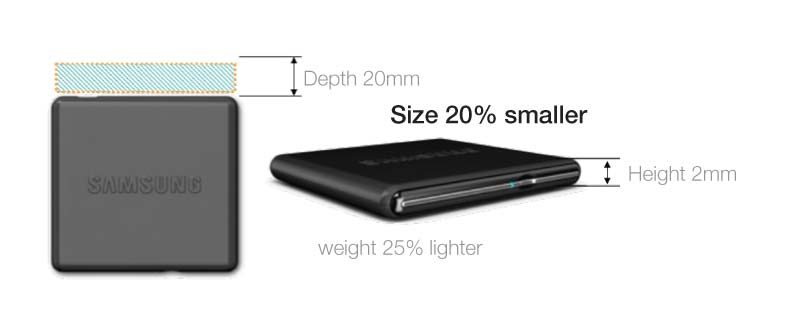
The lightweight, compact design of the Samsung Portable Optical Disc Drive makes it easy to take the device with you wherever you go. The drive is a full 20 percent smaller and 25 percent lighter than conventional DVD writers. At 2/5 by 5-7/10 by 6-7/10 inches (H x W x D), the drive is only slightly larger than a CD case. And it weighs less than 10 ounces, so it travels easily.
To power the Samsung Portable Optical Disc Drive, simply plug it into your computer’s USB 2.0 or USB 3.0 port. No AC adapter is required.
Connects to USB-Compatible TVs for Viewing Videos and Photos
Using an A/V connector, you can connect the Samsung Portable Optical Disc Drive to your TV and play videos and image files directly on your TV. (For use only on TVs with a USB port; check with the TV’s manufacturer for compatibility).
Fast, Reliable Disc Burning
The Samsung Portable Optical Disc Drive is equipped with TruDirect technology, which delivers fast, easy, real-time recording from nearly any digital device directly to DVD.
TruDirect enables you to create DVDs and burn digital content through a PC without using a hard drive. Unlike other disc-burning software, TruDirect doesn’t require empty space on your computer’s hard drive to hold the file and backup. TruDirect also eliminates pre-mastering, multiplexing, and hard-drive buffering, so you can perform live-streaming recording.
In addition, the Samsung Portable Optical Disc Drive contains technology to prevent buffer underrun errors. As a result, disc burning is fast and reliable.
Compatibility and Warranty Information
This drive is compatible with all major computer operating systems, including Windows 7 and Mac OS X. It supports the following disc formats: DVD-RAM, DVD+R, DVD+R dual-layer, DVD+RW, DVD-R, DVD-R dual-layer, DVD-RW, DVD-ROM, DVD-Video, CD-R, CD-RW, CD-ROM, CD-ROM/XA, CD-Audio, Video-CD, Photo CD, CD-I(FMV), and CD-Text.
The Samsung Portable Optical Disc Drive is backed by a one-year limited warranty.
That’s all about the Samsung SE-084D. This External Optical Drive is available in Amazon.com. You can directly order or Buy form here.
Source