
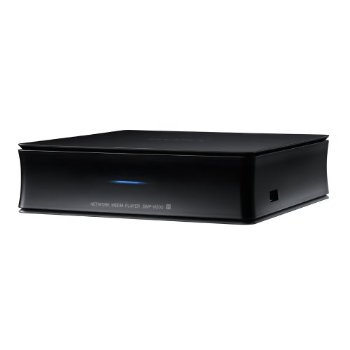
Introducing the Sony SMP-N200 Wi-Fi Streaming Media Player. You can enjoy wireless access to popular apps like Netflix, HuluPlus, YouTube, Pandora, and Crackle directly on your TV using this media player. This Wi-Fi Streaming Media Player turns your TV into a smart TV. Now you have more control on your entertainment. You can Stream your favorite movies, TV shows, music and any thing you want withing your home network using this media player. You are also allowed to control it by using a simple app from your iPhone or Android device. This is an Amazon’s product review. Check out more on this device below.
 |
Features:
- Built-in Wi-Fi
- Full HD 1080p with HDMI output
- Stream 3D and High Definition Video
- Multi-room Audio with Sony Homeshare
- iPhone/iPod touch and Android Phone Remote Control
- USB Input
- I/P Noise Reduction
Smart TV
Get instant access to thousands of hit movies, TV shows, music choices, and online videos.1 Plus get new apps delivered to you automatically, so your selection is never outdated and you are always connected to the best entertainment.
Built-in Wi-Fi
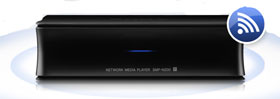
The SMP-N200 doesn’t require messy network cables to deliver content to your TV or audio system, provided you have a working Wi-Fi network in your home. Conno system, pro your home’s wireless broadband network, and go.
Full HD 1080p with HDMI output
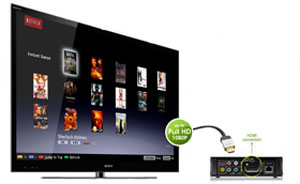
Enjoy up to Full HD 1080p video quality, with a simple, one-cable HDMI connection to your HDTV.2 A perfect solution to conveniently add multimedia streaming to any HDMI equipped HDTV. The SMP-N200 also has HDMI 6composite and component audio/ video outputs, providing the ability to play streamed content on any television you may own.
Stream 3D and High Definition Video
The SMP-N200 has the ability to stream from 3D and high definition video sources, allowing you to take advantage of everything your 3D HDTV has to offer2. You can also stream music, videos and photos from DLNA compatible devices (like a Windows 7 PC) using your home network.
Multi-room Audio with Sony HomeShare
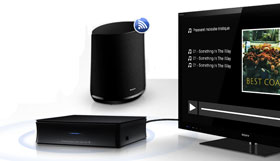
Enjoy Pandora, Slacker, your MP3s and other available audio in another room, in the garage— wherever your home wireless network can reach. Simply link the SMP-N200 to Sony HomeShare™ network speakers, and your music can flow throughout your home.
iPhone/iPod touch and Android Phone Remote Control
Download the free Media Remote app to your iPhone, iPod touch or compatible Android phone and turn it into a versatile remote – access movie info, search entertainment topics and more.
USB Input
Share your videos or photos on the big screen or listen to your favorite music. Simply connect your digital camera, USB-enabled MP3 player, or USB storage device to play a wide variety of file formats.
I/P Noise Reduction
Improve the picture quality of Internet entertainment and enjoy crisp, clear images on your HDTV.
- Broadband speed of at least 2.5 Mbps recommended (10 Mbps for HD). Content subject to change and may require fees.
- Requires compatible HDTV and HDMI cable sold separately
- Requires 3D content, 3D HDTV, 3D glasses, 3D emitter, and HDMI cable (at least 10.2 Gbps).
- Requires devices connected to the same wireless home network.
- Requires HDMI cable (at least 10.2 Gbps) sold separately.
- Requires HDMI Cable sold separately
Product Dimensions
Video: Upscaling: Yes (Precision CinemaHD Upscaler)
Inputs and Outputs: USB Port: 1-side
Weight and Measurements: Approx: 5.9 in. x 1.7 in. x 5.9 in.
What’s in the box
- AC Cable
- AV Cable
- Button Battery (CR2032)
- Remote RMTD302
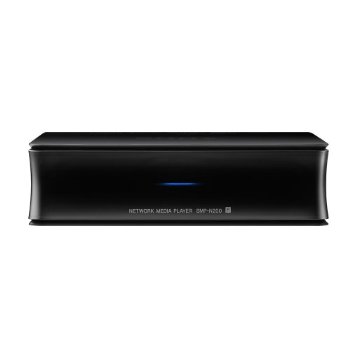
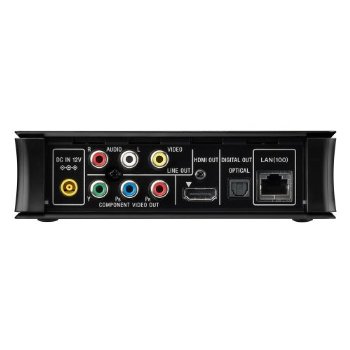
That’s all about the Sony SMP-N200 Wi-Fi Streaming Media Player. This Media Player is available in Amazon.com. You can directly order or buy from Amazon.
[ttjad keyword=”google-tv”]

Am looking for Sony Media Player Hacks. Are there any available yet?