
Amazon has long been stating that its Kindle Fire is doing really well, though critics and analysts had their reservations. The reservations were also widespread because Amazon has been reluctant in divulging the exact numbers of its Kindle Fire sales. Now, however, according to statistics from Comscore, Kindle Fire has been able to grab a massive 54 percent share of the Android tablet market.
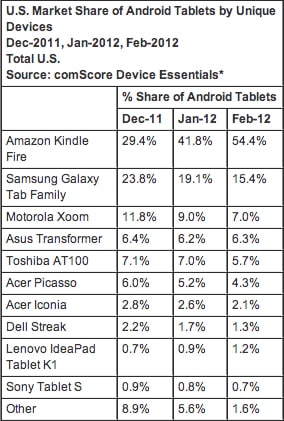
This bit of news is very significant and telling. It goes on to show how Amazon has silently been very successful on the tablet front and that a tablet like Kindle Fire, which doesn’t necessarily come with high-end specs, can still be a massive success.
Samsung, the company which is bagging huge numbers when it comes to smartphone business, hasn’t been doing particularly well in the tablet market. It comes second to Kindle Fire in the Android market share, having a mere 15.4 percent of the share to its name. What is significant is that Samsung has been able to achieve this share merely with its Galaxy Tab line of tablets.
Next to Samsung is a rather unexpected Android vendor, Motorola. Motorola hasn’t been making many headlines these days, especially ever since Google acquired it. But it does have a presence in the Android tablet market with its 7 percent share, which primarily comes off its tablet XOOM.
Finally, Asus is also still here with its Transformer Prime lineup, comprising of some of the sleekest and most awesome tablets and yet having a mere 6.3 percent of the Android market.
Amazon’s success is significant is that its Kindle Fire doesn’t exactly use Android but rather a derivative of the software. Nonetheless, the tablet has still been an immense success with the users so far, or at least so the statistics are telling. The question, what will the other big players such as Samsung do about it?
[ttjad keyword=”android-device”]


![Read more about the article [Deal] Huge Price Cut – Up To $329 Off For iPads, 16GB iPad Mini Costs $239 Only](https://thetechjournal.com/wp-content/uploads/2014/03/iPad-Mini.webp)
