
Internet Explorer has, for long, remained the undisputed king of the world of browsers, until Mozilla Firefox came to seriously threaten its hegemony. However, recently a third contender jumped the bangwagon, Google Chrome. And it has become wildly popular, experiencing the fastest success so far. In March this year, IE was finally surpassed by both Firefox and Chrome as top browsers.
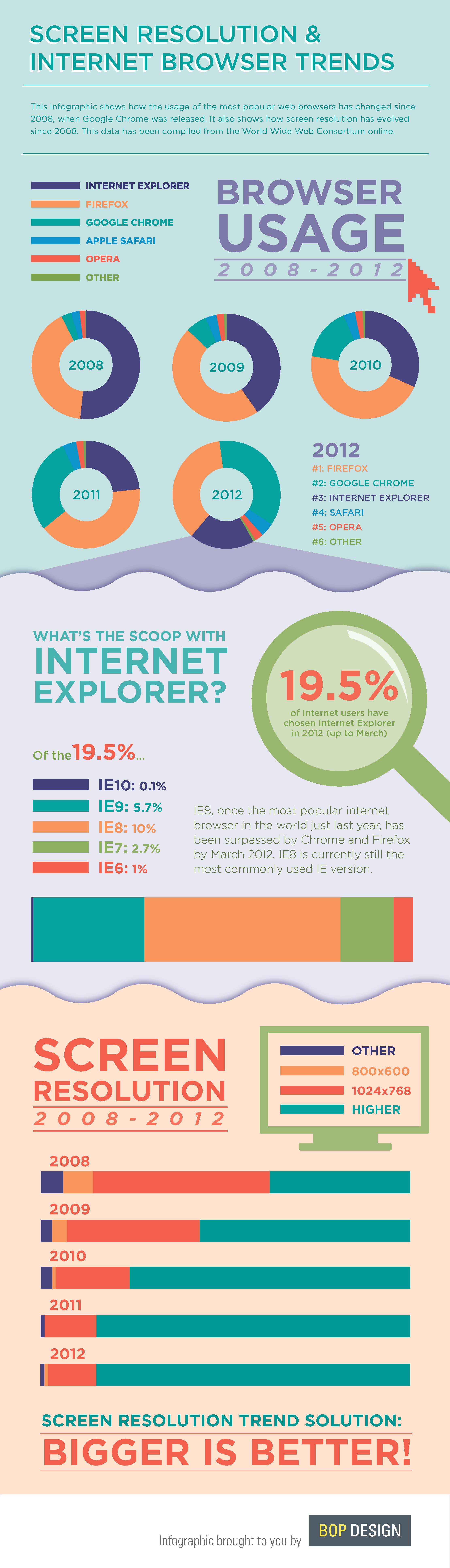
This infographic goes on to show how Internet Explorer, once being the most popular and widely-used browser on the web, gradually lost the position. And the chief contender which eroded the influence of IE was Mozilla Firefox.
However, soon after Firefox’s launch, Google launched its own browser, called Google Chrome. This browser immediately shot into popularity and soon amassed huge numbers of followers. By 2010, it seemed that Firefox would easily beat IE and become the king of the browser world. However, little did we know that Google Chrome would not only become wildly popular, it would also be competing for the top spot.
Come 2011 and the influence of both Firefox and Chrome increased while that of IE decreased. And now, finally in 2012, IE’s use has been squeezed to a smaller percentage while that of both Firefox and Chrome has come to dominate the arena of browsers. Specifically, Chrome seems to have surpassed even Firefox to become the top browser.
Currently, some 19.5% of internet users still tend to stick to IE. Out of them, a vast majority prefers to use IE 8 which is the most popular version of the browser.
As far as screen resolution trends are concerned, the average screen resolution across the tech world has been on the rise. By 2008, the most-used screen resolution was 1024 x 768. However, by 2009, higher screen resolutions became in vogue and the trend has continued ever since, down to 2012. Now that the likes of Apple are shipping out ultra-high display-res tablets, it is only inevitable that the screen resolutions of displays will rise only further.
[ttjad keyword=”hdtv”]

![Read more about the article Time(line) Is Money When It Comes To Facebook [Infographic]](https://thetechjournal.com/wp-content/uploads/2012/05/timeline-512x344.jpg)
![Read more about the article [Infographic] The Trend Of E-Reading](https://thetechjournal.com/wp-content/uploads/2012/06/ereaders-183x768.jpg)
![Read more about the article A Look At London Olympics 2012 [Infographic]](https://thetechjournal.com/wp-content/uploads/2012/07/olymp-512x269.jpg)
Whatever, I don’t like IE browser, From my experience, it opens page slowly compared with the chrome, firefox or even Avant browser I used. Maybe it’s just my illusion, but the ubiquitous script errors make me angry, I don’t think I will back to IE any more.