Twitter has officially supported Do Not Track option which is promoted by The United States Federal Trade Commission (FTC) and Mozilla. Do Not Track (DNT) is a privacy preference that users can set in their web browsers. It request websites visited by DNT enabled users not to track them over the web. By officially supporting DNT, Twitter has acknowledged to honor the requests by not tracking requesting users over the web.
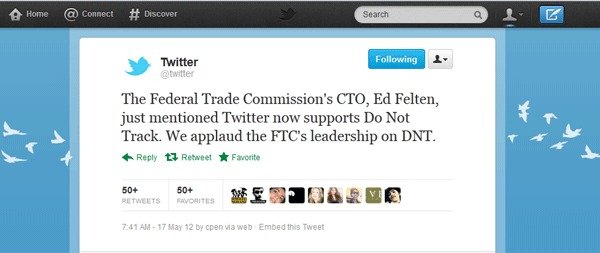
Twitter Director of Growth and International, Othman Laraki, said in a blog post, “As always, we are committed to providing you with simple and meaningful choices about the information we collect to improve your Twitter experience.”
Twitter’s decision has been applauded by FTC. Mozilla, another proponent of DNT movement, said, “We’re excited that Twitter now supports Do Not Track and global user adoption rates continue to increase, which signifies a big step forward for Do Not Track and the web.”
Other major sites that have supported the Do Not Track movement includes Yahoo. Users of Yahoo can “express their ad targeting preferences” using the feature.
All major browsers now include Do Not Track feature in recent versions. Web browsers, enabled with Do Not Track option sends a line of code to websites that the user don’t want to be tracked. However, it is up to the website to honor the request. I have covered how you can enable Do Not Track feature in different browsers below.
Firefox users can enable Do Not Track option according to the below mentioned steps.
- Open the Preferences menu and click Privacy.
- Check the box for Tell web sites I do not want to be tracked.
Internet Explorer 9 users can use the following setps to enable Do Not Track option.
- Visit this Do Not Track test page for information about installing on Internet Explorer 9, and scroll to the bottom to find the link to install.
- When the dialog window shown below pops up, click the Add List button to add an empty Tracking Protection List.
- For more details see this help page from Microsoft.
Safari 5.1 users should follow the below mentioned steps to enable Do Not Track.
- In Safari preferences, click Advanced.
- Next, check the Show Develop menu in menu bar check-box.
- Close the preferences window, and under the new Develop menu, select Send Do Not Track HTTP Header.
Chrome (17.0 or higher) users should follow the below mentioned process.
- Open Chrome, click Window in the top navigation, and select Extensions.
- Click the link at the bottom that says Get more extensions.
- Search for “Do Not Track” from Jonathan Mayer.
- To add “Do Not Track” to your Chrome browser, just click the button Add To Chrome and click Add again when you see the disclaimer.
- Go back to your Extensions and make sure it has been successfully added and enabled.
Source: Guardian
[ttjad keyword=”social-media-samrtphones”]