website statistics

First Rocket Of South Korea Launched With A Satellite

After failures in 2009 and 2010, for the first time, South Korea has successfully launched a native rocket into the space on January 30, carrying a satellite.

When do you use Facebook?

View Results

Loading ... Loading ...
1 Star2 Stars3 Stars4 Stars5 Stars (Rate This)
Loading ... Loading ...

In 2009, South Korea halted the launch of KSLV-1 rocket just before lift-of. In 2010, the country once more tried to launch that rocket, but failed again. But that will not happen all the time. Finally, South Korea has successfully launched that KSLV-1 rocket into the space on Jan 30, but not alone; carrying a satellite.
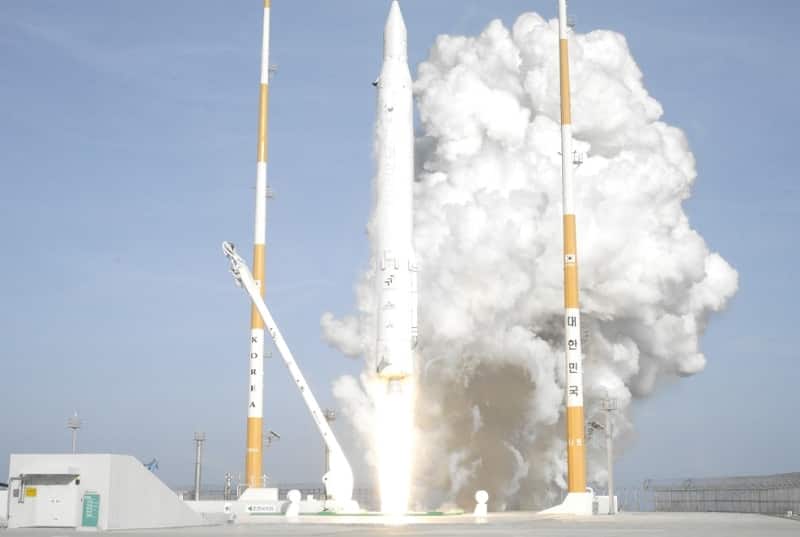

Launch Of South Korea's KSLV-1 Rocket

South Korea desperately wanted to deploy a space rocket from its own soil. So, the country tried twice to send a space rocket called Korea Space Launch Vehicle-1 (KSVL-1), also known as Naro, in 2009 and 2010; but unfortunately failed both time. But the country didn’t lose its hope. South Korea started to work with new enthusiasm and for the first time, the country launched that KSVL-1 space rocket on Wednesday, Jan 30, along with a small Science and Technology Satellite 2C (STSAT-2C) into orbit. The KSVL-1 or Naro blasted off at 4 pm (local time) from the Naro Space Center, which is located 480 kilometers away from South of Seoul. About an hour after takeoff, Science Minister Lee Ju-ho declared the successful launch of that rocket.

South Korea has spent 502.5 billion Won ($407 million) since 2002 to build that rocket and learnt related technologies with Russian assistance and technical supervision. At present, Korea Aerospace Research Institute is working with contractors to build completely in-house rocket stages by 2016, and reach 300 tons of thrust by 2018.

Till now, there were 10 countries who built their own rocket and 12 nation who had successfully deployed a rocket into space from their own territory with a satellite. With the launch of KSVL-1 rocket with STSAT-2C satellite, South Korea has become the 11th country to build a native rocket and the 13th nation to put a rocket into space from own territory.

Source: Yonhap News Agency
Thanks To: Space, Wall Street Journal

Buy Cheapest Related Product From Amazon.com


[Tutorial] How To Install Boxee On Your Apple TV Using Windows

US Students Can Upgrade To Windows 8 Pro For $70 From February 1
You can also press the left/right arrow key on your keyboard to go to previous/next post
  On January 31, 2013(3 months, 18 days ago.)

Recent Search

Recent Tutorials

This tutorial will show how to use S.M.A.R.T. (Self Monitoring Analysis and Reporting Technology) to continuously collect information on health of your equipment.
In this tutorial I'll show you how you can easily protect yourself from any kind of security breaks that may occur through Java.
Today Apple enabled "Two Step Verification" for iCloud And Apple ID. But the process is not that simple. But no worry, here we have made a step by step tutorial.
Cant remember your iPhone passcode? Here I will show you some workaround on what to do and how to recover and restore for every possible scenario.
This tutorial will show you how to perform the Winapp2.ini installation inside CCleaner and how to use it under Windows operating system.
With app called AD Sound Recorder, you can record any stream that passes through your sound card or speakers and in this tutorial I will show you how to do that.
If you want to have Boxee app inside your Apple TV, in this tutorial we will show you how to install XBMC and Boxee using Windows on your Apple TV.
This tutorial will show you how to transfer PS3 Saved Game Files from your PC to your PS3 game console.
Adding videos from external sources such as internet, more specifically from YouTube, is a great solution to enhance a presentation; in this tutorial I will show you the procedure.
If you are one of new comers to Windows Phone 8, like me, in this tutorial I will walk you through the process to update your Windows Phone 8 device.
Close You Have To Login
User:
Pass:
Login With »Login With TwitterLogin With Facebook