website statistics

Apple Bags Patent For Wild 3D Gesturing

USPTO has granted Apple 22 patents, including patents about wild 3D gesturing which will let users create complex 3D models with ease.

When do you use Facebook?

View Results

Loading ... Loading ...
1 Star2 Stars3 Stars4 Stars5 Stars (Rate This)
Loading ... Loading ...

Even when Apple is not busy releasing a product or developing one, we can be rest assured that it is working on many new technologies. This is manifested from the patents that Apple keeps filing and bagging. Now, Apple has bagged a patent for wild 3D gesturing.

Apple Wild 3D Gesturing

In total, the US Patent and Trademark Office granted 22 patents to Apple two days ago. Among these, one patent was related to wild 3D gestures.

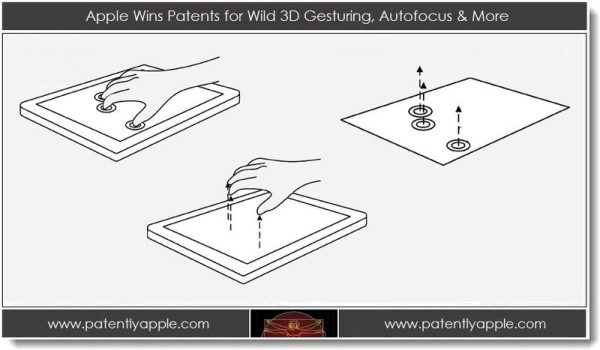
Before we go further, let’s see what is this wild 3D gesturing. According to the patent papers filed by Apple, the wild 3D gesturing refers to an input method on a touch-sensitive display, such as an iPad. But unlike the prevalent touch-screen input methods, 3D gesturing allows for 2D as well as 3D inputs on such a display.

An interesting pinch-and-pull gesture, included in the display, allows a user to literally grab a 2D surface on a display and pull it up, in 3D, to tweak the shape of the object accordingly. The image posted below very aptly shows it:

The huge potential for wild 3D gesturing lies in its virtually infinite applications. Imagine being in a virtual environment where you can use 3D models simply by making simple gestures. By making the process so simple, you can even create very complex 3D models; say, the architecture of a house or a machine. If indeed such a technology lands on an iPad in the future, it would become easy for game-developers and 3D-modellers to create complex models quickly. But at the end of the day, the main concern remains. The question is , how soon will we see the technology in a real device?

Source: Patently Apple

Courtesy: Ubergizmo


Is Facebook’s Ad Business A Scam?

Purify Water Through Solar Bag While You Walk
You can also press the left/right arrow key on your keyboard to go to previous/next post
  On August 2, 2012(10 months, 21 days ago.)

Recent Search

Recent Tutorials

This tutorial will show how to use S.M.A.R.T. (Self Monitoring Analysis and Reporting Technology) to continuously collect information on health of your equipment.
In this tutorial I'll show you how you can easily protect yourself from any kind of security breaks that may occur through Java.
Today Apple enabled "Two Step Verification" for iCloud And Apple ID. But the process is not that simple. But no worry, here we have made a step by step tutorial.
Cant remember your iPhone passcode? Here I will show you some workaround on what to do and how to recover and restore for every possible scenario.
This tutorial will show you how to perform the Winapp2.ini installation inside CCleaner and how to use it under Windows operating system.
With app called AD Sound Recorder, you can record any stream that passes through your sound card or speakers and in this tutorial I will show you how to do that.
If you want to have Boxee app inside your Apple TV, in this tutorial we will show you how to install XBMC and Boxee using Windows on your Apple TV.
This tutorial will show you how to transfer PS3 Saved Game Files from your PC to your PS3 game console.
Adding videos from external sources such as internet, more specifically from YouTube, is a great solution to enhance a presentation; in this tutorial I will show you the procedure.
If you are one of new comers to Windows Phone 8, like me, in this tutorial I will walk you through the process to update your Windows Phone 8 device.
Close You Have To Login
User:
Pass:
Login With »Login With TwitterLogin With Facebook