website statistics

iOS 5.1.1 Launched By Apple To Fix Bugs [Download Link]

When do you use Facebook?

View Results

Loading ... Loading ...
1 Star2 Stars3 Stars4 Stars5 Stars (Rate This)
Loading ... Loading ...

Apple has been quite vigilant in rolling out updates for its iOS platform. This has been an excellent strategy since Apple keeps patching fixes for any bugs that are a part of the earlier release. Now, the company has announced the release of iOS 5.1.1 which goes on to take care of a number of bugs. The bugs which have been fixed in this release are mentioned below.
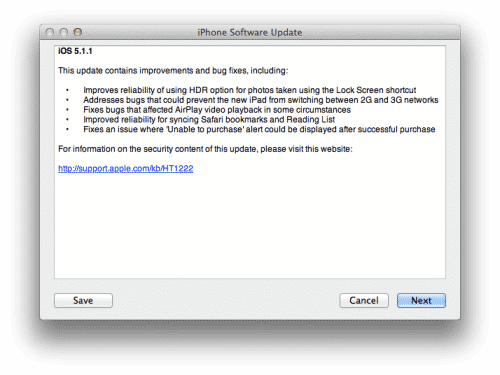

One of the main bugs that was a part of iOS 5.1 was that the users were having problems with the AirPlay video playback. This has fixed with iOS 5.1.1. Moreover, when iOS users would try to buy something, many of them were prompted with an error message which read ‘unable to purchase’ even if nothing was wrong with their purchase. Finally, another problem that the users were facing was that when they tried to switch from 2G to 3G or vice versa on their new iPad, they weren’t able to.

In iOS 5.1.1, all these bugs have been taken care of. Moreover, the update also comes with enhanced support for taking photos and using the HDR option through the Lock Screen shortcut. It also provides the users with the ability to Sync Safari bookmarks and Reading List in a far better and effective way.

If you wish to lay your hands on the new release, you can either go to General> Software Update to get it. Or you can browse to the links provided below:

For iPhone:
iOS 5.1.1 for iPhone 3GS

iOS 5.1.1 for iPhone 4 GSM

iOS 5.1.1 for iPhone 4 CDMA

iOS 5.1.1 for iPhone 4S

For iPad:
iOS 5.1.1 for iPad 1

iOS 5.1.1 for iPad 2 Wi-Fi

iOS 5.1.1 for iPad 3 Wi-Fi

iOS 5.1.1 for iPad 3 GSM

iOS 5.1.1 for iPad 3 CDMA

Source: Apple

Courtesy: CNET

Buy Cheapest Related Product From Amazon.com


Tech Blog Claims To Have Seen Prototype Of Apple HDTV

HTC One V Ready For Summer Release In US
You can also press the left/right arrow key on your keyboard to go to previous/next post
  On May 8, 2012(1 year, 0 months ago.)

Recent Search

Recent Tutorials

This tutorial will show how to use S.M.A.R.T. (Self Monitoring Analysis and Reporting Technology) to continuously collect information on health of your equipment.
In this tutorial I'll show you how you can easily protect yourself from any kind of security breaks that may occur through Java.
Today Apple enabled "Two Step Verification" for iCloud And Apple ID. But the process is not that simple. But no worry, here we have made a step by step tutorial.
Cant remember your iPhone passcode? Here I will show you some workaround on what to do and how to recover and restore for every possible scenario.
This tutorial will show you how to perform the Winapp2.ini installation inside CCleaner and how to use it under Windows operating system.
With app called AD Sound Recorder, you can record any stream that passes through your sound card or speakers and in this tutorial I will show you how to do that.
If you want to have Boxee app inside your Apple TV, in this tutorial we will show you how to install XBMC and Boxee using Windows on your Apple TV.
This tutorial will show you how to transfer PS3 Saved Game Files from your PC to your PS3 game console.
Adding videos from external sources such as internet, more specifically from YouTube, is a great solution to enhance a presentation; in this tutorial I will show you the procedure.
If you are one of new comers to Windows Phone 8, like me, in this tutorial I will walk you through the process to update your Windows Phone 8 device.
Close You Have To Login
User:
Pass:
Login With »Login With TwitterLogin With Facebook