website statistics

Samsung Presents Prototype Featuring Youm Flexible Display

During CES 2013, Samsung has unveiled the fruit of its work towards foldable display - Youm; powered by OLED technology.

When do you use Facebook?

View Results

Loading ... Loading ...
1 Star2 Stars3 Stars4 Stars5 Stars (Rated: 5.00/5)
Loading ... Loading ...

Samsung has been working on flexible displays for quite some time. Evidently, the notion that flexible form factors may be the future of displays has gained a lot of traction in the tech world. At the CES show, the company presented a prototype of a device featuring its flexible display, which is being called Youm.
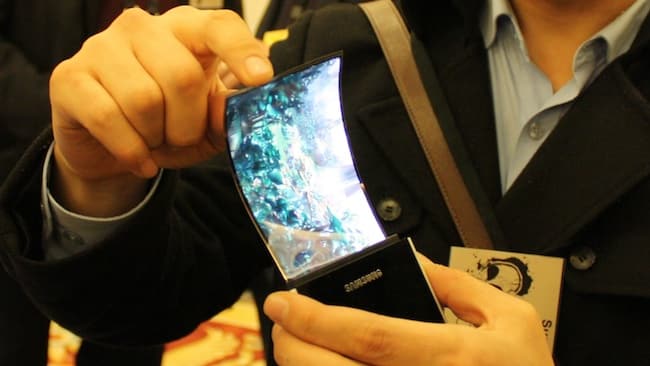

Samsung Youm

Youm has been created using the OLED display technology and looks truly exquisite. When slapped on top of a device, the true power of a foldable display such as Youm comes out.

Samsung’s prototype phone featuring Youm had the foldable display wrapped around the sides so that you could read updates on the ‘display’ on the side of the body. According to Samsung, Youm displays are bendable, foldable and rollable; by using these, other vendors can truly push the envelope on creating new devices.

It is indeed remarkable to see that finally, the tech arena is inching towards realizing the dream of foldable displays. Once the likes of Youm go mainstream, they have the potential to truly transform the tech world.

Imagine holding a phone that is a display all over. The foldable display can be extended all over the body of the device so as to give you a larger space to view your stuff. Such extended displays will also transform the world of user interface, prompting developers to think from a new angle altogether. Given the exciting and virtually infinite possibilities that spring from the use of foldable displays, we can’t wait for Youm to go mainstream!

Courtesy: CNET

Buy Cheapest Related Product From Amazon.com


Samsung Lifts The Curtains Off Exynos5 Octa 8-Core Processor

UltraStick E3331: World’s Smallest Data Card By Huawei
You can also press the left/right arrow key on your keyboard to go to previous/next post
  On January 10, 2013(4 months, 9 days ago.)

Recent Search

Recent Tutorials

This tutorial will show how to use S.M.A.R.T. (Self Monitoring Analysis and Reporting Technology) to continuously collect information on health of your equipment.
In this tutorial I'll show you how you can easily protect yourself from any kind of security breaks that may occur through Java.
Today Apple enabled "Two Step Verification" for iCloud And Apple ID. But the process is not that simple. But no worry, here we have made a step by step tutorial.
Cant remember your iPhone passcode? Here I will show you some workaround on what to do and how to recover and restore for every possible scenario.
This tutorial will show you how to perform the Winapp2.ini installation inside CCleaner and how to use it under Windows operating system.
With app called AD Sound Recorder, you can record any stream that passes through your sound card or speakers and in this tutorial I will show you how to do that.
If you want to have Boxee app inside your Apple TV, in this tutorial we will show you how to install XBMC and Boxee using Windows on your Apple TV.
This tutorial will show you how to transfer PS3 Saved Game Files from your PC to your PS3 game console.
Adding videos from external sources such as internet, more specifically from YouTube, is a great solution to enhance a presentation; in this tutorial I will show you the procedure.
If you are one of new comers to Windows Phone 8, like me, in this tutorial I will walk you through the process to update your Windows Phone 8 device.
Close You Have To Login
User:
Pass:
Login With »Login With TwitterLogin With Facebook