
If you are using PhotoFilter and you need to merge 2 or more images together its nothing easier thanks to arithmetic plugin which you can download for free. You can easily mix two pictures with PhotoFiltre which will give you a realistic overprint effect and in this tutorial I will show you how to do that.
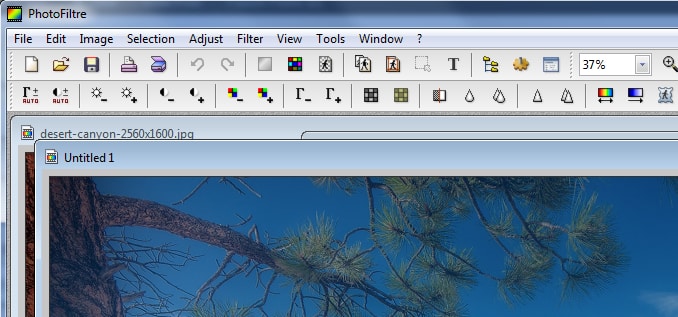
To get started follow steps below
Step 1: In your Web browser, click here to download the Arithmetic plugin for PhotoFilter
Step 2: Save the file on your hard drive and unpack it inside the PhotoFilter plugins folder
Step 3: By default that location of PhotoFilter plugin folder should be in here C:\Program Files\PhotoFiltre\Plugins\
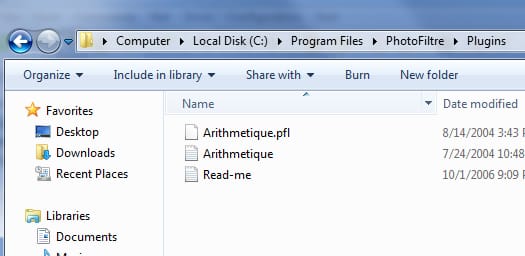
Step 4: Now that the plugin is installed, you can use it whenever you want in PhotoFiltre. Start PhotoFiltre and open the images you want to merge.
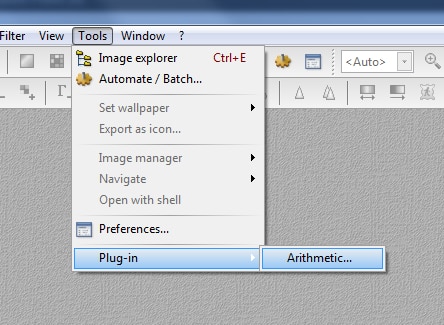
Step 5: Click on the Tools menu, then from dropdown menu choose Plug-in and then from submenu click on Arithmetic.
Step 6: In the control zone (white space), enter the command (I1 + I2) / 2 to merge two images. To merge 3, enter the command (I1 + I2 + I3) / 3, and so on for more images.
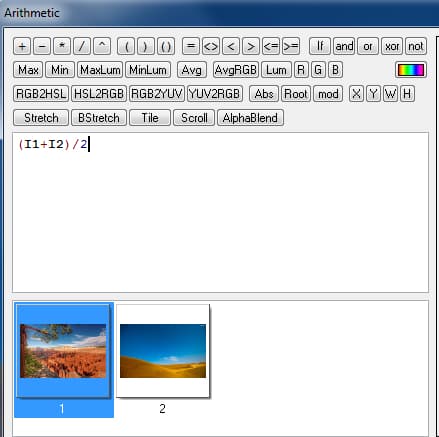
Step 7: Click Preview to preview the result.

Step 8: Once you are done with adjustments click the OK button
Step 9: A new image fusion of your other images is created. You can save your new image by going to File – > Save
Follow us on Twitter or be a Fan on Facebook or Subscribe On our News Feed for free to get regular update.
[ttjad keyword=”best-selling-gadget”]

![Read more about the article [Tutorial] How To Take Screenshot Of An Android Phone In Windows 7](https://thetechjournal.com/wp-content/uploads/2012/05/android-windows-logo.webp)
![Read more about the article [Tutorial] How To Root the Amazon Kindle Fire HD](https://thetechjournal.com/wp-content/uploads/2012/12/root-kindle-fire-hd7-ttj-logo.webp)
![Read more about the article [Tutorial] How To Replace Predictions By Punctuation Marks In The Android Jelly Bean Keyboard](https://thetechjournal.com/wp-content/uploads/2012/08/jelly-bean-puntion-marks-ttj-logo.webp)