
website statistics

HTC Confirms One X, One XL And One S Will Get Jelly Bean Update

HTC has confirmed through a statement that the One X, One XL and One S will be receiving Android 4.1 (Jelly Bean) updated. Check details for more info.

When do you use Facebook?

View Results

Loading ... Loading ...
1 Star2 Stars3 Stars4 Stars5 Stars (Rate This)
Loading ... Loading ...

When Google released its latest Android version 4.1 called Jelly Bean then major smartphone intended to update their devices to this latest version. Today, HTC has confirmed through a statement that the HTC One X, One XL and One S will be receiving update to Android 4.1 (Jelly Bean). But HTC did not mention any specific date for update.
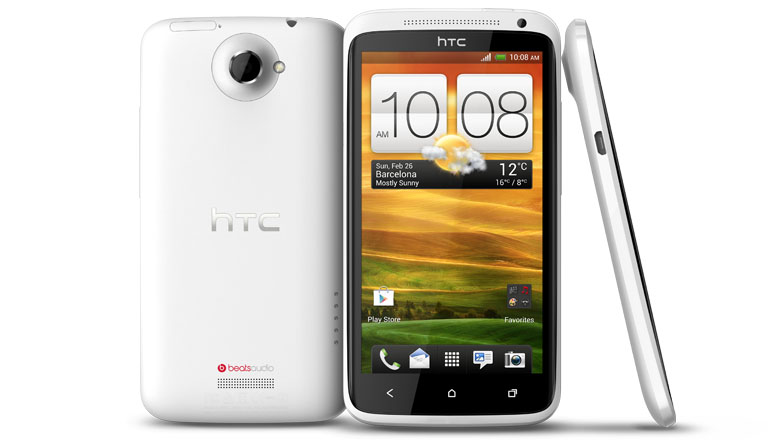

HTC One X, Image credit: TTJ

Here is the HTC’s full statement about the Jelly Bean update:

“We know HTC fans are excited to get their hands on Google’s latest version of Android. At this point in time, we can confirm that we have plans to upgrade our HTC One X, HTC One XL and HTC One S to Jelly Bean. Please stay tuned for more updates regarding device upgrades, timing and other details about HTC and Jelly Bean.”

As it does not say anything about the date or even in which quarter the update could be rolled out, so it seems its not very close. Also we cant find anything from the carrier about this update. Mostly those type of official update should be rolled out by individual carrier, only the rooted device could use custom room and update to 4.1 Jelly Bean unofficially. But after all it brings a breeze of hope for all existing HTC One Series user. Another things to note here, HTC One V is missing from the statement, this means the low profile One V will not receive the Android 4.1 Jelly Bean Update.

And official update should be OTB(Over The Air). So stay tuned with TheTechJournal, we will try to bring the news of availability ASAP.

Source: Engadget

Buy Cheapest Related Product From Amazon.com


WebApps To Be Featured In Next Release Of Ubuntu Desktop

Google AdSense Reporting System Went Down For A While
You can also press the left/right arrow key on your keyboard to go to previous/next post
  On July 20, 2012(11 months, 4 days ago.)

Recent Search

Recent Tutorials

This tutorial will show how to use S.M.A.R.T. (Self Monitoring Analysis and Reporting Technology) to continuously collect information on health of your equipment.
In this tutorial I'll show you how you can easily protect yourself from any kind of security breaks that may occur through Java.
Today Apple enabled "Two Step Verification" for iCloud And Apple ID. But the process is not that simple. But no worry, here we have made a step by step tutorial.
Cant remember your iPhone passcode? Here I will show you some workaround on what to do and how to recover and restore for every possible scenario.
This tutorial will show you how to perform the Winapp2.ini installation inside CCleaner and how to use it under Windows operating system.
With app called AD Sound Recorder, you can record any stream that passes through your sound card or speakers and in this tutorial I will show you how to do that.
If you want to have Boxee app inside your Apple TV, in this tutorial we will show you how to install XBMC and Boxee using Windows on your Apple TV.
This tutorial will show you how to transfer PS3 Saved Game Files from your PC to your PS3 game console.
Adding videos from external sources such as internet, more specifically from YouTube, is a great solution to enhance a presentation; in this tutorial I will show you the procedure.
If you are one of new comers to Windows Phone 8, like me, in this tutorial I will walk you through the process to update your Windows Phone 8 device.
Close You Have To Login
User:
Pass:
Login With »Login With TwitterLogin With Facebook