website statistics

Gateway AIO ZX4951-51 All-in-One Touch Screen Desktop Computer

When do you use Facebook?

View Results

Loading ... Loading ...
1 Star2 Stars3 Stars4 Stars5 Stars (Rate This)
Loading ... Loading ...

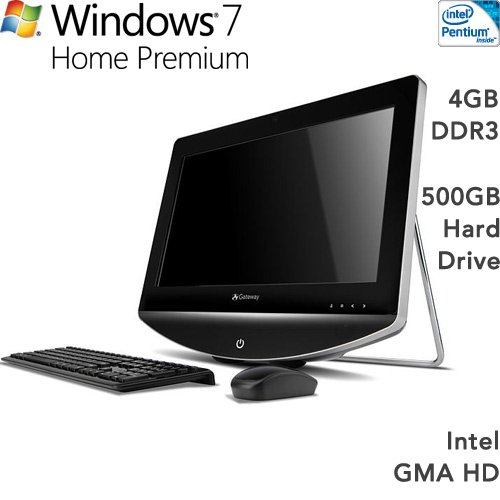
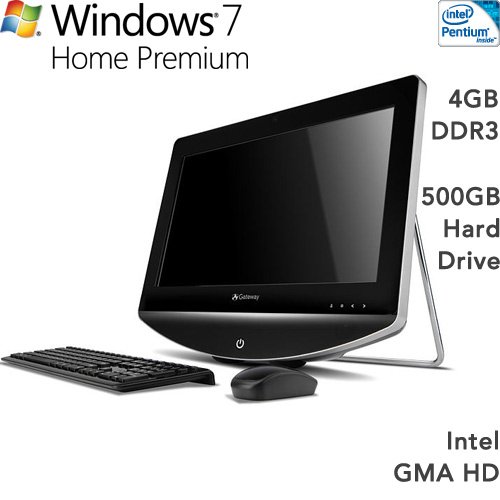
Experience the new look, new size, new processing and new power of the 21.5″ Gateway AIO ZX4951-51 Factory Refurbished All-in-One Touch Screen Desktop Computer multigesture touch screen all-in-one. Like every member of our Gateway One line, our ZX4951-51 Desktop is outfitted with Genuine Windows 7 Home Premium, easy-to-use multigesture touch technology, and great tools for entertainment and media sharing. Features include Intel Pentium Processor G6950 2.8GHz, 21.5″ HD Widescreen UltrabrightTM LCD (1920 x 1080 resolution) with Multi-Touch Capable Touch Screen , Microsoft Windows 7 Home Premium 64-bit ,  4GB DDR3 Memory,  500GB Hard Disk Drive ,  Wireless Keyboard & Mouse. This is an Amazon’s product review. Checkout more details bellow.
http://cdn.thetechjournal.com/wp-content/uploads/images/1109/1316323032-gateway-aio-zx495151-allinone-touch-screen-desktop-computer-1.jpg

Product Features

  • 21.5″ HD Widescreen UltrabrightTM LCD (1920 x 1080 resolution) with Multi-Touch Capable Touch Screen Solution
  • Intel Pentium Processor G6950 (2.8GHz, 3MB Total Cache)
  • Intel H57 Express Chipset/Integrated Intel HD Graphics
  • 4GB DDR3 8GB Maximum /500GB SATA, 7200RPM
  • 4X Blu-ray Disc /802.11b/g/n Wi-Fi CERTIFIED with Wireless Keyboard & Mouse

Processor, Memory, and Motherboard

  • Hardware Platform: PC
  • Processor: 2.8 Pentium
  • Number of Processors: 1
  • RAM: 4 GB
  • RAM Type: DDR3 SDRAM

Hard Drive

  • Size: 500 GB
  • Type: Serial ATA

Wireless

  • Wireless Type: 802.11bgn

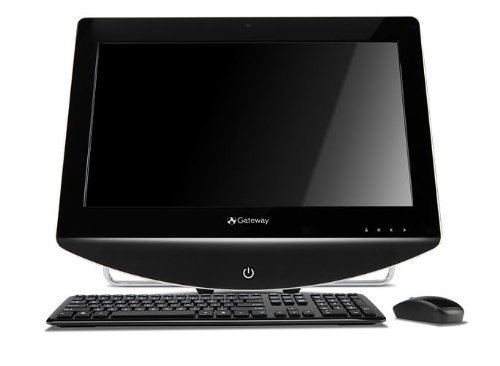
But this ZX entry also boasts a stepped-up 2.8GHz dual-core Intel Pentium Processor G6950, a 21.5″ Full HD Ultrabright widescreen delivering 1920 x 1080 resolution, 4GB of cutting-edge DDR3 memory, a 500GB hard drive, Intel HD graphics and an impressive 220W power supply. Its new slim design fits any room decor, the integrated 5W stereo speaker system provides rich sound, and 802.11b/g/n wireless and the wireless keyboard and mouse keep everything clutter free. Plus, Gateway’s Touch Gadgets let you manage media with a tap, and Blu-ray is at the ready. Your digital world comes under your fingertip control with the Gateway ZX4951-51 all-in-one.
http://cdn.thetechjournal.com/wp-content/uploads/images/1109/1316323032-gateway-aio-zx495151-allinone-touch-screen-desktop-computer-2.jpg
http://cdn.thetechjournal.com/wp-content/uploads/images/1109/1316323032-gateway-aio-zx495151-allinone-touch-screen-desktop-computer-3.jpg
http://cdn.thetechjournal.com/wp-content/uploads/images/1109/1316323032-gateway-aio-zx495151-allinone-touch-screen-desktop-computer-4.jpg

That’s all about the Gateway AIO ZX4951-51. This All-in-One Touch Screen Desktop Computer is available in Amazon.com. You can directly order or buy from here.

Source

Buy Cheapest Related Product From Amazon.com


Samsung Wave 3 Coming On This October

HP Envy 100 e-All-in-One D410a Printer
You can also press the left/right arrow key on your keyboard to go to previous/next post
  On September 18, 2011(1 year, 8 months ago.)

Recent Search

Recent Tutorials

This tutorial will show how to use S.M.A.R.T. (Self Monitoring Analysis and Reporting Technology) to continuously collect information on health of your equipment.
In this tutorial I'll show you how you can easily protect yourself from any kind of security breaks that may occur through Java.
Today Apple enabled "Two Step Verification" for iCloud And Apple ID. But the process is not that simple. But no worry, here we have made a step by step tutorial.
Cant remember your iPhone passcode? Here I will show you some workaround on what to do and how to recover and restore for every possible scenario.
This tutorial will show you how to perform the Winapp2.ini installation inside CCleaner and how to use it under Windows operating system.
With app called AD Sound Recorder, you can record any stream that passes through your sound card or speakers and in this tutorial I will show you how to do that.
If you want to have Boxee app inside your Apple TV, in this tutorial we will show you how to install XBMC and Boxee using Windows on your Apple TV.
This tutorial will show you how to transfer PS3 Saved Game Files from your PC to your PS3 game console.
Adding videos from external sources such as internet, more specifically from YouTube, is a great solution to enhance a presentation; in this tutorial I will show you the procedure.
If you are one of new comers to Windows Phone 8, like me, in this tutorial I will walk you through the process to update your Windows Phone 8 device.
Close You Have To Login
User:
Pass:
Login With »Login With TwitterLogin With Facebook