website statistics

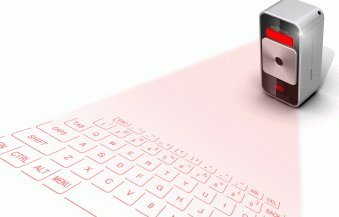
Celluon Magic Cube Laser Projection Keyboard And Touchpad

When do you use Facebook?

View Results

Loading ... Loading ...
1 Star2 Stars3 Stars4 Stars5 Stars (Rate This)
Loading ... Loading ...

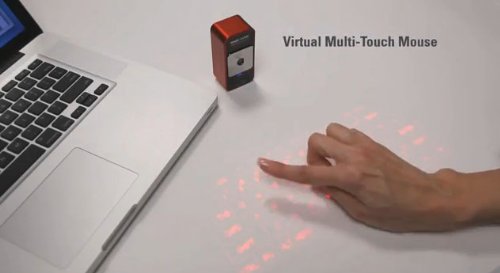
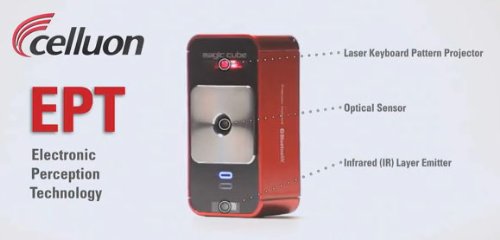
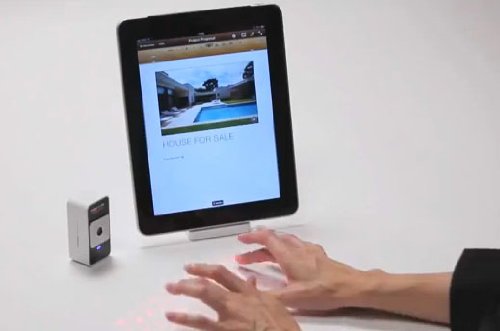
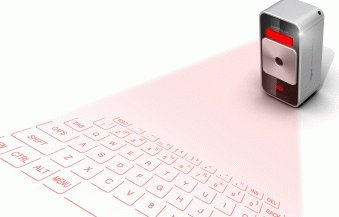
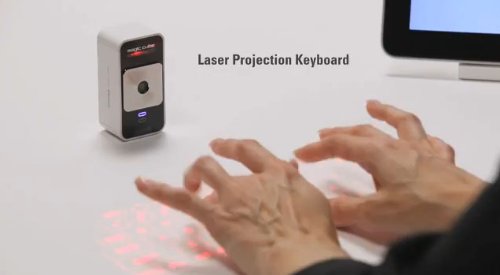
The Celluon Magic Cube turns any table or surface into a virtual keyboard or multi-touch mouse with its amazing laser projection and motion detection technology. The Magic Cube is smaller than a pack of cards – easy to use, and a great travel companion projection keyboard for mobile, tablet, and laptop devices. This is an Amazon’s product review. Checkout more details bellow.
http://cdn.thetechjournal.com/wp-content/uploads/images/1201/1327028209-celluon-magic-cube-laser-projection-keyboard-and-touchpad-1.jpg

Product Features

  • Projects a virtual laser keyboard onto any table and detects keystrokes
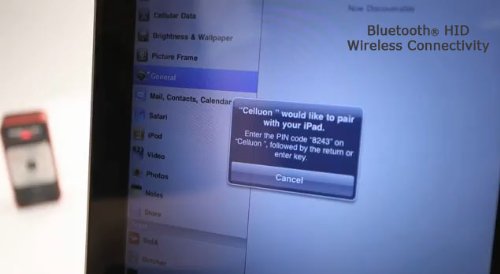
  • Acts as a standard keyboard via Bluetooth (wireless) or USB (wired)–no drivers needed
  • Great companion wireless keyboard for tablets and touch phones. Small. Light. Charges via USB
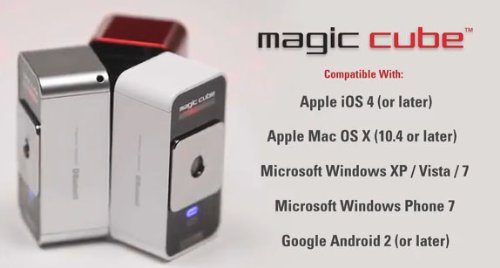
  • Compatible with Win XP SP2+, Mac 10.4+, iOS 4.3.5+ (iPhone/iPod/iPad), etc
  • Mouse mode projects a standard two-finger multi-touch pad (Windows 7 only. Not iOS capable)

Technical Details

  • Brand Name: Celluon
  • Model: CellMC1
  • Item Package Quantity: 1

Features

The Magic Cube appears to your computer or mobile as a standard keyboard or touchpad, communicating via USB wired use or Bluetooth for wireless use. Power off/on the Magic Cube to switch between wired use with USB connected and wireless when not. No drivers are needed. Runs for up to 2 hours of continuous typing when wireless. Charges when connected via wired USB.

Typing

The experience of typing on a projected keyboard is different than a standard keyboard. Projects a condensed QWERTY layout. The Magic Cube detects movement just above the surface of each projected key. Practice using included tips is recommended. Devices with automatic keystroke correction, like the iPad, iPhone, and iPod improve accuracy significantly.

Compatibility

Keyboard function compatible with any operating system supporting the USB HID class or Bluetooth HID profile. Multi-touch mouse mode for Windows 7+ only. Specific compatible systems include Win XP SP2+, Vista, Win7, Mac 10.4+, iOS 4.3.5+ (iPhone 3GS and later, iPod Touch 2nd generation and later, all versions of iPad), Linux and others supporting standard Bluetooth HID keyboards. Android 2.0+ compatibility limited to phones and devices that include Bluetooth keyboard support – please verify with your device maker before purchase. Not for use with Kindle devices — they do not support Bluetooth or USB keyboards.

In the Box

Celluon Magic Cube, internal Li-ion battery, USB 2.0 cable for charging and wired use, Manual/Quick Start Guide (English).
http://cdn.thetechjournal.com/wp-content/uploads/images/1201/1327028209-celluon-magic-cube-laser-projection-keyboard-and-touchpad-2.jpg
http://cdn.thetechjournal.com/wp-content/uploads/images/1201/1327028209-celluon-magic-cube-laser-projection-keyboard-and-touchpad-3.jpg
http://cdn.thetechjournal.com/wp-content/uploads/images/1201/1327028209-celluon-magic-cube-laser-projection-keyboard-and-touchpad-4.jpg
http://cdn.thetechjournal.com/wp-content/uploads/images/1201/1327028209-celluon-magic-cube-laser-projection-keyboard-and-touchpad-5.jpg
http://cdn.thetechjournal.com/wp-content/uploads/images/1201/1327028209-celluon-magic-cube-laser-projection-keyboard-and-touchpad-6.jpg
http://cdn.thetechjournal.com/wp-content/uploads/images/1201/1327028209-celluon-magic-cube-laser-projection-keyboard-and-touchpad-7.jpg
http://cdn.thetechjournal.com/wp-content/uploads/images/1201/1327028209-celluon-magic-cube-laser-projection-keyboard-and-touchpad-8.jpg

That’s all about the Celluon Magic Cube Laser Projection Keyboard And Touchpad. This Laser Projection Keyboard is available in Amazon.com. You can directly order or buy from here.
Source

Buy Cheapest Related Product From Amazon.com


TinyTERM ITX 3270 $39.99 App For iPad FREE Now

Eagle Eye Full – FREE Premium Game For iPhone
You can also press the left/right arrow key on your keyboard to go to previous/next post
  On January 20, 2012(1 year, 4 months ago.)

Recent Products

Buy Now | Compare  
Buy Now | Compare  
Compare  
  • http://www.zimbio.com/Bodybuilding/articles/pWs7wa4jGVW/Ageless+Male+Supplements+Review+Ageless+male Ageless Male Supplement

    I have a Dell Studio 1555 laptop, which I use for work. I’m getting
    tired of typing, then accidentally disturbing my touchpad and moving the
    cursor or selecting something by accident.


Recent Search

Recent Tutorials

This tutorial will show how to use S.M.A.R.T. (Self Monitoring Analysis and Reporting Technology) to continuously collect information on health of your equipment.
In this tutorial I'll show you how you can easily protect yourself from any kind of security breaks that may occur through Java.
Today Apple enabled "Two Step Verification" for iCloud And Apple ID. But the process is not that simple. But no worry, here we have made a step by step tutorial.
Cant remember your iPhone passcode? Here I will show you some workaround on what to do and how to recover and restore for every possible scenario.
This tutorial will show you how to perform the Winapp2.ini installation inside CCleaner and how to use it under Windows operating system.
With app called AD Sound Recorder, you can record any stream that passes through your sound card or speakers and in this tutorial I will show you how to do that.
If you want to have Boxee app inside your Apple TV, in this tutorial we will show you how to install XBMC and Boxee using Windows on your Apple TV.
This tutorial will show you how to transfer PS3 Saved Game Files from your PC to your PS3 game console.
Adding videos from external sources such as internet, more specifically from YouTube, is a great solution to enhance a presentation; in this tutorial I will show you the procedure.
If you are one of new comers to Windows Phone 8, like me, in this tutorial I will walk you through the process to update your Windows Phone 8 device.
Close You Have To Login
User:
Pass:
Login With »Login With TwitterLogin With Facebook