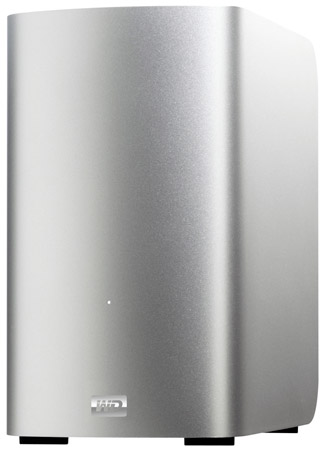
My Book Thunderbolt Duo is a name of the external hard drive and recently it has been released by Western Digital (WD). My Book Thunderbolt Duo dual-drive storage system is made by Thunderbolt technology and this technology delivers the optimum fusion of performance. The device is now available in 4 TB (2 x 2 TB) and 6 TB (2 x 3 TB) capacities.
Overview
My Book Thunderbolt Duo, dual-drive storage system featuring revolutionary Thunderbolt technology, sets new standards for data transfer speeds and workflow flexibility in high-capacity storage.
My Book Thunderbolt Duo 4TB Dual-Drive Storage is available at JR for $549
Thunderbolt technology
Performance that keeps up with your creativity
Transfer a full-length HD movie in under 30 seconds or thousands of MP3 songs in mere minutes. Thunderbolt™ I/O technology gives you two channels on the same connector with 10 Gb/s of throughput in both directions. Data moves to and from drives up to 20 times faster than with USB 2.0 and up to 12 times faster than with FireWire 800, providing more than enough bandwidth to daisy-chain multiple high-speed drives without using a hub or switch.
The bandwidth you need for maximum data throughput
Connect your Thunderbolt technology-enabled external hard drives, media players, HD displays, media capture and editing systems through a Thunderbolt chain while maintaining maximum throughput. Then enjoy nearly unlimited flexibility and performance in your creative life.
One of the most advanced cables ever
Reduce clutter while increasing your productivity. Thunderbolt technology supports daisy chaining multiple devices through a single Thunderbolt connector so you can multi-task at maximum speed without the need for a hub or switch.
Features
- Move data at unprecedented speeds – Finally, a drive that can keep up with your creativity. Video editors and other Digital media professionals can do more work in less time with the ground-breaking data transfer speed of the Thunderbolt ports on My Book Thunderbolt Duo. It offers the indisputably fastest way to get information to and from your external drive.
- Dual drive RAID storage system – User selectable RAID or JBOD modes. When set to RAID 0 (striping), My Book Thunderbolt Duo offers the performance you need when designing or Editing graphics-intensive media files. When set to RAID 1 (mirroring), this drive provides double safe data protection by automatically generating a duplicate copy of your data. Set to JBOD (Just a Bunch Of Disks) to use as two individual drives and select between HFS+J or exFAT per disk. Ideal for running Windows OS on a Mac.
- Dual Thunderbolt ports enhance workflow efficiency – Daisy chain up to seven devices or peripherals using the two Thunderbolt ports to achieve maximum workflow efficiency and productivity.
- High-speed multi-tasking – The revolutionary bi-directional Thunderbolt technology delivers unmatched speed for multi-tasking while video editing, 3D rendering and completing other graphics-intensive projects.
- User-serviceable – Want to replace a drive? Simply open the case and exchange the existing drive – no tools needed. If you fill up a drive, you can simply remove it and replace it with a fresh drive and begin saving even more of your creative life.
- WD Drive Utilities – Register your drive, run diagnostics, manage RAID or JBOD modes and more, using WD Drive Utilities.
- Cool operation – Equipped with WD drives, this system is designed to run cool. Lower operating temperatures extend the life of the drive and improve data reliability.
Specifications
- Data transfer rate: >250 MB/s
- Configuration: Configurable for maximum speed (RAID 0), data protection/mirror mode (RAID 1) or use the drives individually in JBOD mode.
- Connection: 2 x Thunderbolt.
- AC Input voltage: 100 – 240V.
- Compatibility: Formatted for Mac OS X Lion or Snow Leopard.
- System Requirements: Computer with Thunderbolt connector, Mac OS x 10.6.8 or higher, Thunderbolt cable (must be purchased separately).
- Dimensions (HxDxW): 6.5 x 6.2 x 3.9 in.
- Weight: 4.73 lbs.
My Book Thunderbolt Duo is also available at Western Digital for $599.99 (4 TB) and $699.99 (6 TB).
Source: Western Digital
[ttjad keyword=”portable-hard-drive”]