Apple has begun selling Mac OS X Lion on flash USB sticks in its retail stores and the US$69 drives contain a full install of the operating system and look much like the recovery drives that ship with MacBook Airs. The new OS X Lion has introduced a lot of improvements to Mac and this solution is specific to users who cannot or prefer not to download the new update…………..
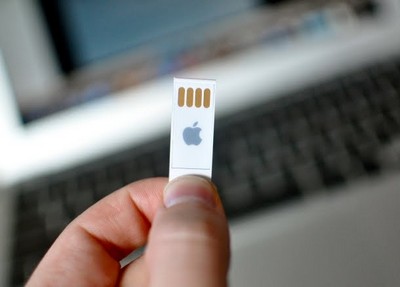
Apple is making good on its promise of delivering OS X Lion on USB keys for whomever cannot install the new operating system using the Mac App Store. In June, soon after WWDC 2011 had kicked off, Apple issued an official report confirming that Lion would be made available the next month. In the same announcement, the company also confirmed that Lion would be made on USB thumb drives in August. “Users who do not have broadband access at home, work or school can download Lion at Apple retail stores and later this August, Lion will be made available on a USB thumb drive through the Apple Store (www.apple.com) for $69 (US),” the technology mammoth confirmed in June. Now, several Apple customers are confirming that Steve Jobs’ boys are sending in the goods. There has been some debate as to whether Apple’s OS X Lion recovery sticks work on a computer that doesn’t have Snow Leopard installed (OS X 10.6 being a requirement for installing OS X 10.7). First off, the price is the biggest giveaway. Lion costs $29.99 as an upgrade from Snow Leopard. Pricing the USB key more than double ($69.99) wouldn’t seem the proper way to go, even if the customer does get good quality physical media instead of a lousy disc that’s prone to scratching and breaking. Next, the instructions on the back clearly state “restart your computer while holding down the C key until you see the Recovery window”. This doesn’t have anything to do with Snow Leopard whatsoever, meaning the Lion USB drive can be used at all times on any machine, so long as its hardware supports the OS. Finally, the purpose of these Lion USB sticks is to be able to install the OS not only on computers that lack an internet connection, but also on those that lack an optical drive.
[ttjad keyword=”mac”]