website statistics

‘Invisible’ Keyboard Coming Soon From Snapkeys

A representative of Snapkeys named Alexandra Rabinovich said, they are hopping to have a downloadable version ready for Android devices by the summer.

When do you use Facebook?

View Results

Loading ... Loading ...
1 Star2 Stars3 Stars4 Stars5 Stars (Rate This)
Loading ... Loading ...

Snapkeys has confirmed that the Snapkeys 2i ’invisible’ keyboard is coming soon. A representative of Snapkeys named Alexandra Rabinovich said that they are hoping to have a downloadable version ready for Android devices by the summer. Users can easily type on touchscreen devices with Snapkeys 2i because of the predictive text technology used inside. Snapkeys demanded that within a short time users will learn to type faster with Snapkeys 2i compared to a traditional QWERTY keyboard.
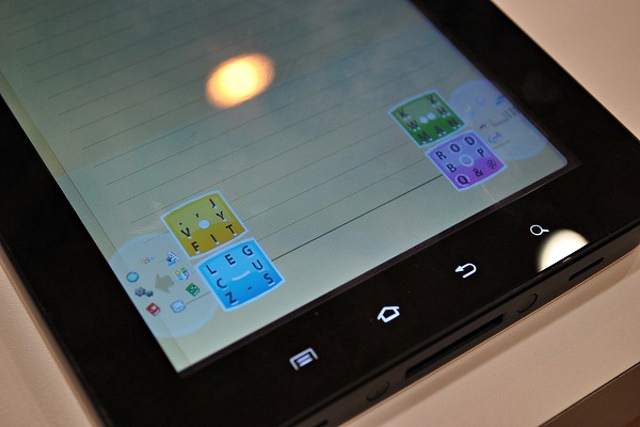

Everybody has an experience to use T9 method. This keyboard works like T9, but with four buttons only. All characters are distributes under the four buttons. While typing it guesses the best word you are trying to type and helps complete the word. The only problem is that the users have to cross a steep learning curve before being expert on the system. But, once they become habituated in the new keyboard, they can hide the four buttons and type without any problem.

Newman of Techland said “I can see how Snapkeys 2i could become effortless over time, but it does have some unique stumbling blocks.” He also added “To enter a particular letter, you must swipe a thumb across the button in the direction of that letter, so typing proper nouns or other unrecognized words can take a while. You must also make swiping motions to enter numbers and special characters. In those cases, it’d be easier to have a traditional keyboard.”

However, Snapkeys has showed some promises by breaking a record of the fastest SMS typing time. A typist has typed out the official phrase in 24.94 seconds. (A U.K. woman typed the same message using the Swype keyboard in just under 26 seconds in 2010.)

Snapkeys is offering a demo app for iPhone, Windows and Android that lets users try out the new keyboard.

Source: Techland

Buy Cheapest Related Product From Amazon.com


New Technology To Charge Your Mobile Phone With Your Shoes

Audi Introduces Electronic E-Bike That Could Be Controlled With A Smartphone
You can also press the left/right arrow key on your keyboard to go to previous/next post
  On May 13, 2012(1 year, 0 months ago.)

Recent Search

Recent Tutorials

This tutorial will show how to use S.M.A.R.T. (Self Monitoring Analysis and Reporting Technology) to continuously collect information on health of your equipment.
In this tutorial I'll show you how you can easily protect yourself from any kind of security breaks that may occur through Java.
Today Apple enabled "Two Step Verification" for iCloud And Apple ID. But the process is not that simple. But no worry, here we have made a step by step tutorial.
Cant remember your iPhone passcode? Here I will show you some workaround on what to do and how to recover and restore for every possible scenario.
This tutorial will show you how to perform the Winapp2.ini installation inside CCleaner and how to use it under Windows operating system.
With app called AD Sound Recorder, you can record any stream that passes through your sound card or speakers and in this tutorial I will show you how to do that.
If you want to have Boxee app inside your Apple TV, in this tutorial we will show you how to install XBMC and Boxee using Windows on your Apple TV.
This tutorial will show you how to transfer PS3 Saved Game Files from your PC to your PS3 game console.
Adding videos from external sources such as internet, more specifically from YouTube, is a great solution to enhance a presentation; in this tutorial I will show you the procedure.
If you are one of new comers to Windows Phone 8, like me, in this tutorial I will walk you through the process to update your Windows Phone 8 device.
Close You Have To Login
User:
Pass:
Login With »Login With TwitterLogin With Facebook