website statistics

Metro-Styled Google Chrome For Windows 8 Released

When do you use Facebook?

View Results

Loading ... Loading ...
1 Star2 Stars3 Stars4 Stars5 Stars (Rate This)
Loading ... Loading ...

Microsoft is nearing the launch of its much-anticipated and promising Windows 8. And in anticipation of this launch, hardware vendors as well as software developers are gearing up to ship out their relevant products. While we do  know that Mozilla team has all plans of handing out a fully-functional Firefox browser for Windows 8, it now appears that Google has also hit the bandwagon.
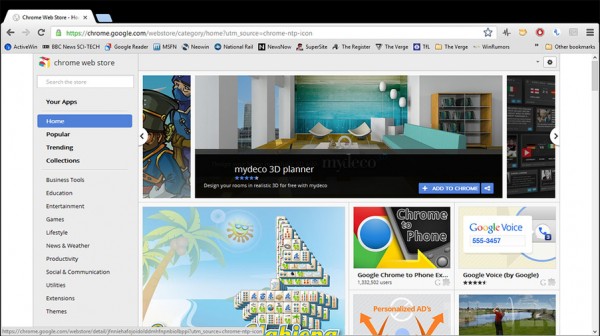

The dilemma is that although Google Chrome is the most used browser now, Windows remains the most widely OIS. And if Google wishes to maintain its browser supremacy, it will have to prepare for the Windows 8 launch sooner or later and release a Chrome version that will suit Windows 8.

It now seems that the search giant is well aware of this and has already released a Metro styled version of Chrome for Windows 8. The version can be used by downloading it on a machine running Windows 8 Release Preview and then installing the latest dev channel release from Google. Moreover, you will also require to make it the default browser in Windows 8.

The Metro version of the browser is good but not very different from its regular version. It offers add-ons and sync and also provides support for Adobe Flash content. The app is not fully Metro yet, in that it doesn’t yet support forward and backwards swipe motions on touchscreen devices. However, top-to-bottom swipe motions are supported.

The browser also supports the sharing contract feature of Windows 8, allowing the users to share web pages with various apps. In looks as well as in functionality, the app is good, though not extra-ordinary. We can hope that Google may release a better version once Windows 8 is finally here.

Source: Chrome

News/ Image Courtesy: The Verge

Buy Cheapest Related Product From Amazon.com


Seagate ‘Backup Plus’ Storage Drives Integrate Social Media

Guided Access: Apple Introduces New Feature In iOS 6
You can also press the left/right arrow key on your keyboard to go to previous/next post
  On June 12, 2012(11 months, 10 days ago.)

Recent Search

Recent Tutorials

This tutorial will show how to use S.M.A.R.T. (Self Monitoring Analysis and Reporting Technology) to continuously collect information on health of your equipment.
In this tutorial I'll show you how you can easily protect yourself from any kind of security breaks that may occur through Java.
Today Apple enabled "Two Step Verification" for iCloud And Apple ID. But the process is not that simple. But no worry, here we have made a step by step tutorial.
Cant remember your iPhone passcode? Here I will show you some workaround on what to do and how to recover and restore for every possible scenario.
This tutorial will show you how to perform the Winapp2.ini installation inside CCleaner and how to use it under Windows operating system.
With app called AD Sound Recorder, you can record any stream that passes through your sound card or speakers and in this tutorial I will show you how to do that.
If you want to have Boxee app inside your Apple TV, in this tutorial we will show you how to install XBMC and Boxee using Windows on your Apple TV.
This tutorial will show you how to transfer PS3 Saved Game Files from your PC to your PS3 game console.
Adding videos from external sources such as internet, more specifically from YouTube, is a great solution to enhance a presentation; in this tutorial I will show you the procedure.
If you are one of new comers to Windows Phone 8, like me, in this tutorial I will walk you through the process to update your Windows Phone 8 device.
Close You Have To Login
User:
Pass:
Login With »Login With TwitterLogin With Facebook