
iOS 4.3 included Apple’s new WiFi Tethering Option, that was a great feature “Personal Hotspot”. But, this iOS 4.3 Personal Hotspot depends on the Carrier which you choose the best like Verizon or AT&T and it might come with a monthly fee, unless you get yourself TetherMe (Cydia Tweak).
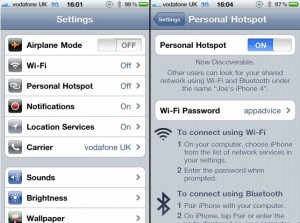
TetherMe allows users all around the World to Activate USB & Bluetooth Tethering. To activate iOS 4.3 Personal Hotspot through TetherMe, you have to Jailbreak iOS 4.3 first.
TetherMe will be available to purchase from Cydia at $0.99 and your iPhone, iPod Touch or iPad will allow you to use the native Feature as if you were paying for it, and if you are on AT&T or Verizon Carrier, they can charge you $20 per Month for this iOS 4.3 Personal Hotspot (WiFi), but it will be a good deal, and once Activated iOS 4.3 Personal Hotspot Feature using TetherMe Cydia Tweak.
You can purchase TetherMe for iPhone 4 from Cydia Store for $0.99.
Thanks
Click On Ads To Buy iPhones Accessories

![Update iPhone, iPad, iPod touch to iOS 4.3 Beta Without Developer Account[How To]](https://thetechjournal.com/wp-content/uploads/2011/01/ios43-thumb-450x320_450x320-211x150.jpg)
will TetherMe works on 3gs, be able to active personal hotspot?
its brick my iphone 3gs
Dont install it…its crupted imei my 3gs
Att detected I am using tetherme
I am using theterme but really I don’t need this app because I have mywi
Mywi has trouble after installation of theterme. hotspot via wifi is not posible
I only can cannect via USB
the soln is that u have to enter the apn settings to internet tether too. and it will automaticaly will be displayed after 1 or 2 day .
i also got personal hotspot feature after 2 days of entering settings
Amazing write-up! This could aid plenty of people find out more about this particular issue. Are you keen to integrate video clips coupled with these? It would absolutely help out. Your conclusion was spot on and thanks to you; I probably won’t have to describe everything to my pals. I can simply direct them here!