
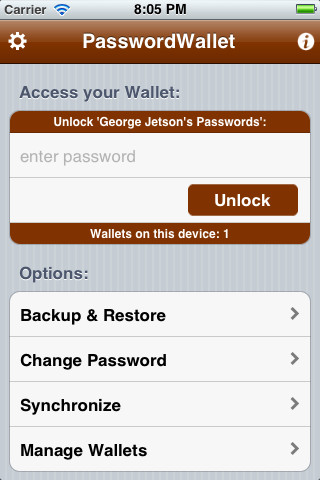
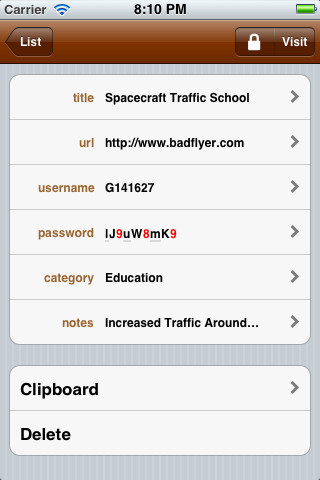
PasswordWallet is a very powerful and secure Password Manager App for iOS devices. Selznick Scientific Software, LLC developed this premium app supports iPhone, iPod touch, and iPad. With this app you can backup, restore and view your data with any computer. Now you can download this app for FREE from iTunes store under Utilities category and save $4.99.

iTunes Link: http://itunes.apple.com/app/passwordwallet-password-manager/id295999660?mt=8
Overview:
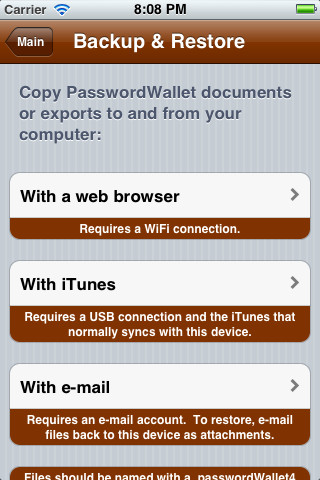
A very small sized app can run in any iOS device. I have just started using this app in my iPhone. PasswordWallet lets you easily backup, restore and view your data with any computer with no special software even iTunes also not required! You do not have to pay anything for the services! A great safety net. Synchronize your data with PasswordWallet for Mac and Windows: includes a 25% off coupon for Mac and Windows versions. Very interesting app Game , so simple to play, nice graphics user interface.
INCLUDES:
✶ Easy Backup and Restore with any computer without special software!
✶ A COUPON for 25% off the Mac OS X and Windows versions of PasswordWallet!
✶ Fully encrypted exports that you can open on any computer with no special software.
✶ Free utility to retrieve lost data from iTunes backups if your phone is lost or stolen.
✶ Easy sync between Macs and Windows versions of PasswordWallet.
If you’re experiencing problems, please drop us a log with [Main]->[Info]->[Log]->[Submit] from inside the software, and then push the e-mail button to tell us what went wrong!
DESCRIPTION:
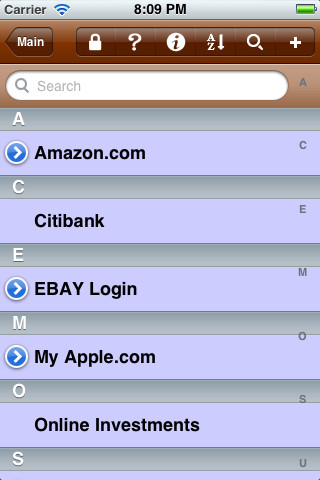
✶ PasswordWallet stores ALL of your passwords and other private information in one, convenient location – because password confusion just isn’t necessary!
✶ Use the auto-typing feature to LOG IN to your favorite web sites. You can even edit entries while navigating a site. PasswordWallet encrypts your passwords, usernames, PIN numbers, combinations and personal notes with extremely fast Blowfish encryption.
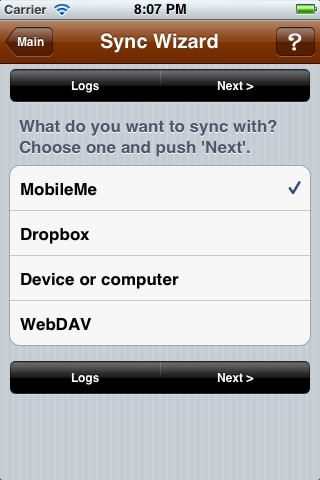
✶ Users can seamlessly synchronize multiple PasswordWallet files with multiple computers and move between them easily.
✶ Synchronization is secured with (1) Pairing your Mac with your iPhone and (2) Keeping all data encrypted during synchronization.
✶ Pro Tip: Rotate all views for larger font sizes!
What’s New in Version 4.7.0
PasswordWallet 4.7.0 for iPhone now includes:
✶ Lots of usability enhancements.
✶ Added backup reminder!
✶ New synchronization options to “make all other device data look like this one”, no matter how many devices you have.
✶ Now trying harder to wake up synchronization server after the device wakes up from sleep.
✶ More helpful logging.
✶ PasswordWallet is now available in Chinese!
Requirements: Compatible with iPhone 3GS, iPhone 4, iPhone 4S, iPod touch (3rd generation), iPod touch (4th generation) and iPad. Requires iOS 4.0 or later. This app is totally free to download from iTunes.
Current Version: 4.7.0
Size: 3.7 MB
[ttjad keyword=”iphone”]



Doesn’t seem to be free here on the West Coast of the US. I even tried several hours ago soon after the article was posted.
Doesn’t seem to be free, still $4.99.