
The iPhone Dev Teams have released the latest version of Redsn0w to jailbreak the iPhone 4 on iOS 6. This tool will allow users to complete a tethered jailbreak — meaning that if your iPhone 4 loses power, you must re-connect and boot via Redsn0w. This jailbreak will work with any A4 device, including the iPod touch fourth generation, iPhone 3GS, iPhone 4, and original iPad.
Continuing on with the iPhone 4 jailbreak, follow the steps below:
Step 1: Click here to download Redsn0w for Windows; and here to download the iOS 6 IPSW for your specific device. Save them somewhere you will remember, such as your desktop. (Required)
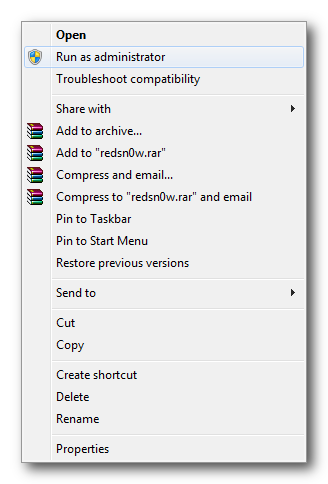
Step 2: Find the Redsn0w icon, right-click, and select Run as administrator from the pop-up menu.
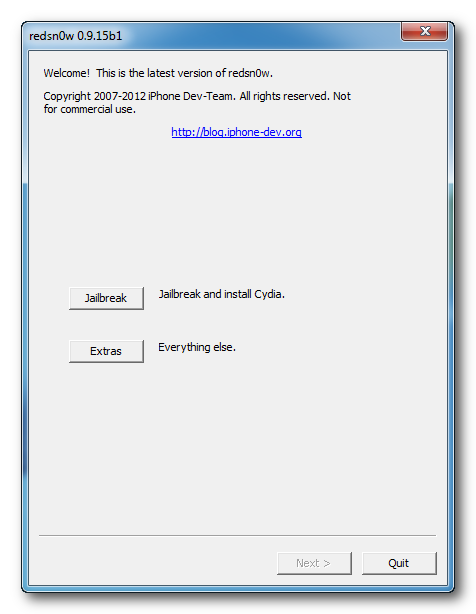
Step 3: Select ‘Extras’ and then navigate on over to ‘Select IPSW’ and find the iOS 6 IPSW file you downloaded in step one.
Step 4: Navigate back to the front-pane of Redsn0w and click on the “Jailbreak” button. Assure your iOS device is attached to the computer and turned off.
Step 5: When brought to the following prompt, select “Next.” Redsn0w will now guide you through booting in DFU mode. The instructions can also be found below:
- Hold down the Power (corner) button for 3 seconds
- Without releasing the Power button, also hold down the Home (bottom center) button for 10 seconds
- Without releasing the Home button, release the Power button BUT KEEP holding the Home button for 15 seconds
Step 6: Following the DFU mode steps, your iPhone, iPod, or iPad will be exploited with limera1n and prepared with jailbreak data. Wait patiently until the following menu appears:

Step 7: Choose “Install Cydia” from the list and click “Next.”

Step 8: The jailbreak installation process has began. Redsn0w will upload new RAM Disk and Kernal and will reboot upon finishing.
Step 9: Once completed, you will need to boot tethered. This can be completed by navigating to Extra > Just Boot and following the on-screen instructions.
Congratulations! Your iOS device is now jailbroken and you can take advantage of all the wonderful jailbreak tweaks, applications, and more.
[ttjad keyword=”iphone”]


![Read more about the article [Astonishing] Our Report Says Major User Already Upgraded To iOS 6.0.1 But Why?](https://thetechjournal.com/wp-content/uploads/2012/11/iOS-On-2012-11-06-Chart-Final-512x329.jpg)