
website statistics

Apple Officially Released MacBook Pro 13-inch With Retina Display

It very slim then previous version and featured astonishing high resolution. Price starts from $1699. Its new MacBook Pro 13-inch retina display.
From TTJ Products
1 Star2 Stars3 Stars4 Stars5 Stars (Rate This)
Loading ... Loading ...

Apple just released a new MacBook Pro 13-inch retina display as expected. It very slim then previous version and featured astonishing high resolution. Price starts from $1699. Check the details below.
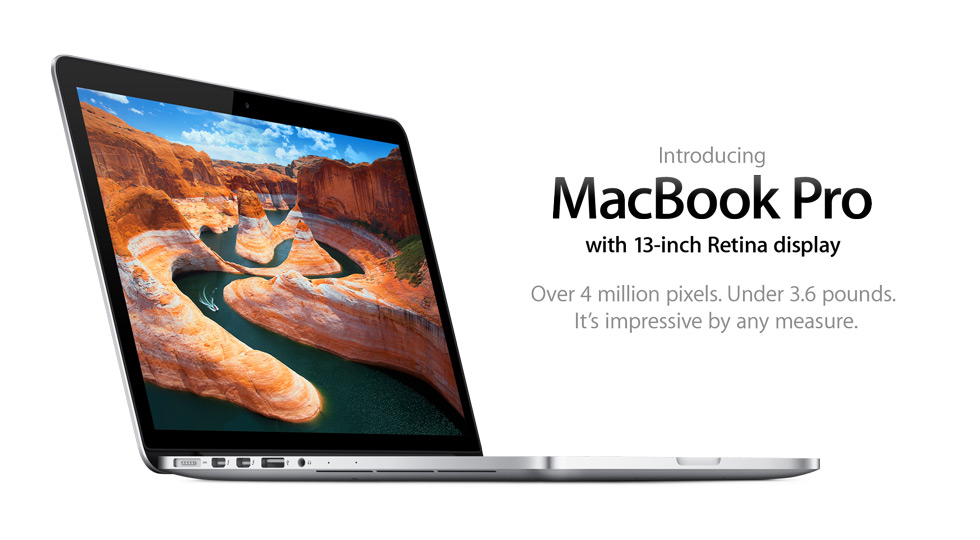

MacBook Pro 13*inch Retina Display

We all expecting this new MacBook Pro 13-inch With Retina Display, as we heard a lot rumour. Now its official. Its super slim, ultra high resolution. In the todays special event they compared with normal HD TV and its pixel density and resolution is higher than those.

Complete Feature List:

# 13.3-inch (diagonal) Retina display
# 2560-by-1600 native resolution
# 2.5GHz
# 2.5GHz dual-core Intel Core i5 processor (Turbo Boost up to 3.1GHz) with 3MB shared L3 cache
# Configurable to 2.9GHz dual-core Intel Core i7 (Turbo Boost up to 3.6GHz) with 4MB shared L3 cache.
# 8GB of 1600MHz DDR3L onboard memory
# 128 GB Flash Drive (SSD),
# Configurable to 256GB, 512GB, or 768GB flash storage.
# Specification:
Height: 0.75 inch (1.9 cm)
Width: 12.35 inches (31.4 cm)
Depth: 8.62 inches (21.9 cm)
Weight: 3.57 pounds (1.62 kg)

# Intel HD Graphics 4000
# 720p FaceTime HD camera
# Check expansion and ports in picture below
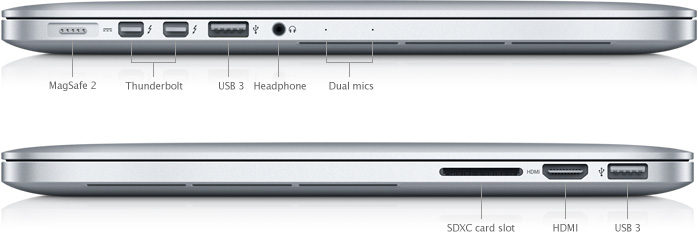
# WiFi 802.11n Wi-Fi wireless networking;3 IEEE 802.11a/b/g compatible.
# Up to 7 hours wireless web
# price starts at $1699, higher configuration could be priced upto $3,199.00

Check more details at Apple Store Online

Whats your thoughts on this new MacBook Pro? Going to grab one? Pre-order starts from today, shipping will starts from October 25.

Buy Cheapest Related Product From Amazon.com


Apple Releases Refreshed Mac Mini Computer

Apple Introduces Fusion Drive
You can also press the left/right arrow key on your keyboard to go to previous/next post
  On October 24, 2012(7 months, 2 days ago.)

Recent Search

Recent Tutorials

This tutorial will show how to use S.M.A.R.T. (Self Monitoring Analysis and Reporting Technology) to continuously collect information on health of your equipment.
In this tutorial I'll show you how you can easily protect yourself from any kind of security breaks that may occur through Java.
Today Apple enabled "Two Step Verification" for iCloud And Apple ID. But the process is not that simple. But no worry, here we have made a step by step tutorial.
Cant remember your iPhone passcode? Here I will show you some workaround on what to do and how to recover and restore for every possible scenario.
This tutorial will show you how to perform the Winapp2.ini installation inside CCleaner and how to use it under Windows operating system.
With app called AD Sound Recorder, you can record any stream that passes through your sound card or speakers and in this tutorial I will show you how to do that.
If you want to have Boxee app inside your Apple TV, in this tutorial we will show you how to install XBMC and Boxee using Windows on your Apple TV.
This tutorial will show you how to transfer PS3 Saved Game Files from your PC to your PS3 game console.
Adding videos from external sources such as internet, more specifically from YouTube, is a great solution to enhance a presentation; in this tutorial I will show you the procedure.
If you are one of new comers to Windows Phone 8, like me, in this tutorial I will walk you through the process to update your Windows Phone 8 device.
Close You Have To Login
User:
Pass:
Login With »Login With TwitterLogin With Facebook