
Logitech is launching a couple of cool expansion items for the Apple iPad: a joystick for games and a fold-up keyboard for the iPad 2, these devices show that it’s not so hard to come up with clever devices that extend the functionality of an iPad so that it can be better used for work or play. The Logitech Joystick for iPad is a thumbstick-style game controller that attaches to the iPad screen with suction cups and The fold-up keyboard works only with an iPad 2, a full-size keyboard that connects via Bluetooth and charges via universal serial bus (USB). The Logitech iPad Joystick is available for pre-order now at $19.99 each…………….
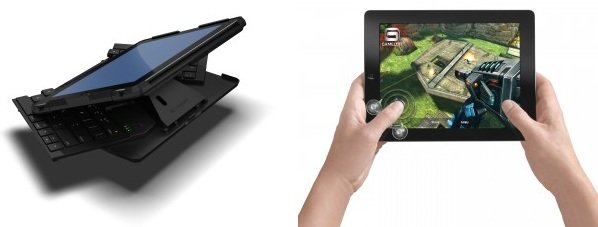
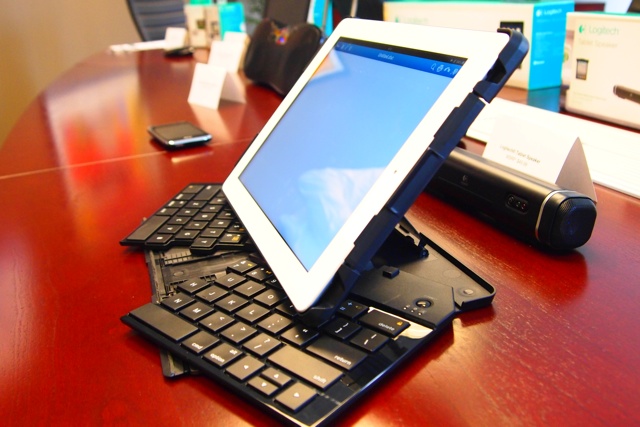
Logitech unveiled two new accessories that help you make the most of your tablet. The Logitech Fold-Up Keyboard for iPad 2 is the ideal tool for comfy, on-the-go typing, and the Logitech Joystick for iPad offers more accurate, immersive game play. Moving tablet use beyond the traditional touchpad strokes, both devices empower you to interact with your iPad more efficiently, extending your tablet experience into the world around you. “Many people are using tablets in ways that require more than fingertip scrolling, pointing and pressing on the touchpad,” said Azmat Ali, Logitech vice president of mobile and tablet products. “Whether you’re typing notes, emailing, or playing games, both devices greatly extend flexibility when it comes to creating content or enjoying entertainment.” The Logitech Fold-Up Keyboard for iPad 2 is your perfect on-the-go solution. With a full-size, Bluetooth keyboard and stand, you simply open and type and close and forget. Closed, the keyboard rests securely underneath your iPad 2. Open, it holds the tablet at an ideal angle for typing and taking notes. Unlike folio-style Bluetooth keyboards, the Logitech Fold-Up Keyboard for iPad 2 is full-sized for comfy typing. And it charges over USB, so you never need to worry about replacing batteries. The device wakes up and is ready to use as soon as it’s unfolded, and turns itself off automatically when folded to save battery power.
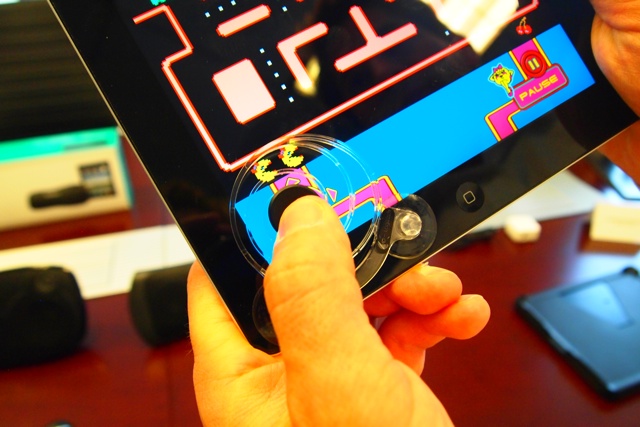
The Logitech Joystick for iPad is the perfect gaming companion for your iPad or iPad 2. No one likes to lose a point or go down in defeat because their thumb misses the control area. The Logitech Joystick for iPad gives you a thumb-stick style game controller that you can use with just about any game with an on-screen joystick or d-pad. The device attaches to your iPad with suction cups that are easy to apply and easy to remove. And the coiled spring provides force feedback that automatically returns the joystick to the center position. The Logitech Fold-Up Keyboard is expected to be available in the U.S. and Europe beginning in September, for a suggested retail price of $129.99 (U.S.). The Logitech Joystick is expected to be available in the U.S. and Europe beginning in September, for a suggested retail price of $19.99 (U.S.). Visit our blog or website for more information.
[ttjad keyword=”ipad”]

just that is mine. never did i meet man of logitech. who is the man that logitech meet?
logitech fold up keyboard for ipad2 will not launch in this month. logitech must check patent or patent application. you must check this title “foldable keyboard for portable computer”. easy- checking is just gooling.
sorry, just googling is very easy.