
website statistics

Samsung Unveiled 5-inch Single- And Dual-SIM Galaxy Grand With Android Jelly Bean

Samsung has given us a sudden surprise. On December 18, Samsung unveiled its new Android smartphone Galaxy Grand. This phone packs a 5-inch display and Android Jelly Bean.
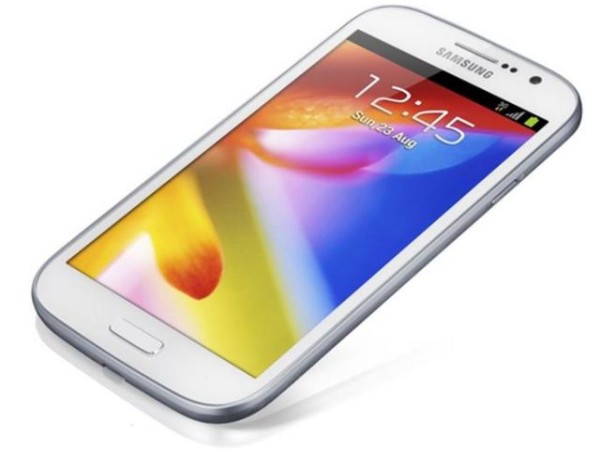
From TTJ Products
1 Star2 Stars3 Stars4 Stars5 Stars (Rated: 5.00/5)
Loading ... Loading ...

Samsung has given us a sudden surprise. On December 18, Samsung unveiled its new Android smartphone Galaxy Grand. This phone packs a 5-inch display and Android Jelly Bean.


Galaxy Grand

The Galaxy Grand is larger, wider, thicker and heavier than than its predecessor – the Galaxy S III. The Galaxy Grand weighs 162 grams with dimensions 143.5 mm x 76.9 mm X 9.6 mm. This handset runs on Android 4.1.2 Jelly Bean, and packs 1.2GHz dual-core processor, 2 mega-pixel front-facing camera for 720p video calls, 8 mega-pixel rear-facing camera with 1080p Full HD video recording, 1GB RAM, 8GB internal memory, a large 2,100 mAh battery, expandable microSD slot (up to 64GB), HSPA+ (up to 21Mbps down, 5.76 up) on 850/1900/2100 bands, Bluetooth 4.0, DLNA and Wi-Fi.
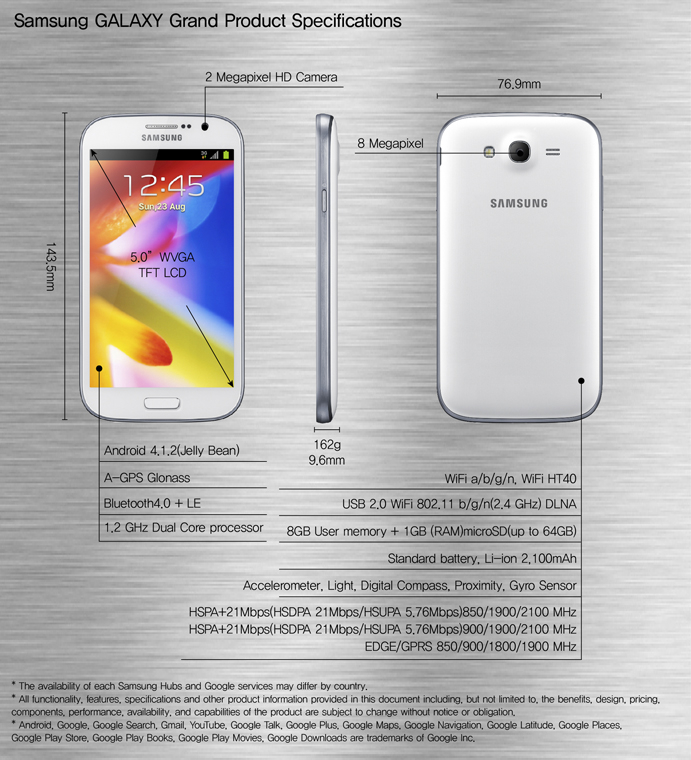
Galaxy Grand

The Galaxy Grand will be available in single- and dual-SIM versions. Samsung will first release the dual-SIM version (GT-I9082) and later the single-SIM (GT-I9080) model. The dual-SIM model will enable users to manage two phone numbers from one device, even receiving calls from one number while talking on the other. However, both single- and dual-SIM versions of Galaxy Grand will have some pre-loaded Samsung-specific features such as Direct Call – which enables users to dial a number by raising the handset to their ear, Popup Video – which allows users to watch a video in a pop-up window despite the task on hand, Samsung Hubs – which deliver on-demand movies, games and music.

It is expected that the Galaxy Grand will hit Asian markets in early 2013.

Source: Samsung (Official Blog)

Buy Cheapest Related Product From Amazon.com


Samsung Will Release 3,000mAh Battery For Galaxy S III

Wii U Launching Nintendo TVii Service Today
You can also press the left/right arrow key on your keyboard to go to previous/next post
  On December 20, 2012(5 months, 4 days ago.)

Recent Search

Recent Tutorials

This tutorial will show how to use S.M.A.R.T. (Self Monitoring Analysis and Reporting Technology) to continuously collect information on health of your equipment.
In this tutorial I'll show you how you can easily protect yourself from any kind of security breaks that may occur through Java.
Today Apple enabled "Two Step Verification" for iCloud And Apple ID. But the process is not that simple. But no worry, here we have made a step by step tutorial.
Cant remember your iPhone passcode? Here I will show you some workaround on what to do and how to recover and restore for every possible scenario.
This tutorial will show you how to perform the Winapp2.ini installation inside CCleaner and how to use it under Windows operating system.
With app called AD Sound Recorder, you can record any stream that passes through your sound card or speakers and in this tutorial I will show you how to do that.
If you want to have Boxee app inside your Apple TV, in this tutorial we will show you how to install XBMC and Boxee using Windows on your Apple TV.
This tutorial will show you how to transfer PS3 Saved Game Files from your PC to your PS3 game console.
Adding videos from external sources such as internet, more specifically from YouTube, is a great solution to enhance a presentation; in this tutorial I will show you the procedure.
If you are one of new comers to Windows Phone 8, like me, in this tutorial I will walk you through the process to update your Windows Phone 8 device.
Close You Have To Login
User:
Pass:
Login With »Login With TwitterLogin With Facebook