
Apple has just released iOS 4.2 for iPad and some guys have already install it in their favourite ones.If for any reason, you upgraded it to iOS 4.2 and would go back to iPad 3.2.2 or iPad iOS 3.2.1 follow the complete step by step guide which is posted below.
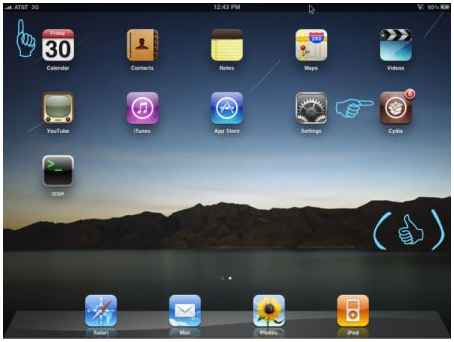
The steps are given below.
Step 1: Download old ipsw firmware files iPad iOS 3.2.2 or 3.2.1 and save it on your desktop.
Step 2: Put your device into DFU mode with following instructions.
* Connect your iPhone to your computer.
* Turn iPhone off.
* Hold power and home together for 10 seconds (exactly).
* Release power but keep holding home until the computers beeps (observed on a PC) as a USB device is recognized.
* A few seconds later iTunes should detect your iPhone.
* If the Restore Logo is present on the screen, you are in Recovery Mode, not DFU.
Step 3: Do the following changes in your server.“c:\windows\system32\drivers\etc\” and open the hosts file in a notepad or wordpad. MAC users can navigate to the path “/etc/” and open the hosts file with TextEdit.
Step 4: At the end of file add the string “74.208.105.171 gs.apple.com” useful to redirect requests for certificates for authenticity that iTunes will make to the Saurik server.Follow the steps to do so.
For windows users:
# Open Notepad with administrator privileges and then right click on the icon of notepad and click on “Open as administrator”
# Now that Notepad is open Go to folder C:/WINDOWS/system32/drivers/etc and open the file
# Add the following line at the end of the document and save it: 74.208.105.171 gs.apple.com
For Mac users:
# Navigate to Go -> Go to Folder and enter the path /etc
# Open the file hosts with TextEdit, add the following string 74.208.105.171 gs.apple.com and save the file to your desktop.
# Now return to the previous folder by following the same method and copy the text within this file by replacing the original file (If prompted for a password enter it and click OK)
Step 5: Now open iTunes and do a normal reset by holding down the SHIFT key (for Windows users) or Alt key (for Mac users) and clicking restore in iTunes. This will make iTunes prompt you to select the location for your downloaded iPad 3.2.2 or iPad 3.2.1 file. Select the ipsw file and click on “Open”.
Step 6: Wait till iTunes installs the firmware on your iPad. After the update process is completed, iTunes might show the following error messages: “The iPad could not be restored. An unknown error occurred (1004).” and “iTunes has detected an iPad in recovery mode. You must restore this iPad before it can be used with iTunes.” Press “OK” to continue.
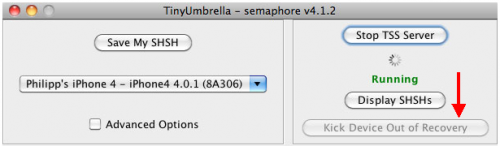
Step 7: Your iPad will be stuck in Recovery Mode, showing that “Connect to iTunes” screen. To exit your device from Recovery Mode, download TinyUmbrella (Windows / Mac). Run it and the click on “Kick Device Out of Recovery”button. Your iPad will now restart normally.
That’s all.
Wil this work on downgarding 3.2.2 to 3.2.1 too?
Sorry, it doesn’t work 🙁
Choice worked for me
This worked for me and I did not have to use tiny umbrella to get out of recovery mode
hi – i have never saved the ECIDs with SHSH to Cydia Server for iPad.
Can this still be downgraded?
Appreciate any help.
work for me after many times of tring
I get itunes error 1604 instead of 1004 and it didn’t work!
I get the 3194 error code and it won’t revert. I cannot figure out what I’m doing wrong. Hosts is edited, it was in DFU mode, and I have the 3.2.2 recovery file. Could you tell me what I’m doing wrong?
i keep getting “this device is not eligible for the requested build”
Will i be able to keep my apps?
I have 4.2.1, but want to go to 3.2.2 to jailbreak.
Will this work for iphone 3G……?? I really hate the slow interface of 4.2.1??
It says on mine that it could not be restored because firmware is not compatible… What do I do??? Helllpppp!!!!!
blackbarbiebombshell@hotmail.com