Genius has just launched its EasyPen M610XA graphics design tablet with Adobe Photoshop Elements 9 and Corel Painter Essentials 4. By using its photo editing bundle, you can edit photos and create digital artwork quickly and professionally. If you want, you can connect this tablet to notebooks and computers through a USB port. Genius has also provided a cordless stylus with tablet which is pressure sensitive with 1024 pressure levels. The EasyPen M610XA is available in the US & Canada now for $169.99.
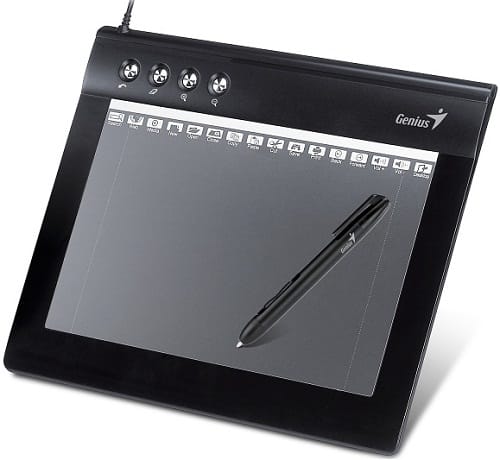
The tablet has a 6” x 10” working area which can be easily switched between 4:3 and 16:9 mode. It has also four express keys near the top for advantage (Undo, Eraser, Zoom in, Zoom out) and sixteen programmable hot cells which enables customization of Microsoft Office and internet shortcuts for easy navigation.
Product Highlights of EasyPen M610XA Graphics-Design Tablet
- Big 6” x 10” working area for drawing and handwriting.
- 4000 LPI resolution.
- 4 express keys (Undo, Eraser, Zoom in & Zoom out).
- 16 programmable shortcuts.
- Cordless stylus with 1024 pressure levels.
- Conveniently bundled with helpful software, including: Adobe Photoshop Elements and Corel Painter Essentials 4.
Specification
- OS Support: Windows 7/Vista/XP/Mac OS 10.4 or above
- Resolution(LPI): 4000 LPI
- Interface: USB
- Digital Pen-Pressure Sensitive: 1024 Levels
- Digital Pen-Number of Buttons: 2
- Express Keys: 4
- Report Rates (RPS): 200 PPS
- Wide/4:3 Screen: Wide Screen
- Active area: 6” x 10”
- Digital Pen-Accuracy: ±0.25 mm
- Pen clip: YES
- Software hot keys: YES
- With Cordless Pen: YES
- Transparent overlay sheet: YES
The Genius PenSketch M610XA Graphics-Design Tablet’s bundled software includes:
- Adobe Photoshop Elements 9 (PC & Mac) – allowing you to quickly and professionally edit photos and create digital artwork.
- Corel Painter Essentials 4 – allowing you to draw and paint from scratch as well as turn photos into stunning paintings.
- PenDrawer (Windows only) – allowing you to make personal annotations on your favorite photos and save to popular file formats to easily share with your family and friends.
- PenSign – allowing you to add your digital signature conveniently.
- Pen Toolbar – allowing you to hand-write notes and sign documents in Word, Excel, PowerPoint, and emails.
System Requirements:
- Windows 7/Vista/XP or Mac OS X 10.4 or later
- CD/DVD-ROM drive for installation
- IBM PC/Pentium 233 compatible or higher
- One USB port
Source: Genius
[ttjad keyword=”windows-tablet”]