
The MeeGo project has released preview source code for the MeeGo Handset environment, including the first touchscreen support. Meanwhile, Intel has released a video demonstrating a pre-alpha version of MeeGo’s tablet environment, showing off five-finger multitouch support.
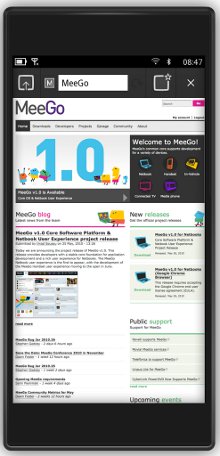
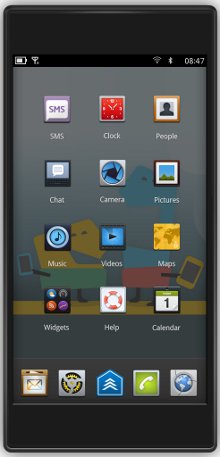
As promised when the MeeGo project released the open source Linux MeeGo 1.0 for Netbooks in late May, the handset environment was released in the month of June, albeit on the very last day. Meanwhile, Intel showed off a preview of the tablet environment for MeeGo (see farther below). Both are expected to reach fruition in October when MeeGo 1.1 will be released, supporting touch-enabled handsets, tablets, and in-vehicle infotainment (IVI) devices, says the project.
MeeGo combines the Intel-backed Moblin and Nokia’s Maemo distribution, as well as Nokia’s Qt application framework. Unlike the netbook version, which uses Google’s Chrome browser, the handset version incorporates the Fennec (Firefox for Mobile) browser.
The preview source code released yesterday, dubbed MeeGo Project Handset Day 1, shows off major developments in the handset reference user experience. This includes basic touch support, as demonstrated in the YouTube video farther below.
The release also reflects the implementation of MeeGo UI design principles and interaction guidelines, says the MeeGo project, which is hosted by the Linux Foundation. In addition, the project opened up the MeeGo Build Infrastructure, which is based on the OpenSUSE Build Service (OBS).
“This milestone marks the completion of the merger of Moblin and Maemo as major architecture decisions and technical selections have been determined,” write Valtteri Halla (Nokia) and Imad Sousou (Intel) of the MeeGo Technical Steering Group in their blog announcement.
A developer preview image has been made available for the Aava Mobile handset reference design, which is based on the Intel Atom Z6xx (“Moorestown”) processor. The ARM Cortex-A8 OMAP3x-based Nokia N900 smartphone is currently being supported with a kickstart file that enables developers to build their own image, says the project. Nokia recently revealed to Reuters that all future Nokia N-series smartphones will use MeeGo instead of Symbian.
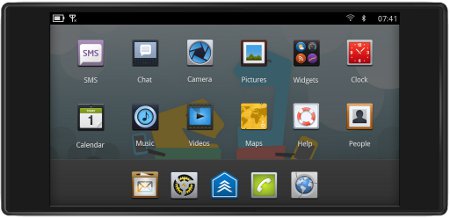
The preview release is based on Linux kernel 2.6.35 and incorporates the QtContactsTracker back-end contracts storage management engine, says the project. The release is said to offer icons and visual assets on the toolbar and home screen, as place holders for future development.
Also included are a dialer, SMS, photo viewer, the Fennec browser, and personal connection management (“Handset People”) applications. In addition, the release provides several settings options, including options for Wi-Fi and a phone simulator, “so you may use the majority of the currently working applications,” says the project.
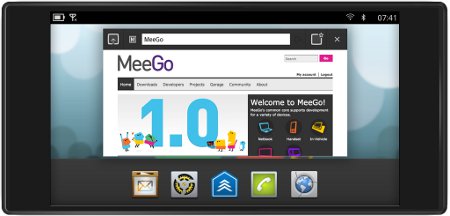
The MeeGo Project Handset Day 1 is said to include:
* MeeGo APIs, incorporating Qt and MeeGo Touch UI Framework (MTF)
* Subset of the handset reference UI and applications:
o Status bar — clock, network, Bluetooth, 3G connection, notifications, and battery charge
o Home screen
o Lock screen
o Application launcher
o Virtual keyboard
* MeeGo Core OS, including middleware components
* Hardware adaptation support for Intel Atom-based handset (Moorestown) and ARM-based Nokia N900
* MeeGo applications:
o MeeGo Handset Dialer
o MeeGo Handset SMS
o Fennec Browser
o MeeGo Handset Photos
o MeeGo Handset People (contacts)
Last week, Intel released a YouTube video demo of a pre-alpha version of the MeeGo tablet environment, which is due for release this fall. Despite the pre-alpha label, the interface seems fairly polished, compared to the handset video UI above, especially in terms of the multitouch support. The video demonstrates multitouch image resizing and rotating, as well as a finger-painting app that shows off five-finger multitouch.
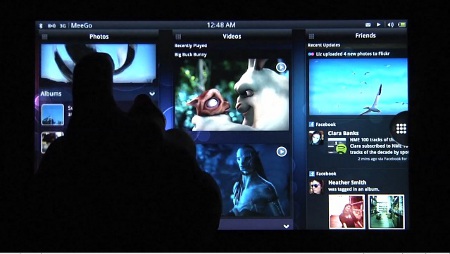
As described in a blog summary of the video by Bob Duffy on the Intel Atom Developer Program site, the demo shows navigation both by application and by content. The content part of the demo shows “something we have yet to see in a touch tablet devices,” writes Duffy. “I like to think of it as Tweetdeck Gone Wild.”
“Recent content, recent web pages, social content, content currently open are all accessible in these scrolling columns,” he continues. “And by auto creating thumbnails for your content, this experience really caters to an immersive visual experience.”
If the approach to content navigation is novel, as Duffy notes, the application navigation UI is fairly similar to that of the iPad. MeeGo, however, can best the iPad on multitasking, he adds. “The MeeGo team is obviously playing to its multitasking strengths by providing a row of apps/content that are currently running,” writes Duffy.
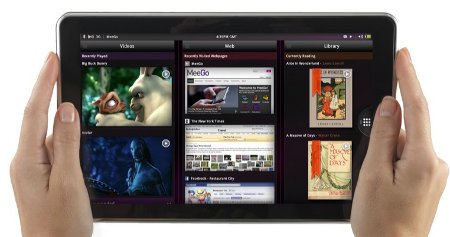
A number of MeeGo tablet prototypes were demonstrated at Computex in early June, all running on Intel’s Z6xx. These included tablets from Wistron, Compal, CZC, and Quanta, which showed off its Redvale tablet (pictured above). More recently, Red Flag Software unveiled its NPad tablet running MeeGo, said to be preparing for a third quarter release.
The MeeGo Project Handset Day 1 preview release announcement may be found here, and the release notes, with links to downloads, screenshots, and background information, may be found here.
![Read more about the article 5 New iPad 2 Destroyed By a ShotGun[Video]](https://thetechjournal.com/wp-content/uploads/2011/03/zagg-ipad-2-shotgun.webp)
