
We recently reported that a Russian hacker had claimed to have stolen some 6.5 million LinkedIn passwords and then having them posted to online forums. LinkedIn, after relenting for some time, yielded to the claims and confirmed the leak, prompting the users to immediately change their LinkedIn passwords. Here’s a quick guide on how to do so.

First of all, you have to log into your LinkedIn account. You will be navigated straight to your home page.
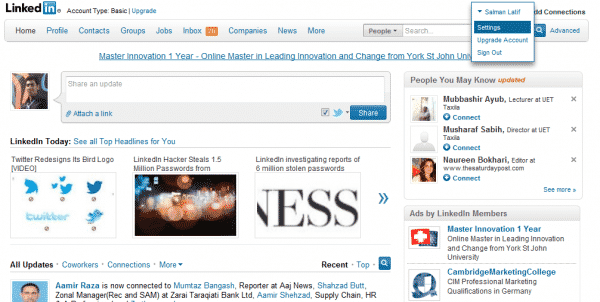
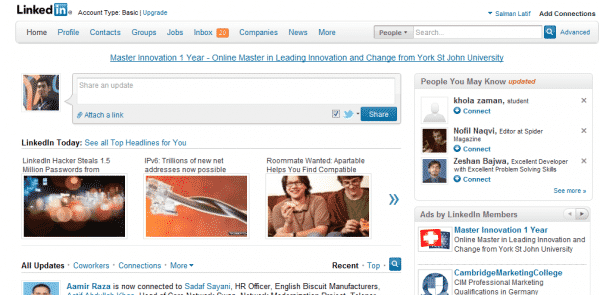 Now, go straight to your name on the top right corner and hover mouse over it. It will present a drop-down menu which will contain ‘settings.’ Click on it.
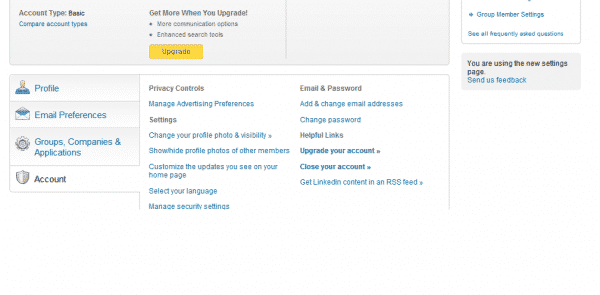
When the ‘Settings’ page opens, scroll down to the bottom of the page. You will find the ‘Account’ tab there, click on it. Once you click, you will be presented with ‘Change password’ option under ‘Email & Password.’ Click on it.
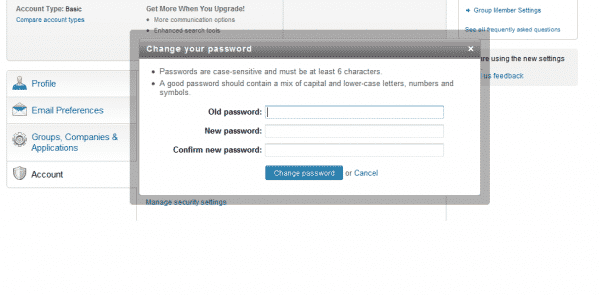
 When you click on the ‘Change Password’ option, a pop up windows appears right in the middle of the screen, asking to confirm the old password and the new password that you want to set. You can choose a new password right here.
 This will conveniently change your LinkedIn password. Just do it as soon as possible since if you happen to be among the affected accounts, your password is surely in unsafe hands.
[ttjad keyword=”cloud-storage-drive”]

![Read more about the article [Tutorial] How To Setup & Read Email Message In The iPhone](https://thetechjournal.com/wp-content/uploads/2012/04/mail-icon-iphone.webp)
![Read more about the article [Tutorial] How To Share Photos With Opera Unite Photo Sharing](https://thetechjournal.com/wp-content/uploads/2012/03/opera-unite-logo3.webp)
![Read more about the article [Tutorial] How To Move Application To Memory Card On Android](https://thetechjournal.com/wp-content/uploads/2012/10/settings-app-android-w8e798w7e98we7.webp)
you happen to be among the affected accounts, your password is surely in unsafe hands.