website statistics

[Tutorial] How To Constantly Keep An Eye On Facebook – Facebook Messenger

With the Facebook Messenger, you can use Facebook without having Facebook in your browser. While browsing the web or using other applications on your computer, you can chat live with friends and send them messages on Facebook, see the latest updates from your friends in the telex and receive notifications on what is happening around you. This tutorial will show you some basics on how to make these things work under Windows.
When do you use Facebook?

View Results

Loading ... Loading ...
1 Star2 Stars3 Stars4 Stars5 Stars (Rate This)
Loading ... Loading ...

With the Facebook Messenger, you can use Facebook without having Facebook in your browser. While browsing the web or using other applications on your computer, you can chat live with friends and send them messages on Facebook, see the latest updates from your friends in the telex and receive notifications on what is happening around you. This tutorial will show you some basics on how to make these things work under Windows.


To constantly be connected with Facebook friends and their updates follow steps below

Step 1: Click here to download Facebook Messenger.

Step 2: Once the download is complete, click Run and wait until Facebook Messenger lunch

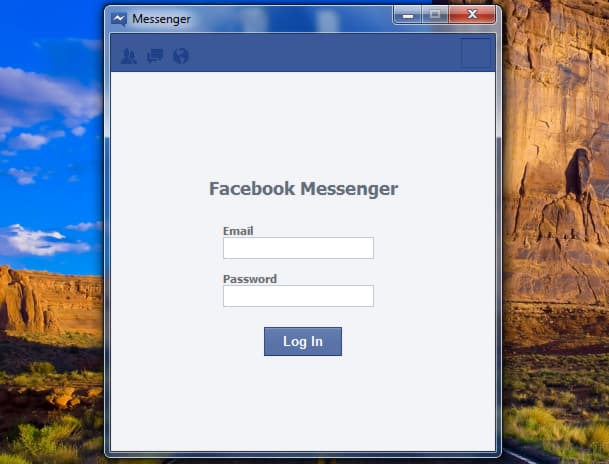
Step 3: In the window that opens, enter your Facebook username and password. Click Log In button.

Step 4: At the top of the window you will see recent news from your friends and right below news feed is a list of your friends available for a chat. Click a person to open a new window and chat with him/her.

Step 5: When someone wants to talk with you, a Windows notification is displayed.

Step 6: If you want to keep Facebook Messenger always visible even when you open other windows or programs, simply click the small Dock icon located at bottom right of your Facebook Messenger window. Once you click on that icon, Messenger will spread to maximum height of your screen and will be ‘glued’ to the right edge. This window will remain in this position and you will always have Facebook in front of your eyes.
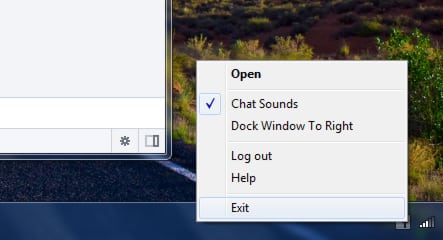
Step 7: When you close the window, Messenger is minimized in the taskbar and you will still be able to see the notifications. To permanently close Facebook Messenger, right click its icon located in Windows system tray and choose Exit.

Buy Cheapest Related Product From Amazon.com


World’s First Multi-Tuner InfiniTV 4 PCIe Now $199

[Tutorial] How To Schedule A Task In Windows 7
You can also press the left/right arrow key on your keyboard to go to previous/next post
  On February 24, 2012(1 year, 3 months ago.)

Recent Products

Buy Now | Compare  
Buy Now | Compare  
Compare  

Recent Search

Recent Tutorials

This tutorial will show how to use S.M.A.R.T. (Self Monitoring Analysis and Reporting Technology) to continuously collect information on health of your equipment.
In this tutorial I'll show you how you can easily protect yourself from any kind of security breaks that may occur through Java.
Today Apple enabled "Two Step Verification" for iCloud And Apple ID. But the process is not that simple. But no worry, here we have made a step by step tutorial.
Cant remember your iPhone passcode? Here I will show you some workaround on what to do and how to recover and restore for every possible scenario.
This tutorial will show you how to perform the Winapp2.ini installation inside CCleaner and how to use it under Windows operating system.
With app called AD Sound Recorder, you can record any stream that passes through your sound card or speakers and in this tutorial I will show you how to do that.
If you want to have Boxee app inside your Apple TV, in this tutorial we will show you how to install XBMC and Boxee using Windows on your Apple TV.
This tutorial will show you how to transfer PS3 Saved Game Files from your PC to your PS3 game console.
Adding videos from external sources such as internet, more specifically from YouTube, is a great solution to enhance a presentation; in this tutorial I will show you the procedure.
If you are one of new comers to Windows Phone 8, like me, in this tutorial I will walk you through the process to update your Windows Phone 8 device.
Close You Have To Login
User:
Pass:
Login With »Login With TwitterLogin With Facebook