
There are plenty of YouTube video download tools out there; some of these are free, some are not. But you will be surprised to know that one of your old friends named VLC media player can easily download a video posted on YouTube; in this tutorial I will walk you through the process.

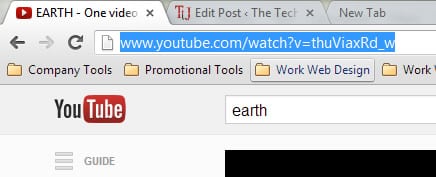
Step 1: In your web browser, open the video on YouTube you want download. Select the page address in the address bar and copy it with Ctrl + C (you can also click with the right mouse button on the link and click Copy).
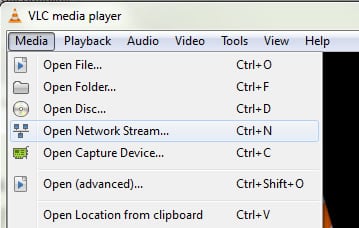
Step 2: Start VLC media player and click on the Media menu and then click Open Network Stream.
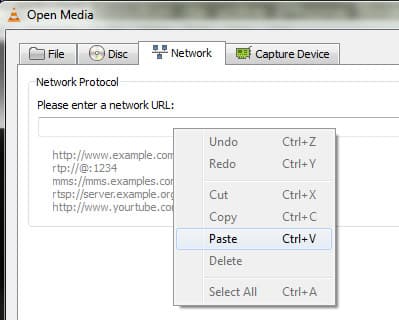
Step 3: Click the Enter URL field network and paste the address of the YouTube video previously copied. For this, use the keyboard shortcut Ctrl + V, or right-click and then from context menu choose Paste.
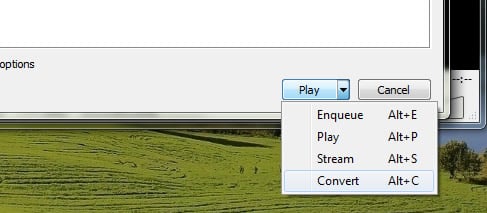
Step 4: Click on the small arrow next to the Play button and click Convert.
Step 5: Under the section Destination file, click Browse button.
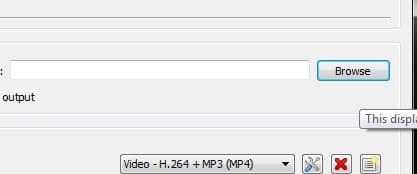
Step 6: Select a location to save the video file and give it a name. Be sure to specify the extension .mp4 after the file. Click Save.
Step 7: Select the profile Video – H.264 + MP3 (MP4).
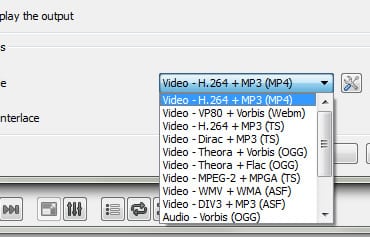
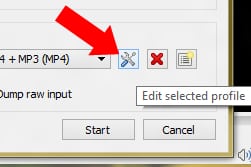
Step 8: In order to get original file without conversion, click on “Edit selected profile” icon next to drop down menu.
Step 9: When new window opens up, first select “Video codec” tab and then select check box in front of “Keep original video track“.
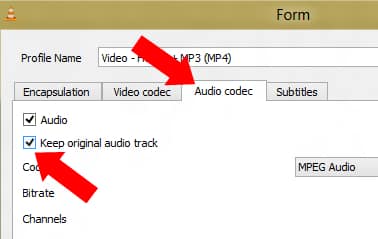
Step 10: Now select “Audio codec” tab and then select checkbox in front of “Keep original audio track“. Click “Save” button.
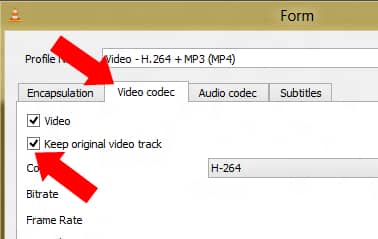
Edited: Updated By Author Per User Request.
[ttjad keyword=”google-tv”]

![Read more about the article [Tutorial] How To Turn On Battery Saver For LG G3 Or G3 S](https://thetechjournal.com/wp-content/uploads/2014/12/BSA_1-432x768.png)
![Read more about the article [Tutorial] How To Enable Spotify’s New Web Player](https://thetechjournal.com/wp-content/uploads/2012/11/respotify-profile-name-asd.jpg)
![Read more about the article [Tutorial] How To Upgrade Galaxy Nexus To Android 4.1 Jelly Bean](https://thetechjournal.com/wp-content/uploads/2012/07/galaxy-nexus-jelly-bean-ttj-logo-512x226.jpg)
Your download tutorial requires conversion, which causes loss of quality. Especially, since most videos on Youtube are already MP4, converting to MP4 is rather pointless.
Further, you’re suggesting the wrong choice for audio, cause Youtube audio is generally in AAC format, which is way better than MP3 and is also compatible with all players and phones.
So, your method causes needless degradation both in video and audio.
The phrase “think before you talk” comes to mind. With due respect to VLC player, if it can’t download without performing a conversion, this “download” function is worthless.
The CORRECT WAY to download Youtube videos is to keep it in whatever format its in (choosing MP4 over FLV, unless the FLV file is in higher resolution, if you want the video footage)
If you just want the audio, download the lowest resolution MP4 available. Then use MP4box to split out the unaltered AAC track and then re-wrap it in Apple’s M4A wrapper, which is compatible with Mac, PC Linux and Android audio players and allows you to add tags as well as cover art. All this without having recoded/degraded the sound quality at all.
Good insight. But there is in fact ways to get the original file without conversion.
In the step 7, select the MP4 profile but click the settings button just beside the profile selector. In Audio and Video codec selection you could select “Keep Original Track” settings and de-select Audio/Video.
You could even save this setting as profile and use later.
Hope that helps and solve the issue. I could ask Boris (the writer) to show this option in tutorials too.
Hi Asif2BD, thanks for the answer and useful info..
I agree you should ask Boris to include your information, because many people wouldn’t know the importance of avoiding conversion / re-encoding unless its absolutely necessary.
Boris updated the tutorial with new screen shot.
nice job!
so, I tried it out…
pasted “www.youtube.com/watch?v=zHGVgd7882Q” into the URL field as per the tutorial, and got the following error: “Your input can’t be opened: VLC is unable to open the MRL ‘www.youtube.com/watch?v=xDuweaUlAyE’. Check the log for details.”
I retried with firewall set to allow all, but got the same error. Gonna google the error and see if there’s a workaround..
That same track downloads directly in chrome or firefox without problem.
Probably you have to add “http://” at the beginning of the youtube link.