
If you are one of many Android users who like rooting your phone then newest version of Samsung Galaxy S will not be of any exception. By rooting your Android phone you will be able to use many cool things such as custom ROMs, and other applications that are not available at Google Play store. By removing this protection from your phone you will also lose all of the safety features so have this risk on your mind. If your decision is final and you want to root your Samsung Galaxy S 3 phone then this tutorial will help you by leading you step by step.
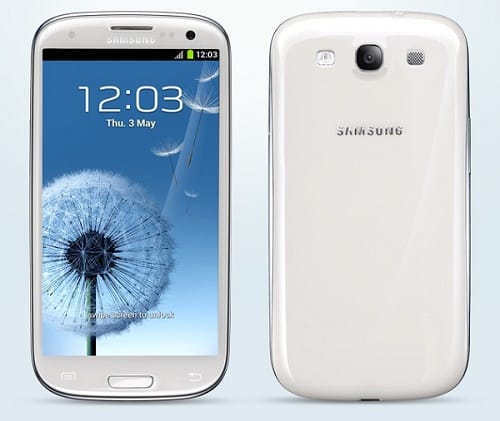
Before proceeding to below steps you need to make sure which version of Samsung Galaxy S3 because this tutorial will work on devices GT-I9300 and GT-I9300T. If by any chance your device model has a suffix I don’t recommend you to use this tutorial because you may brick your device. To check your device model go to Settings -> About device -> Model number
If your device model don’t have any suffix you may continue following steps below
Step 1: Download Odin 3 from this link and unpack it on your computer
Step 2: Next you need to download CF-Root-SGS3 from this link and again unpack it on your computer
Step 3: If by any chance while extracting CF-Root-SGS3 you end up with a recovery.img and cache.img file, you’ve extracted twice. In order for all to work you need to end up with a .tar file making sure you do not unpack that one

Step 4: Now if your phone is connected with a computer over USB, disconnect it.
Step 5: Now start Odin 3 which yu previously downloaded in Step 1
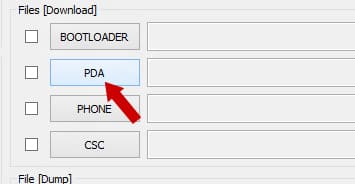
Step 6: When Odin opens click on PDA button, then locate and select CF-Root-SGS3 which you previously downloaded and extracted in Step 2
Step 7: Now it comes a tricky part. You need to put your phone in download mode by turning it off, and then hold buttons Volume-Down + Home + Power to boot. If you receive a message to press a button to continue, tap on the listed button, or run adb reboot download command
Step 8: Now using USB cable connect phone to your computer
Step 9: Before proceeding to below steps make sure Repartition option is not checked
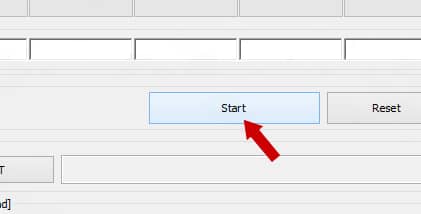
Step 10: Click the Start button, wait for few minutes and your Samsung Galaxy S3 is now rooted.
[ttjad keyword=”samsung-galaxy-s”]

![Read more about the article [Tutorial] How To Perform Secure Format On Your Hard Drive](https://thetechjournal.com/wp-content/uploads/2012/09/disc-512x320.jpg)
![Read more about the article [Tutorial] How To Display Website Thumbnail In Google, Bing and Yahoo! Search Results](https://thetechjournal.com/wp-content/uploads/2012/02/ff-a-search-preview-512x230.jpg)

why do I get FAIL text on odin?
There could be many reasons for that, and I can’t give you the correct answer since I can’t see the Odin log. One of the most often reason this happen is because of corrupted download. Re-download all files I suggested in above tutorial and try again.
I am getting a write operation failed message in odin. I think I might have tried to use the unpacked version the first time but I am using the correct version now. What do I need to do?