
Mostly, people tend to use real buttons that they can touch on their smartphone and tablets. But there are also those who prefer on-screen virtual buttons since they let you navigate through the device without going away from the screen. The Android smartphone, Galaxy Nexus comes with Android OS, Ice Cream Sandwich (ICS) and ICS provides virtual buttons on screen. The best part is that you can use these virtual buttons on any Ice Cream Sandwich ROM. Given below is a step by step guide about how to do this.
You need to have a fairly good idea of Android OS to accomplish this because it is kind of a technical task. Also, be sure to take a backup of your device’s framework-res.apk file in case you are unable to successfully complete the steps in this guide.
1- Extract a copy of framework-res.apk file from System>Framework to your desktop PC. You can do this by using a root-ready file explorer app such as File Expert.
2- Now save the original APK separately. Make a copy of it and use that copy to apply the hack. Use APK Tool to decompile this copy of APK. You can try APK Tool 1.4.3. In case that doesn’t work, try APK Tool 1.4.2.
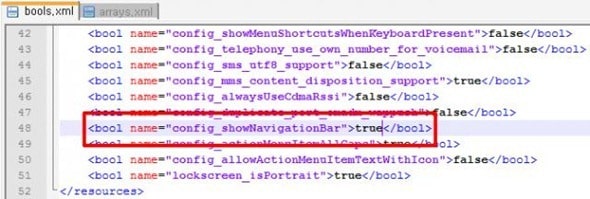
3- In a text editor, such as Notepad, open bools.xml from /res/values/bools.xml. Find config_showNavigationBar and set it’s value to True. The diagram below can give you an idea of where to find this and how to change the value.
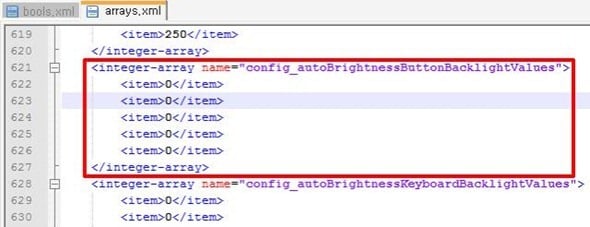
4- In case you turn off the backlight for your off-screen capacitive buttons, you also need to go to arrays.xml and edit it:
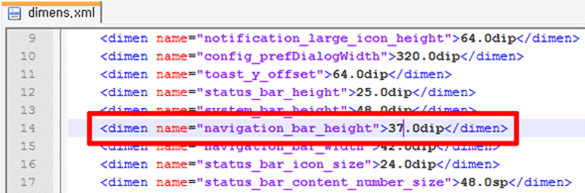
5- You should resize the buttons so that it avoids any keyboard overlapping problem. For this, you will have to navigate to dimens.xml. There, you should find the navigation_bar_height and edit it’s value to whatever suits you.
6- Now compile APK again. You can use aapt for this.
7- Now place back the APK in System>framework. You can use this through a file explorer on your PC.
Now that you have followed all your steps, by now the hardware buttons of your device will also be virtually represented. If that doesn’t happen, it means that the hack has failed, so restore back to original APK.
If you are facing problems in the hack, go to XDA-developers and post your query.
Image courtesy abulhussain.

![Read more about the article [Tutorial] How To Add A Table From Web Page Into Microsoft Excel](https://thetechjournal.com/wp-content/uploads/2012/02/excel-table-logo.webp)

![Read more about the article [Tutorial] How To Remove Search History From Your Facebook Activity Log](https://thetechjournal.com/wp-content/uploads/2013/01/activity-log-as56d465ew4r6we4r.webp)