
Opera has many hidden features that are not available from the browser interface, but displayed in external links. Opera does not have a page that lists the different pages available internally as we can find in Firefox with about:about or Chrome with chrome://about. So you will have to manually enter the address of each internal page to access its contents and in this tutorial I will show you some examples.

To get started open your Opera browser and use below commands to get started.
opera:config
Page opera:config allows you to access to many Opera settings. In here you can refine some options that do not appear in the Opera menus.
opera:plugins
Page opera:plugins displays a list of all installed plugins. You can disable a plugin by clicking the link Disable next to plugin name.
opera:history
opera:historysearch
Page opera:history shows a view of your browsing history different from the one you can find in the browser menu. Visited pages are sorted by day and by hour.
Page opera:historysearch lets you search your browsing history.
opera:cache
Page opera:cache lets you browse your browsing cache that contains the elements of web pages you’ve visited, including images, text, style sheets, videos, music, etc..
opera:debug
Page opera:debug lets you connect to another Opera browser on another computer to access the browsing session. This can be used to solve a problem.
To connect to another computer from this page
Step 1: Another user must enable the development tool Opera Dragonfly by clicking on the Opera menu -> Developer Tools -> Opera Dragronfly
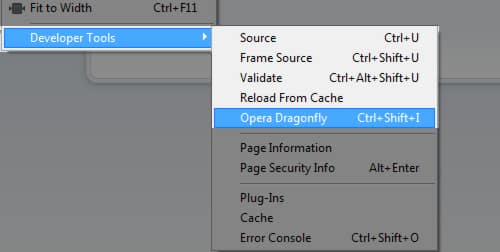
Step 2: He then must click on the Configuration option for remote debugging. Select the port to use and confirm.
Step 3: For your part, enter the IP address of the machine that contains the Opera as well as to control the port specified by the user and confirm.
opera:drives
Page opera:drives lets you browse your hard drives in a web-like interface
opera:memdebug
Page opera:memdebug displays information about the Opera memory usage
opera:webstorage
The pages opera:webstorage provide information about the data stored locally on your computer from web sites you previously visited
[ttjad keyword=”microsoft”]


![Read more about the article [Tutorial] How To Completely Silent Your iPad](https://thetechjournal.com/wp-content/uploads/2012/04/sound-ipad.jpg)
![Read more about the article [Tips] How To Change The Look Of The New Tab in Google Chrome](https://thetechjournal.com/wp-content/uploads/2012/10/awesome-new-tab-asd987a98s7d9as-512x275.jpg)