Alto is an email client designed and coded by AOL. When you think of AOL, much can come to mind, including dial-up internet, the year 2002, instant messaging, and emailing. Other than instant messaging, I thought the age of AOL was long gone, but with their ‘Alto’ revealing, they are trying to prove the public eyes wrong.
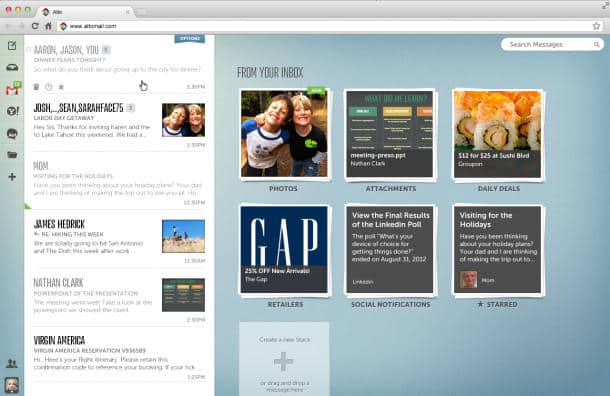
Alto provides nearly everything your typical cyber-geek requires. I’m a huge fan of technology and have tried numerous email clients on occasion, and Alto has just ‘one-upped’ every client known to man. Prior to this point I’ve been a huge fan of the Sparrow email client, but Alto has completed the impossible and beat-out Sparrow’s beautiful design work along with organizational manner.
The morning of October 18th Alto had launched in what’s called ‘private beta’ mode. Users are required to request an invitation to the service to be granted usage permissions. Anyone with a Gmail, Yahoo, AOL, or Mac mail accounts will be able to view their email from the Alto client. AOL allows users to load up-to five separate emails at once.
What’s very neat about Alto is the organization system implanted by AOL — they were smart and actually created a solution for those who generally don’t create & use folders on their current default email client. What Alto does is they allow users to create what is called a ‘stack’ to arrange email messages into separate categories. By default each user is provided with a photo, attachments, daily deals, retailers, and social notifications stack. The user can manually organize emails into these stacks, or Alto will automatically determine where each single email should be placed.
How Stacks Work: You will have a inbox just like any email client, and to the right you will find your stacks. When you receive an email, say from Groupon, you can choose the “skip your inbox” feature to add them to a stack. All future emails coming from that email address will then be added to its specific stack category. It’s really a golden idea because now you can see all the real important emails in your inbox without digging through ‘spam.’
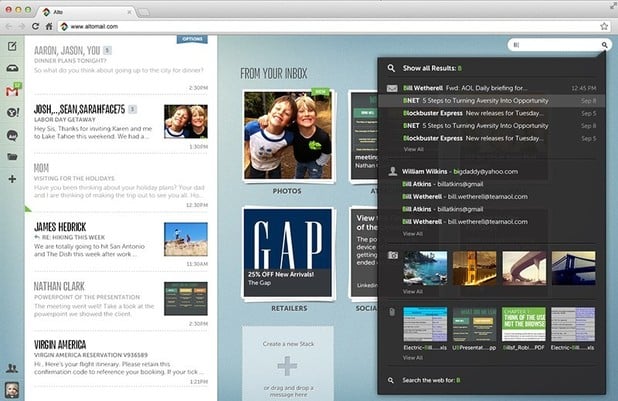
Alto even includes a flawless method of searching your entire inbox. At the upper-right-hand corner just enter the designated search term and you’ll be presented with separated results — including emails, contacts, photos, and attachments.
I’m also amazed by the design-work presented by AOL in this Alto client. In the inbox the text is bold, and very easy to see. If you receive an email with a photograph or attachment a small icon of the media will appear. Furthermore, the stacks are listed in chronological order depending on the last new email received.
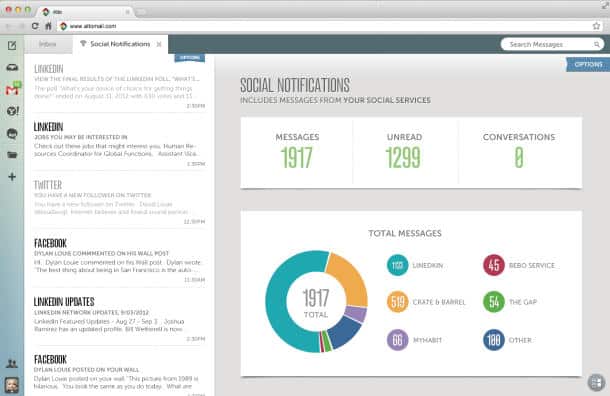
Another neat feature — Alto provides analytics for each of your stacks. For example, in the screenshot above the analytics of a user’s social notifications are presented. A user should easily be able to determine where a majority of their emails are emerging from.
At the time, Alto is a free email client to use. In the future AOL has plans to monetize the client with advertisements. If you’re granted access to Alto beta, know the client works on any computer, along with the iPad as an HTML5 internet application.
I’m fairly pleased with the sleek interface and organization system brought-on by Alto. If you’re an organized person like me, Alto wouldn’t be a horrible email client choice, although it’s just in beta.
Request an Alto invitation: Click Here
Source: CNET
[ttjad keyword=”camera-general”]