website statistics

See The First Panaromic Pictures From Mars By Curiosity

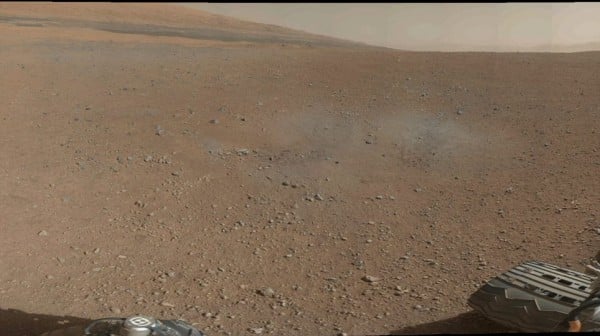
In a news briefing on August 9, Thursday, NASA released Curiosity's first color panorama view - one in color and one in black-n-white.

When do you use Facebook?

View Results

Loading ... Loading ...
1 Star2 Stars3 Stars4 Stars5 Stars (Rate This)
Loading ... Loading ...

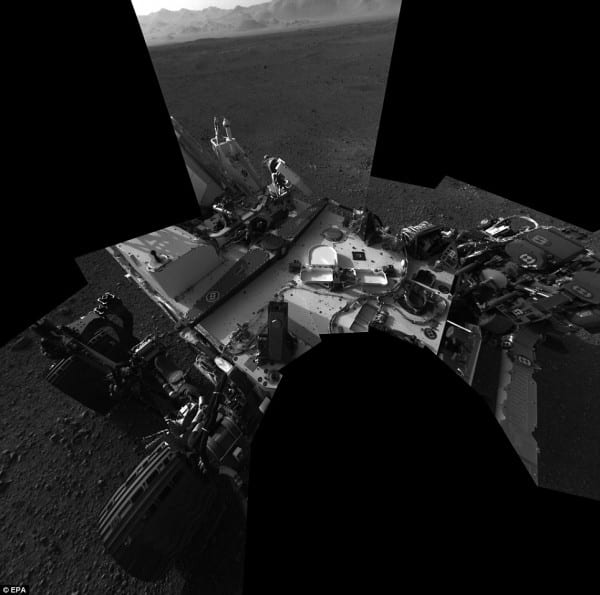
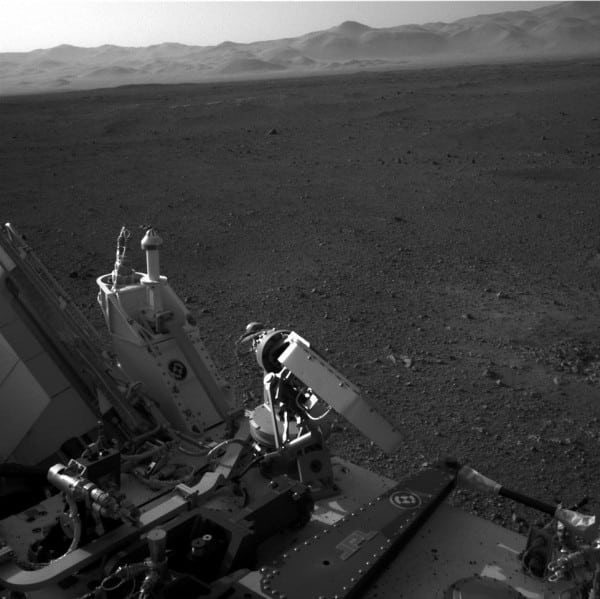
The NASA’s Mars Rover, Curiosity, has successfully touched down on Mars on Sunday (Aug. 5 PDT), and has already sent back black-and-white and color images of the Martian landscape and a self-portrait to the Earth. Curiosity has captured a magnificent ‘postcard’ from the Red Planet — a 360 degree color view that offers a glimpse of the rover’s colorful and diverse surroundings. In a news briefing on August 9, Thursday, NASA released Curiosity’s first color panorama view – one in color and one in black-n-white.
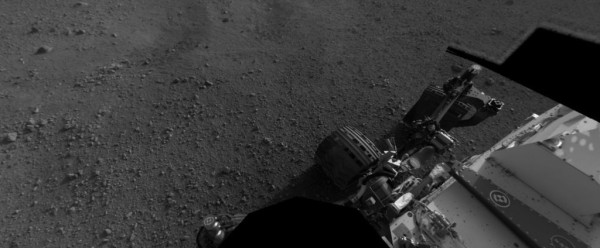

Panorama View of Mars

This is the first 360 degree panorama in color of the Gale Crater landing site taken by NASA’s Curiosity rover. This images were taken on late August 8 PDT (Aug. 9 EDT) in the late Martian afternoon. The color panorama is made up of 130 low-resolution (144 x 144 pixels each) thumbnail images taken by the 34 millimeter Mast Camera of Curiosity. In fact, Curiosity’s panoramic photo is just the beginning of the rover’s visual documentation of Mars.
1
2
3
4
5
6

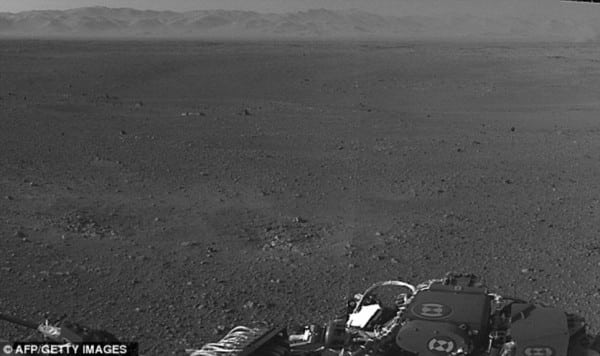
NASA has also released a black-n-white panoramic view of Curiosity, standing on the Martian ground. Eight shots were used to create the panoramic picture using the rover’s twin navigation cameras (Navcam) which are used to capture 3D images. The panoramic view shows Curiosity’s own shadow reflected on the Martian surface, with a dark band of rocks in the distance. Grey-coloured dust streaks can be seen in the foreground of the shot from where the rocket engines of the rover’s descent apparatus impacted the ground during landing.

Dawn Sumner, a NASA scientist working on the Mars mission, at a news conference on Thursday said, “You see these beautiful layered knolls, those knolls are recording the history of Gale crater.”

Scientists have become excited by seeing these panoramic scenes and started taking a closer look at several splotches in the foreground that appear gray because it revealed two nearby scorch marks in the Martian surface. The marks were created by the rocket-powered sky crane that lowered Curiosity to the Gale Crater floor.

Source : JPL (NASA)
Special Thanks To : Daily Mail

Buy Cheapest Related Product From Amazon.com


Amazing Music Video Created Entirely In Microsoft Excel

Google Nexus D Concept Image Shows Curved Screen
You can also press the left/right arrow key on your keyboard to go to previous/next post
  On August 11, 2012(10 months, 12 days ago.)

Recent Search

Recent Tutorials

This tutorial will show how to use S.M.A.R.T. (Self Monitoring Analysis and Reporting Technology) to continuously collect information on health of your equipment.
In this tutorial I'll show you how you can easily protect yourself from any kind of security breaks that may occur through Java.
Today Apple enabled "Two Step Verification" for iCloud And Apple ID. But the process is not that simple. But no worry, here we have made a step by step tutorial.
Cant remember your iPhone passcode? Here I will show you some workaround on what to do and how to recover and restore for every possible scenario.
This tutorial will show you how to perform the Winapp2.ini installation inside CCleaner and how to use it under Windows operating system.
With app called AD Sound Recorder, you can record any stream that passes through your sound card or speakers and in this tutorial I will show you how to do that.
If you want to have Boxee app inside your Apple TV, in this tutorial we will show you how to install XBMC and Boxee using Windows on your Apple TV.
This tutorial will show you how to transfer PS3 Saved Game Files from your PC to your PS3 game console.
Adding videos from external sources such as internet, more specifically from YouTube, is a great solution to enhance a presentation; in this tutorial I will show you the procedure.
If you are one of new comers to Windows Phone 8, like me, in this tutorial I will walk you through the process to update your Windows Phone 8 device.
Close You Have To Login
User:
Pass:
Login With »Login With TwitterLogin With Facebook