
Since Firefox 3.6, the Properties command has disappeared from the menu that appears when you click a on the link or picture from a Web page. This command allowed you to display more information on a particular object. In this tutorial I will show you how to return this option in newer Firefox versions with a simple Firefox plugin.
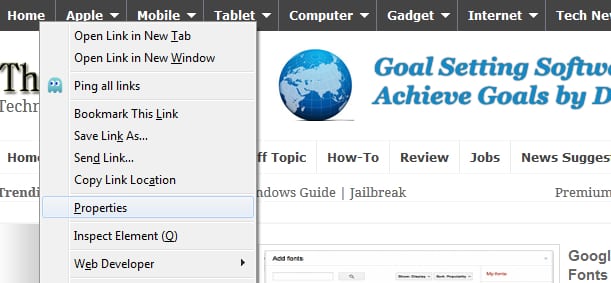
To get started follow steps below
Step 1: In Firefox, press the Alt key on your keyboard to display the menu bar. Click on the Tools menu and click Add-ons.
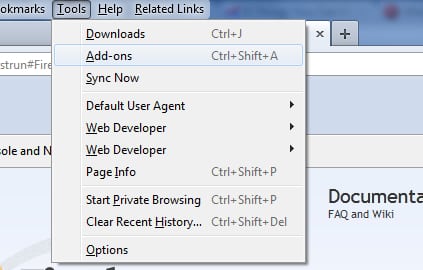
Step 2: In the search field located at top right, type element properties and click the magnifying glass to start the search
Step 3: Select the extension Element Properties 6 and click the Install.
Step 4: Wait until it’s downloaded and installed in your web browser

Step 5: Then restart Firefox to complete installation of the extension.
Step 6: The Properties command has returned from the context menu that appears when you click right mouse on an object on a Web page.
Step 7: Click to view information about that item.
[ttjad keyword=”all-in-one-desktops”]

![Read more about the article [Tutorial] How To Re-Restore Your iPad From iOS 5.x To iOS 5.x Using Windows](https://thetechjournal.com/wp-content/uploads/2013/01/11111111111.webp)
![Read more about the article [Tutorial] How To Lock Your Windows 7 Theme (Prevent Users From Changing Theme)](https://thetechjournal.com/wp-content/uploads/2012/02/windows-theme.webp)
![Read more about the article [Tips] How To Change The Look Of The New Tab in Google Chrome](https://thetechjournal.com/wp-content/uploads/2012/10/awesome-new-tab-asd987a98s7d9as.webp)