
website statistics

Sony Reveals Single And Dual SIM ‘Xperia Tipo’ Android 4.0 Smartphone

Shortly after revealing the upcoming availability of the Xperia Miro, Sony Mobile announced a new Xperia phone - the 'Xperia Tipo'. Xperia Tipo has both single and dual SIM supported set.

When do you use Facebook?

View Results

Loading ... Loading ...
1 Star2 Stars3 Stars4 Stars5 Stars (Rate This)
Loading ... Loading ...

Shortly after revealing the upcoming availability of the Xperia Miro, Sony Mobile announced a new Xperia phone – the ‘Xperia Tipo’. The Xperia’s new upcoming set has single and dual SIM supported smartphone.
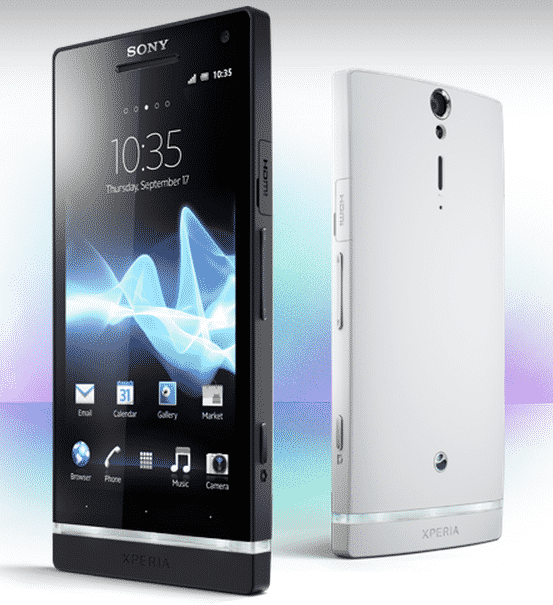

Sony Mobile's New Xperia Phone 'Xperia Tipo' That Supports Dual SIM, Image Credit : sonymobile.com

Sony has two types of Xperia. The set that supports only single SIM is called ‘Tipo’ and the set that supports dual SIM is known as ‘Tipo Dual.’ Both ‘Tipo’ and ‘Tipo Dual’ come with 3.2″ scratch-resistant 480 x 320 TFT screen (VGA), 800MHz Snapdragon processor, 3.2-megapixel rear camera, 2.5GB of internal memory, a microSD card slot, a dedicated set-up guide, Bluetooth, Wi-Fi connectivity, a 1500mAh battery that lasts for over 24 hours on a single charge.

In a dual SIM handset, user can switch SIM cards with just a single switch for seamless connectivity. Tipo and Tipo Dual, both the smartphone run on Android 4.0 Ice Cream Sandwich. The smartphones will be available in red, white, blue and black colors.

Xperia Tipo At A Glance :

* Android 4.0 (Ice Cream Sandwich)
* 800 MHz Qualcomm MSM7225 processor
* 3.2 inch (320×480) display
* 2.9GB internal storage
* 512MB RAM
* 3.2-megapixel camera
* microSD expansion

Tipo Dual will arrive in stores during Q3 of 2012. Its price has not been revealed.

Source : Press Release
Thanks To : Sony Facebook

Buy Cheapest Related Product From Amazon.com


Google Attempts To Make Offline Chrome Apps More Popular

Deal For Students: Buy A Sony VAIO Laptop, Get PS3 Or PS Vita
You can also press the left/right arrow key on your keyboard to go to previous/next post
  On June 14, 2012(11 months, 8 days ago.)

Recent Search

Recent Tutorials

This tutorial will show how to use S.M.A.R.T. (Self Monitoring Analysis and Reporting Technology) to continuously collect information on health of your equipment.
In this tutorial I'll show you how you can easily protect yourself from any kind of security breaks that may occur through Java.
Today Apple enabled "Two Step Verification" for iCloud And Apple ID. But the process is not that simple. But no worry, here we have made a step by step tutorial.
Cant remember your iPhone passcode? Here I will show you some workaround on what to do and how to recover and restore for every possible scenario.
This tutorial will show you how to perform the Winapp2.ini installation inside CCleaner and how to use it under Windows operating system.
With app called AD Sound Recorder, you can record any stream that passes through your sound card or speakers and in this tutorial I will show you how to do that.
If you want to have Boxee app inside your Apple TV, in this tutorial we will show you how to install XBMC and Boxee using Windows on your Apple TV.
This tutorial will show you how to transfer PS3 Saved Game Files from your PC to your PS3 game console.
Adding videos from external sources such as internet, more specifically from YouTube, is a great solution to enhance a presentation; in this tutorial I will show you the procedure.
If you are one of new comers to Windows Phone 8, like me, in this tutorial I will walk you through the process to update your Windows Phone 8 device.
Close You Have To Login
User:
Pass:
Login With »Login With TwitterLogin With Facebook