website statistics

Cricket To Sell ZTE Engage Smartphone Exclusively, For $250

Cricket and ZTE has jointly announced the pricing and availability of the ZTE Engage smartphone in the U.S. The phone will be exclusively available through Cricket.

When do you use Facebook?

View Results

Loading ... Loading ...
1 Star2 Stars3 Stars4 Stars5 Stars (Rate This)
Loading ... Loading ...

Cricket and ZTE has jointly announced the pricing and availability of the ZTE Engage smartphone in the U.S. The prepaid wireless carrier has shelved an exclusivity deal with ZTE on this new smartphone. According to the deal, ZTE Engage will be available exclusively through Cricket’s brick-stores, dealers and mycricket.com.
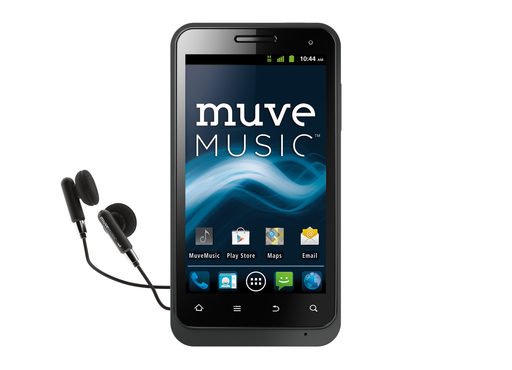

ZTE Engage Android smartphone

ZTE Engage is priced at $249.99, and it’s contract-free. The monthly subscription plans start at $50 with unlimited talk, text and 3G data, along with 1GB of full-speed data per month. With $60 and $70 smartphone plans, users will get 2.5GB of full-speed data per month and 5GB of full-speed data per month, respectively.

ZTE Engage features at a glance

  • 4.0” WVGA TFT capacitive touchscreen .
  • Qualcomm MSM8655T Scorpion – 1.4GHz .
  • Dual-Facing Cameras: Rear (8.0MP) w/LED Flash & Front (VGA).
  • MUVE Music Ready with 4GB Muve Music SD Card included.
  • Removable MicroSD Memory Card (up to 32GB).
  • Bluetooth 2.1 + EDR.
  • Lithium Ion 1900 mAh battery.
Matt Stoiber, senior vice president of devices for Cricket, said, “The ZTE Engage is an exciting smartphone with enhanced functionality from Android 4.0 OS and will be available with Cricket’s new value-rich no-contract smartphone service plans.” He also added, “Impressive at any price, the ZTE Engage will be a WOW device for Cricket customers and is a great new addition to the higher-end smartphone line-up that Cricket is turning on this year.”

Source: Press release

Buy Cheapest Related Product From Amazon.com


ADATA DashDrive Elite HE720: World’s Thinnest External Hard Drive

Two MIT Scientists Trying To Transform Nuclear Waste Into Electric Power
You can also press the left/right arrow key on your keyboard to go to previous/next post
  On September 29, 2012(8 months, 23 days ago.)

Recent Search

Recent Tutorials

This tutorial will show how to use S.M.A.R.T. (Self Monitoring Analysis and Reporting Technology) to continuously collect information on health of your equipment.
In this tutorial I'll show you how you can easily protect yourself from any kind of security breaks that may occur through Java.
Today Apple enabled "Two Step Verification" for iCloud And Apple ID. But the process is not that simple. But no worry, here we have made a step by step tutorial.
Cant remember your iPhone passcode? Here I will show you some workaround on what to do and how to recover and restore for every possible scenario.
This tutorial will show you how to perform the Winapp2.ini installation inside CCleaner and how to use it under Windows operating system.
With app called AD Sound Recorder, you can record any stream that passes through your sound card or speakers and in this tutorial I will show you how to do that.
If you want to have Boxee app inside your Apple TV, in this tutorial we will show you how to install XBMC and Boxee using Windows on your Apple TV.
This tutorial will show you how to transfer PS3 Saved Game Files from your PC to your PS3 game console.
Adding videos from external sources such as internet, more specifically from YouTube, is a great solution to enhance a presentation; in this tutorial I will show you the procedure.
If you are one of new comers to Windows Phone 8, like me, in this tutorial I will walk you through the process to update your Windows Phone 8 device.
Close You Have To Login
User:
Pass:
Login With »Login With TwitterLogin With Facebook